How to Paper Trade on TradingView: Free $100K Demo Account (2026 Guide)

TradingView gives every account, including the free tier, a $100,000 paper trading demo to practice trades without risking real money. Most beginners click into it, place a few random trades, and learn nothing useful. This guide shows how to actually use the demo: how to place orders through the Order Panel, how to manage and close positions, how to reset the account when you want to start over, how to backtest with Bar Replay, and the four habits that make paper trading worthless if you do not catch them.
Key Takeaways
- TradingView paper trading is free on every plan, including the free tier, and starts you with a $100,000 virtual balance.
- You can place market, limit, stop, and bracket orders the same way you would on a live broker, and you can close, modify, or reset the entire account at any time.
- Paper trading does not simulate real-broker slippage, commissions, or psychology, so the only useful way to practice is to follow your real strategy rules exactly and log every trade as if it were real.
Paper trading only teaches you something if you can review the trades later. Log entries, exits, screenshots, and the reason behind each setup, then watch your win rate and P&L by symbol and hold duration as you iterate.
Start Tracking FreeWhat Is TradingView Paper Trading?
TradingView paper trading is a built-in simulator that lets you place real-time, real-price trades using virtual money instead of real money. It is bolted directly into the chart you are already analyzing on TradingView, which means you can run a full strategy session, including alerts, indicators, drawings, and Pine scripts, without leaving the platform. Every paper account starts with a $100,000 USD virtual balance. The simulator works with the full TradingView asset universe: US equities, ETFs, forex, crypto, futures, commodities, and indices. You can place market, limit, stop, stop-limit, and bracket orders, and you can run open positions across as many symbols as your strategy needs.
The point of paper trading is not to make pretend money. It is to validate that your entry rules, exit rules, position sizing, and risk per trade actually work in real market conditions before you commit real capital. If you cannot follow your own plan with $100,000 of fake money on the line, you will not follow it with $5,000 of real money on the line.

Is TradingView Paper Trading Free?
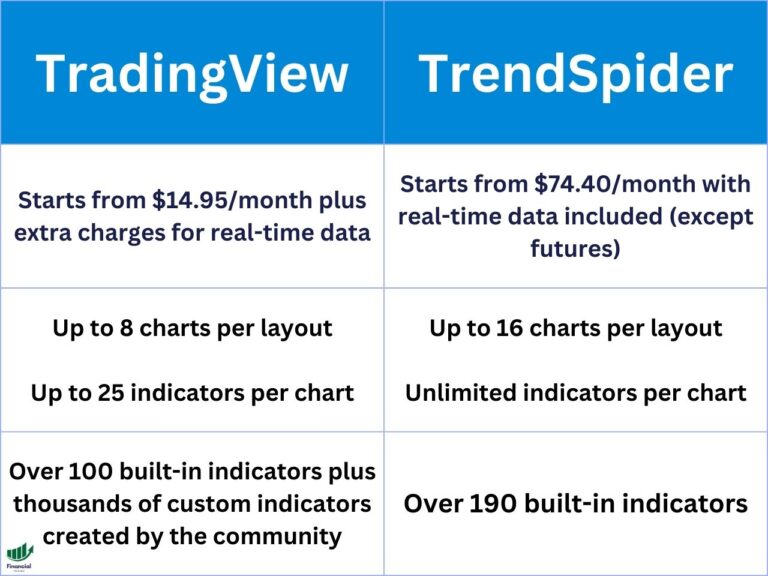
Yes. Paper trading is available on every TradingView plan, including the free Basic plan, with no upgrade required and no credit card needed. The only requirement is a free TradingView account. Paid TradingView plans (Essential, Plus, Premium, Expert) unlock more chart layouts, more indicators per chart, faster data updates, and intraday minute-level Replay, but every plan has access to the same paper trading engine.
If you want to run multiple paper strategies in parallel on the same chart, or you want minute-precision Bar Replay for backtesting, the Plus or Premium plan is worth the extra. To see a full breakdown of what each tier costs, see our guide on how much TradingView costs. For a paid plan credit, our TradingView referral link lands you a $30 credit when you upgrade to a paid plan after the free trial. You can also check our full TradingView free trial guide for what is included before you commit.
How to Access Paper Trading on TradingView
Getting into the paper trading mode takes about 30 seconds from any chart:
- Open any chart on tradingview.com or in the TradingView desktop app.
- Click the Trading Panel button at the bottom of the chart, or press Alt+T (Cmd+T on Mac) to toggle it open.
- From the broker dropdown at the top of the panel, select Paper Trading and click Connect.
- Confirm the disclaimer. Your $100,000 paper account is now live and tied to the chart you are on.
Once connected, the Trading Panel shows your account balance, open positions, working orders, order history, and account history tabs. The buy and sell buttons in the chart toolbar will now route to the paper account instead of asking you to connect a real broker.
If you do not see Paper Trading in the broker list, refresh the chart. On a brand-new TradingView account the broker integration sometimes needs one full page reload to populate.
How to Place Your First Paper Trade
Once the paper account is connected, placing a trade works exactly the same way it would with a real broker connected. Here is how each order type works.
Placing a market order
Click the green Buy or red Sell button at the top right of the chart. The Order Ticket opens with a default quantity of one share or contract. Before placing the trade, add your best TradingView indicators to the chart so your entry decisions are based on your actual strategy signals. Adjust the quantity, optionally set a take-profit and stop-loss, and click Place Order. The trade fills at the next tick.
Placing a limit or stop order
In the Order Ticket, change the order Type dropdown from Market to Limit or Stop. Enter your price level. The order sits in your Working Orders tab until the market hits your level.
Placing a bracket order with stop and target
Open the Order Ticket and check the Take Profit and Stop Loss boxes underneath the Quantity field. Enter your levels in either ticks, percent, or absolute price. The bracket pair fills automatically when your entry order fills.
Closing a position
Click the open trade in the Positions tab and choose Close Position, or right-click the position price line on the chart and pick Close. You can also reverse a position (close and immediately open the opposite side) from the same menu.
Modifying open orders
Drag working-order or stop and target lines on the chart to adjust them visually, or right-click them and use the dropdown.
How to Reset Your TradingView Paper Trading Account
If your paper balance has spiraled (for better or worse) and you want a clean $100,000 starting line, you can reset the entire paper account in two clicks.
- With the Trading Panel open, click the gear icon at the top right of the panel.
- Click Reset Paper Account, then confirm.
The reset wipes all open positions, all order history, and all account history, and returns the balance to $100,000 USD. There is no undo, so if you want a record of your prior practice run, screenshot the Account History tab or export your trades to your trading journal first.
When to reset: after each completed strategy test, after a string of revenge trades that polluted your account, or whenever you want to start fresh on a new plan with a clean equity curve.
Paper Trading on TradingView Mobile
The TradingView mobile app on iOS and Android supports the same paper trading engine as the web platform. Open any chart in the app, tap the Trading button (the chart toolbar at the bottom), tap the broker name, and pick Paper Trading. The Order Ticket on mobile is a simplified version of the desktop ticket: market, limit, stop, and bracket orders all work, but advanced order types like One-Cancels-Other are easier to set up on the desktop platform first and then monitor on mobile.
Mobile paper trading is the right tool for monitoring positions and closing trades on the go, not for placing new entries on a fast-moving chart. Use desktop or web for the actual setup work.
How to Backtest Strategies with TradingView Bar Replay
Paper trading runs forward in real time. Bar Replay (the second icon in the chart's top toolbar that looks like a play button) runs backward in historical time, which makes it the right tool for testing how a strategy would have handled past trade setups.
Click the Replay icon, then click any candle on the chart to set the replay starting point. The chart fast-forwards to that bar and freezes. Use the play, pause, step-forward, and speed controls to advance one bar at a time or stream through at 1x to 10x speed. You can place paper trades during a Replay session as if it were live: the trades respect the visible bar by bar price action.
Bar Replay limitations to know: equities replay is limited to the daily timeframe on the free plan; intraday minute and second replay requires a paid plan. Replay also does not handle gaps the same way live data does (no overnight gap fills, no weekend gaps for crypto).
For Pine Script users, the Strategy Tester is a separate tool that runs scripted backtests across the entire historical bar set automatically. Use Bar Replay for discretionary practice, Strategy Tester for systematic Pine scripts.
For a complete walkthrough of both methods, including how to configure settings for realistic numbers and how to read backtest results, see the guide to TradingView backtesting.
Connecting a Real Broker When You Are Ready to Trade Live
When you are done paper trading, TradingView lets you flip from the paper engine to a real broker connection without changing your charts, indicators, or alerts. From the Trading Panel, click the broker name and pick a real broker from the supported list (Tradovate, Interactive Brokers, OANDA, TradeStation, Tradier, Capitalise.ai, AMP Futures, AMP Global, PIE Asset Management, GAIN Capital, FOREX.com, Saxo, and several others).
Each broker handles authentication differently: most use OAuth so you log in to the broker website inside a TradingView popup, then approve the read-and-trade scope.
Once connected, your charts, alerts, and Pine scripts behave exactly like they did in paper mode. The buy and sell buttons now route real money. Run your real strategy with the smallest position size your broker allows for at least 30 trades before scaling up, even if your paper trading was profitable.
Four Mistakes That Make Paper Trading Worthless
Ignoring slippage and liquidity
The paper engine fills your market orders at the visible bid or ask. Real markets, especially in low-volume tickers and futures contracts, fill at worse prices when your size moves the book. If you trade size on illiquid names in paper, your real P&L will be lower.
Trading without emotional skin in the game
The most expensive lesson in trading is psychological, not technical. With $100,000 of fake money you will hold losers longer, take bigger swings, and abandon your stop. Treat every paper trade as if real money were on the line.
Breaking your own strategy rules
The point of paper is to validate the system, not to free-style. If your plan says to enter on a 9 EMA cross and you took the trade because it “looked obvious,” the result is meaningless data.
Building false confidence
A 30-trade paper sample at 80% win rate tells you almost nothing. Most strategies need 100-200 trades across mixed market conditions before the win-rate number is statistically meaningful.
Paper Trading Limitations to Know
Even when you avoid the four mistakes above, the TradingView paper engine has structural limits worth knowing:
- No commissions or fees applied. Real-broker per-share, per-contract, and SEC fees can shift a borderline-profitable strategy to net-negative.
- No realistic slippage modeling on stocks and crypto. Futures partly account for it through the bid-ask spread, but not in stress conditions.
- No after-hours or pre-market fills on most equity tickers; the engine waits for regular session open.
- No partial fills. In real markets, large orders fill in pieces at varying prices.
- No margin call simulation. The paper account does not enforce margin requirements the way a real broker would.
- Reset on any browser session sometimes wipes recent trades that did not sync to the cloud. If a session feels critical, screenshot the Account History tab before closing the tab.
If your strategy depends on tight margins, exact fills, or after-hours liquidity, paper trading is a sanity check, not a final validation. Trade the smallest live size your broker allows after paper.
Transitioning From Paper Trading to Real Trading
Assess your readiness
Before you go live, you should have at least 50 paper trades that follow your plan exactly, a written strategy document, and a positive expectancy after fees and slippage. If any of those three are missing, stay on paper.
Start with the smallest live size your broker allows
Most brokers will let you trade one share, one micro futures contract, or fractional crypto. The point is not to make money on the first 30 live trades. The point is to prove that you do not panic when real money is on the line.
Log every trade like it matters
The traders who scale from paper to real successfully are not the ones with the best entries. They are the ones who keep a Financial Tech Wiz Trading Journal, review every trade, and catch their own mistakes early. If you are not ready for the paid app, start with a free trading journal template and build the habit first.
Financial Tech Wiz / Free resources
Build a clearer picture of your trading.
Start with the free trading journal template. Keep your trades organized, review your results, and build a consistent review routine.
- Free Google Sheets and Excel trading journal template
- Indicators, watchlists, and scanners
- Access to the free trading community
Ready for automatic trade tracking? Explore the Financial Tech Wiz Trading Journal.
Free resources + trading emails. Unsubscribe anytime.
FAQ
Is TradingView paper trading actually free?
Yes. Paper trading is available on every TradingView plan including the free Basic tier, with no credit card required. You only need a free TradingView account.
How much money do you start with on TradingView paper trading?
Every paper account starts with a $100,000 USD virtual balance. You can reset the account at any time from the Trading Panel settings to return to $100,000.
Does TradingView paper trading support options?
No. As of 2026, the TradingView paper trading engine supports stocks, ETFs, forex, crypto, futures, and indices, but not single-leg or multi-leg options strategies. For options paper trading, use thinkorswim's paperMoney or Webull's paper trading account, both of which simulate options orders.
How do I reset my TradingView paper trading account?
Open the Trading Panel, click the gear icon at the top right, and click Reset Paper Account. The reset wipes all positions, working orders, and history, and returns the balance to $100,000.
Can I paper trade on TradingView mobile?
Yes. The iOS and Android apps connect to the same paper trading engine as the web platform. Tap the Trading button at the bottom of any chart, tap the broker name, and pick Paper Trading. Order types are simplified compared to desktop, so set up complex bracket and OCO orders on desktop first.
TradingView Paper Trading: Bottom Line
Paper trading on TradingView is the cheapest, fastest way to validate a strategy before risking real capital, but only if you treat it like real trading: follow your rules, log every trade, watch the limitations (no slippage, no commissions, no real psychology), and reset the account between strategy tests so each run gets a clean equity curve. When you are ready to flip to live, the same charts, alerts, and Pine scripts carry over to a real-broker connection from the same Trading Panel. Pair paper trading with a journal that captures the why behind every entry and exit, and the practice run actually compounds into real-world skill.
Financial Tech Wiz / Free resources
Build a clearer picture of your trading.
Start with the free trading journal template. Keep your trades organized, review your results, and build a consistent review routine.
- Free Google Sheets and Excel trading journal template
- Indicators, watchlists, and scanners
- Access to the free trading community
Ready for automatic trade tracking? Explore the Financial Tech Wiz Trading Journal.
Free resources + trading emails. Unsubscribe anytime.