
Can You Trade on TradingView? Yes, Here’s How

TradingView is a charting platform, not a brokerage, but you can execute real trades directly from its charts by connecting a supported broker. The setup takes a few minutes, and once linked, you can place orders, set stops, and manage positions without leaving TradingView’s interface. This guide covers how the connection works, which brokers are supported, what you can actually trade, and what to do if your broker is not on the list.
Key Takeaways
- TradingView supports live trading through a connected broker, but live order execution typically requires a paid TradingView subscription.
- The Trading Panel integrates with 100+ brokers across stocks, forex, futures, and crypto, including Interactive Brokers, Fidelity, TradeStation, OANDA, and AMP Futures.
- Paper trading is available on TradingView’s free plan and is the easiest way to test your setup without risking real capital.
Financial Tech Wiz Trading Journal
Automatically import and analyze your broker trades.
Once you are executing trades through a connected broker, the Financial Tech Wiz Trading Journal imports your full trade history from 25+ brokers via SnapTrade. Win rate, P&L by symbol, and an equity curve: no manual logging.
Track Your TradesCan You Trade Directly on TradingView?
Yes. TradingView lets you execute live trades directly from its charts through the Trading Panel, but with an important clarification: TradingView is the interface, not the broker. When you place an order on TradingView, it routes to your connected brokerage account, which clears and settles the trade. TradingView does not hold funds, manage margin, or act as a counterparty.
This matters practically: your account settings, buying power, and commissions are all determined by your broker, not TradingView. You need both a funded brokerage account with a supported broker and a TradingView subscription that includes Trading Panel access.
Does TradingView Require a Paid Plan to Trade?
For live trading, yes. Accessing the Trading Panel and executing real orders requires a paid TradingView subscription (Essential, Plus, or Premium) for most brokers and asset classes. Paper trading is the exception; it is available on the free plan.
If you are just starting or testing a setup, paper trading is the faster path. When you are ready to go live, you will need to upgrade your TradingView plan. See how much TradingView costs for a full breakdown of what each plan includes.
If you do not have TradingView yet, you can start with a free trial before committing to a plan.
What Can You Trade on TradingView?
The instruments available through TradingView’s Trading Panel depend on your connected broker. Here is what is supported across the major categories:
Stocks and ETFs: Available through Interactive Brokers, TradeStation, Webull, Tradier, and others. US equities trade during standard market hours; extended hours availability varies by broker.
Forex: Supported through OANDA, FOREX.com, FXCM, and similar forex-focused brokers. Spot forex pairs trade directly from TradingView charts with live pricing.
Futures: AMP Futures and Optimus Futures are the primary futures-enabled brokers on TradingView. A funded futures account and a paid TradingView plan are both required before placing live futures orders.
Crypto: Select crypto exchanges are integrated with TradingView. Availability varies by region and exchange. Confirmed live crypto integrations include Kraken, Coinbase Advanced, Gemini, OKX, and Crypto.com Exchange.
Options: Limited. TradeStation supports single-leg options execution from the chart view. Multi-leg strategies and spreads require using your broker’s native platform directly.
Paper Trading on TradingView
If your broker is not supported or you want to test a strategy before risking real capital, TradingView’s paper trading mode lets you simulate trades on live market data. You can place simulated orders across any chart, track a paper P&L, and practice position sizing, with no brokerage account required.
Paper trading is available on TradingView’s free plan and is useful for:
- Familiarizing yourself with the order ticket and Trading Panel before going live
- Testing a Pine Script strategy against live market data
- Practicing stop placement and position sizing on unfamiliar instruments
Paper trading results do not account for slippage, partial fills, or commission drag. Treat them as directional signals, not guaranteed previews of live performance. When you move to live trading, log each trade in a journal so you can compare your actual results to what you expected.
How to Integrate Your Broker With TradingView
Integrating your broker with TradingView involves a few simple steps:
- Sign up for a free TradingView account (use my referral link to get a referral credit and a free trial).
- Navigate to the Trading Panel on TradingView and find your broker in the list.
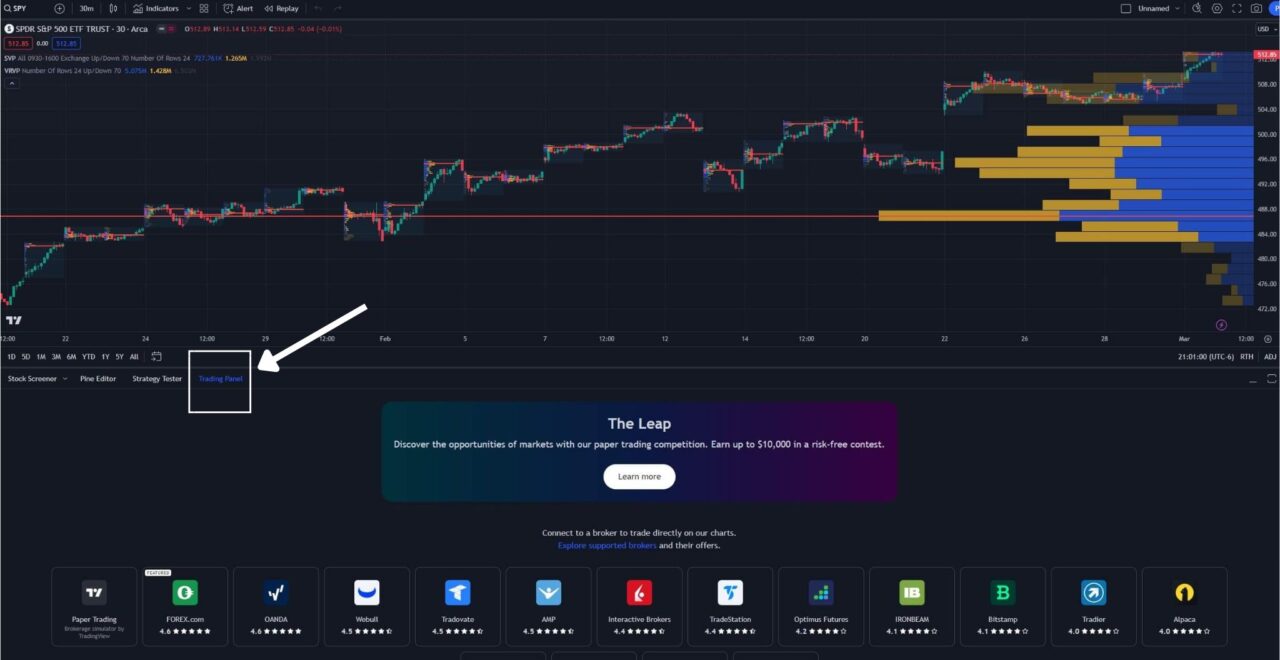
- Follow the prompts to connect your brokerage account with your TradingView profile.
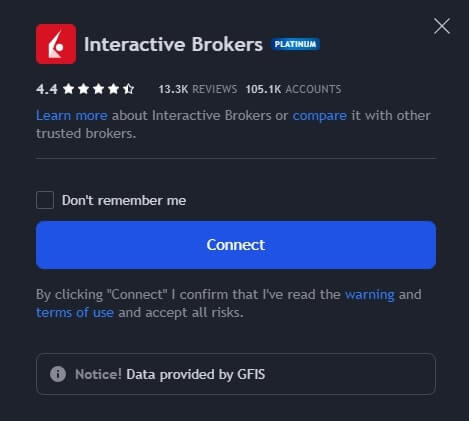
- Once connected, you can start trading directly from TradingView’s charts.
What Brokers Can You Trade With on TradingView?
The brokers below cover the most commonly used TradingView integrations across major asset classes:
| Broker | Best For | Asset Classes | Notes |
|---|---|---|---|
| Interactive Brokers | Active traders, global access | Stocks, ETFs, Forex, Futures, Options | Widest instrument coverage; margin accounts supported |
| TradeStation | US equities and futures | Stocks, Futures, single-leg Options | Options via chart view only |
| Webull | Commission-free US trading | Stocks, ETFs, Crypto | No options or forex via TradingView |
| OANDA | Forex and CFDs | Forex, CFDs | Strong pair coverage; no US stock support |
| FOREX.com | Forex | Forex, CFDs | Good for non-US traders |
| AMP Futures | Low-cost futures | Futures | Flat-rate commissions; popular for ES/NQ/CL |
| Optimus Futures | Futures | Futures | Multi-platform integrations |
| Tastytrade | Options-first trading | Stocks, Options, Futures | Better for complex options strategies via native app |
| Tradier | Low-cost US equities | Stocks, ETFs, Options | Commission-free equity trades |
| Fidelity Investments | Full-service brokerage users | Stocks, ETFs, Options | Direct TradingView integration; no separate download needed |
| NinjaTrader | Futures traders | Futures | Popular for E-mini and Micro E-mini contracts |
| Tradovate | Low-cost futures | Futures | Cloud-based; no platform download required |
For the full and current list, visit TradingView’s broker directory directly. The integration list expands as new brokers launch support. You can also read more about the best brokers for TradingView for a side-by-side look at what each integration offers active traders.
Financial Tech Wiz Trading Journal
Import your broker trades. Analyze your performance.
Connect your broker once and the journal handles the logging. The Financial Tech Wiz Trading Journal imports trade history from 25+ brokers, calculates win rate and P&L by symbol, and gives you an equity curve across all your positions. $19/month or $9.91/month billed annually.
Start Tracking Your TradesBenefits of Trading on TradingView
Trading directly on TradingView gives you access to professional-grade charting without switching platforms to place orders. A few key advantages:
Chart-integrated execution: Analyze a setup and place the order from the same chart: no manual price entry, no window switching.
Strategy automation: TradingView’s strategy tester and backtesting tools let you test a Pine Script strategy on historical data. Alerts from a strategy can route orders to a connected broker automatically.
Indicators on execution: The same custom indicators you use for analysis remain visible when you place the trade, reducing the chance of acting on a misread setup.
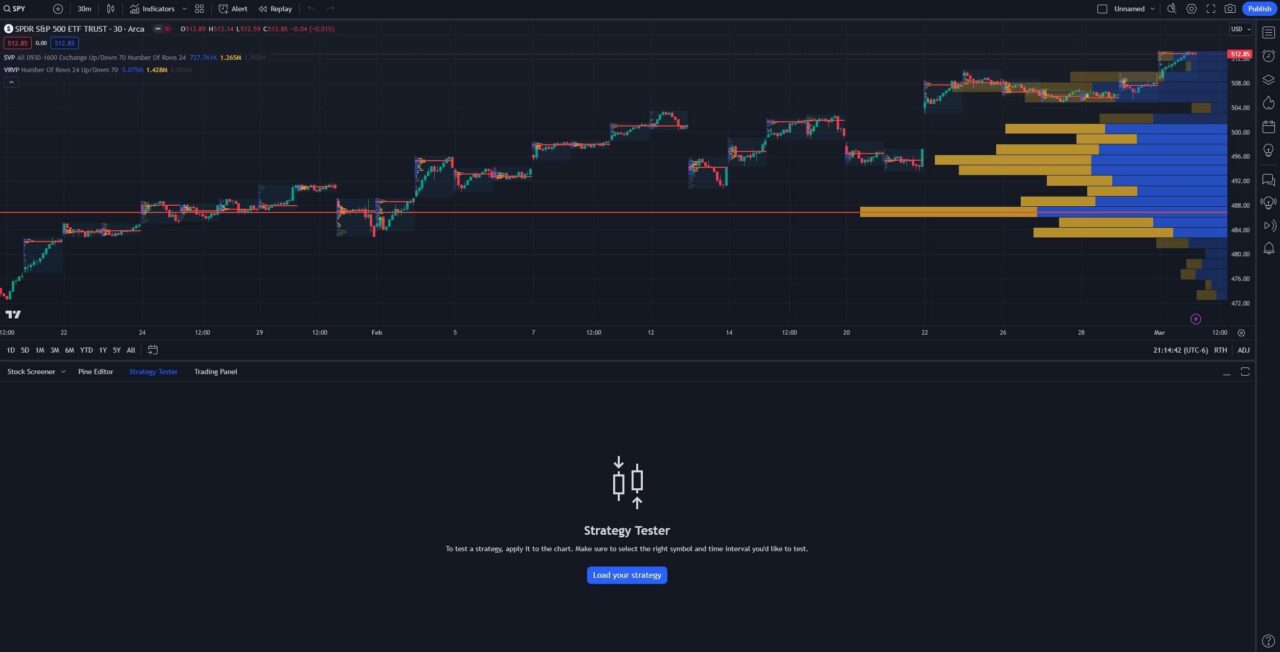
Trading with Pine Script on TradingView
Pine Script is TradingView’s programming language that traders use to create custom indicators and strategies. This enables traders to automate their trading based on specific criteria that have backtested well.
Trading Through TradingView: Bottom Line
TradingView works best as an execution interface layered on top of your existing brokerage, not as a standalone trading platform. Connect a supported broker, confirm your plan includes Trading Panel access, and use paper trading to test your order workflow before going live. Once you are actively trading, keep a performance log so you can measure what is working and adjust over time.
If you are not yet tracking your trades, the free trading journal template is a Google Sheets-based starting point that costs nothing.
Sign up through my referral link to get a 30-day free trial of TradingView’s premium features and a referral credit applied to your account.
Get a TradingView Referral Credit and Free Trial
Get Your Free Trial and Referral Credit NowFAQ
Can I buy and sell stocks on TradingView?
Yes. You can buy and sell stocks on TradingView through connected brokers like Interactive Brokers, TradeStation, and Webull. You need a funded brokerage account with a supported broker and a paid TradingView plan that includes Trading Panel access.
Is it free to trade on TradingView?
Paper trading on TradingView is free. Live trading requires a paid TradingView subscription (Essential or higher) in addition to a funded brokerage account. The brokerage may also charge commissions depending on which broker and asset class you trade.
Is TradingView a trading broker?
No. TradingView is a charting and analysis platform. When you place an order through TradingView’s Trading Panel, it routes to your connected brokerage account. The broker holds your funds and executes the trade. TradingView acts as the interface only.
Can I connect Fidelity to TradingView?
Yes. Fidelity Investments is a directly connected broker on TradingView’s Trading Panel, so you can place live stock, ETF, and options trades from your TradingView charts without a separate download. You still need a funded Fidelity account and a paid TradingView plan that includes Trading Panel access.
Which popular brokers are NOT supported on TradingView?
Robinhood, Charles Schwab (including thinkorswim), and Trading 212 are not currently connected brokers on TradingView’s Trading Panel. You can still use TradingView for charting, alerts, and analysis with any broker, then place the order manually through your broker’s own app or platform.
Can you trade futures on TradingView?
Yes. Futures trading is available through brokers like AMP Futures and Optimus Futures. A funded futures account with a supported broker and a paid TradingView plan are both required before placing live futures orders from TradingView charts.
What if my broker is not supported on TradingView?
You can use TradingView for charting and alerts, then place orders manually through your broker’s platform. TradingView’s paper trading mode, available on the free plan, is also useful for practicing execution while you decide whether to switch to a supported broker.
Get Your Free Trading Resources
Grab the free trading journal template plus the same tools we use to stay organized, consistent, and objective.
- Free trading journal template
- Custom indicators, watchlists, and scanners
- Access our free trading community
Enter your email below to get instant access.
No spam. Unsubscribe anytime.







