
TradingView Options in 2026: Trading, Chain, and Strategy Builder Guide

As of 2026, you can trade options on TradingView through TradeStation, Alpaca, and Tradier. TradingView also offers an options chain, a strategy builder with multi-leg payoff diagrams, and a volatility tab for tracking IV across expirations. Here is how each piece works and which brokers actually execute trades.
Key Takeaways
- Options trading on TradingView is live through TradeStation (February 2025), Alpaca, and Tradier (Q1 2026). Single-leg orders can be placed from the chart; multi-leg orders route to the broker’s own dashboard.
- The options chain, strategy builder, and volatility tab are free to use for analysis even without a connected broker account.
- TradingView’s options pricing is close to broker pricing but not a real-time match unless you pay for real-time data.
Recommended Tool
Financial Tech Wiz Trading Journal
Built for options traders who want to see what actually works: win rate by symbol, P&L by hold duration, and performance by asset type. SnapTrade imports from TradeStation, Tradier, tastytrade, Schwab, and more. Starting at $9.91/month billed annually.
Try It FreeCan You Trade Options on TradingView in 2026?
Yes. Options trading went live on TradingView in February 2025 through TradeStation, with Alpaca and Tradier following in 2025 and early 2026. You connect your brokerage account from the TradingView chart, and single-leg options orders route to that broker for execution.
There are two things to know:
- Single-leg orders (buy one call, sell one put) can be placed directly from a TradingView chart once your broker is connected.
- Multi-leg orders (spreads, iron condors, calendars) currently route to the broker’s own dashboard. TradingView is working on native multi-leg execution but it is not available at every broker yet.
If you already have a Schwab or tastytrade account for options, you are not missing much by sticking with thinkorswim or the tastytrade platform for actual order entry, since both have deeper options order tickets. What TradingView brings is the ability to analyze an underlying on its best-in-class charts and fire a single-leg order without leaving the window. If you are choosing between Schwab’s thinkorswim platform and tastytrade for heavier options work, see the thinkorswim vs tastytrade comparison.
Exclusive Deal: 30-Day FREE Premium Access + Bonus Credit
Don’t Miss Out – Sign up for TradingView Now!
- Advanced Charts
- Real-Time Data
- Track all Markets
How to Access TradingView’s Options Tools
1- Start by navigating to the TradingView homepage and hovering over ‘Products,’ and selecting ‘Options.’
2- From here, you can access the TradingView options chain, strategy builder, and volatility charts.
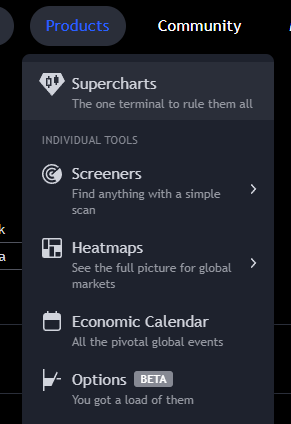
Here is an overview of each tool:
- Strategy Builder: Plots payoff diagrams for single-leg and multi-leg options strategies. Choose your symbol, expiration, and strike, then press create. You can stress-test the trade by shifting time forward or moving IV up and down.
- Chain: Live bid, ask, IV, delta, and gamma for every supported options contract. Covers US futures options (ES, NQ, RTY, YM) plus NSE stocks and bitcoin options.
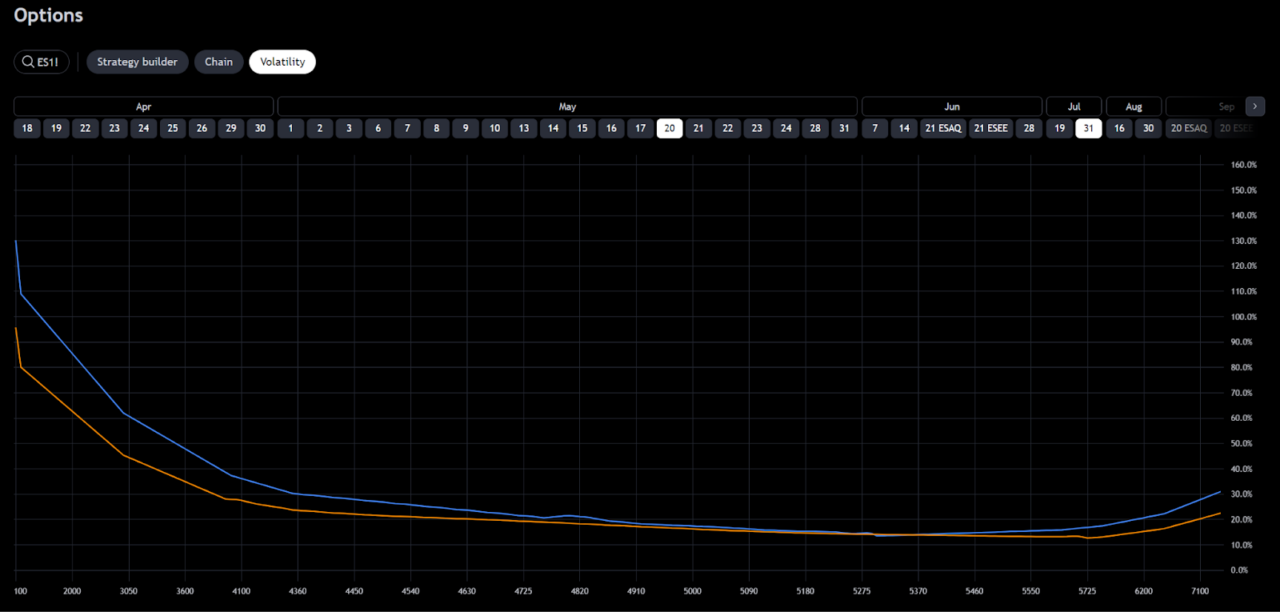
- Volatility: View IV across multiple expirations on a single chart. Useful for reading term structure before building a calendar spread.
Options Chain: By Strike vs By Expiration
TradingView’s options chain has two layouts and most users only ever see the default one.
By strike is the classic layout. Strike prices run down the center column, calls are stacked to the left, puts to the right. This is what you want when you are scanning a single expiration for a delta or IV that fits your thesis.
By expiration transposes the table. Dates run down the center, and each row shows the same strike across multiple expirations side by side. This view is better when you are comparing a calendar spread candidate or when you want to see how IV term structure is shaped on a given strike.
Toggle between them from the view switcher at the top of the chain. Both views surface bid, ask, IV, delta, and gamma, and both update live on the free account without a real-time data subscription, though the ticks will lag the broker by a second or two.
Get Your Free Trading Resources
Grab the free trading journal template plus the same tools we use to stay organized, consistent, and objective.
- Free trading journal template
- Custom indicators, watchlists, and scanners
- Access our free trading community
Enter your email below to get instant access.
No spam. Unsubscribe anytime.
Strategy Builder: Multi-Leg Payoffs and Greeks
The Strategy Builder is the part of TradingView’s options suite that does the heavy analytical lift. You add legs (up to as many as the strategy needs), pick the type (call, put, or underlying), set the expiration and strike for each leg, and TradingView plots a payoff diagram on the right side of the screen.
Three things make it actually useful:
- You can mix expirations on the same strategy, so calendar spreads and diagonals plot correctly.
- The “What if” dropdown lets you shift time forward (what does this look like with 5 fewer days to expiration) or move volatility up and down by a percentage. Useful for stress-testing a trade before you take it.
- Delta, gamma, theta, and vega all plot as lines on the same chart, so you can see how Greeks decay through the trade window, not just at a single point.
You can also duplicate a strategy, adjust size or strike, and plot both versions side by side. This is the piece that most free options tools do not do well.
Can You Chart Options on TradingView?
While you cannot chart the price of a single options contract on a regular TradingView chart, you can view the payoff diagram of an options strategy inside the Strategy Builder to analyze the potential price outcomes along with the Greeks. If you want to chart an options contract directly, brokers like tastytrade and Schwab (with thinkorswim) let you view option prices on a chart.
Supported Options and Analysis Tools
TradingView supports a wide range of options, including:
- ES & MES S&P 500 futures options
- NQ Nasdaq futures options
- RTY Russell 2000 futures options
- YM Dow Jones futures options
- Bitcoin options
- Many stocks on the NSE
- NIFTY options (mostly useful for Indian retail traders)
How Accurate Is TradingView’s Options Pricing?
TradingView’s options pricing is close to broker pricing but not a tick-for-tick match unless you pay for real-time data. On a free account, you should expect a small lag and a cent-or-two difference on liquid contracts.
A side-by-side of the 5000 ES contract at the same moment, with tastytrade as the reference:
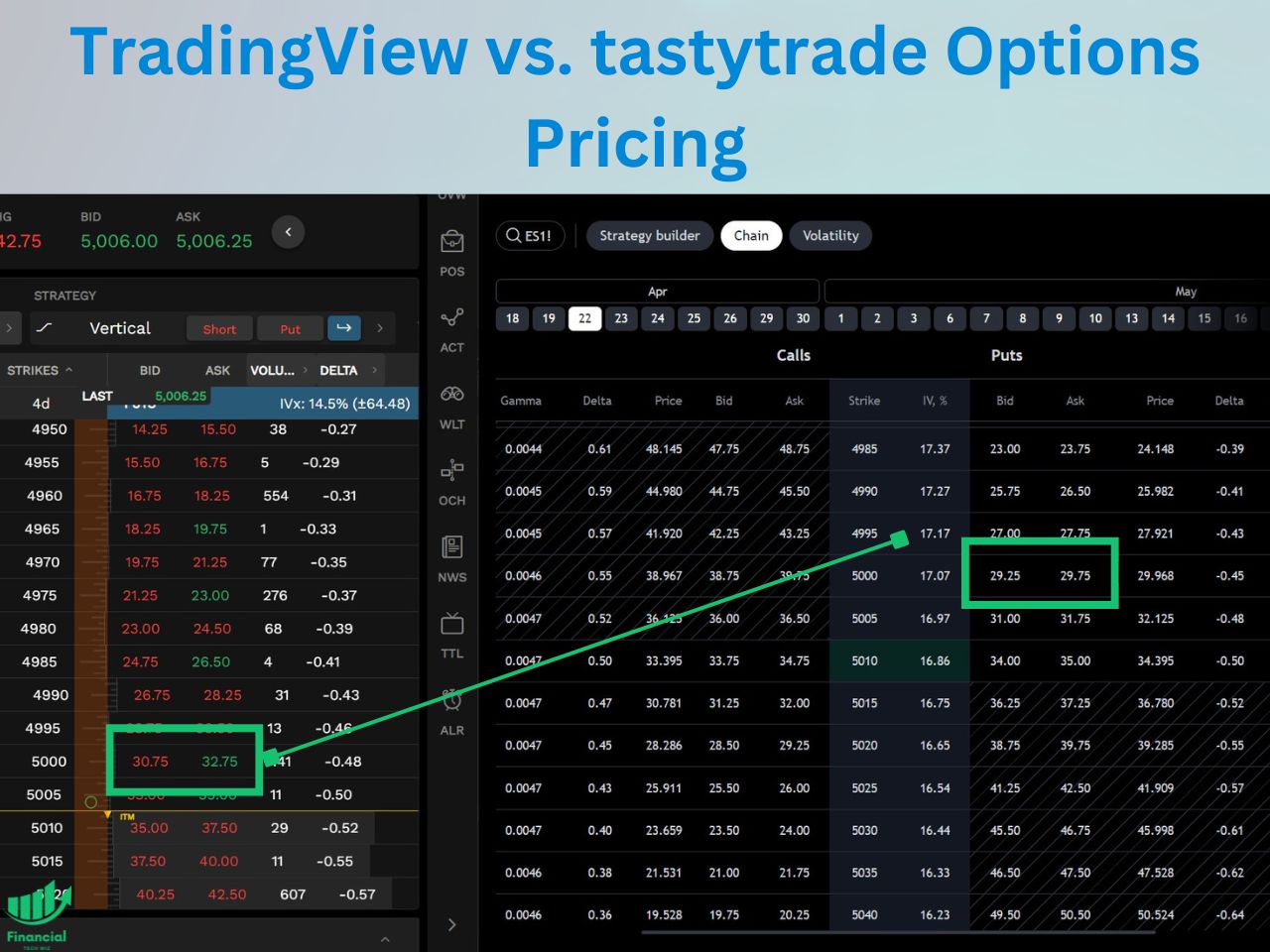
- TradingView: 29.25
- tastytrade: 30.75
Close enough for scanning the chain and building a strategy, too loose to time a fill. Upgrade to real-time data if you are going to trade from TradingView.
TradingView’s Options Volatility Tab Reviewed
The volatility tab on TradingView allows you to track the volatility levels by strike price and expiration date on a single chart. You can plot several different expirations, allowing you to compare IV levels for several time frames on one chart.
Can You Paper Trade Options on TradingView?
Yes, with a caveat. TradingView’s built-in paper trading engine works for the underlying (so you can paper trade ES futures, not ES options directly). For paper trading actual options contracts, the current path is to connect a paper account from TradeStation or Alpaca, both of which offer paper trading through their brokerage API and feed it into the TradingView chart.
This is useful before you commit real money to a strategy you built in the Strategy Builder. Run the leg through a paper account for a few days, watch how the Greeks actually behave with the underlying moving, then decide. For paper trading the underlying on TradingView itself (not options), see the dedicated TradingView paper trading walkthrough.
Can You Backtest Options on TradingView?
No. TradingView’s strategy tester works on the underlying, not on options contracts. For options backtesting specifically, see the best options backtesting software roundup which covers platforms that handle historical options chains.
TradingView Options: The Bottom Line
TradingView’s options suite is no longer just an analysis tool. Between TradeStation, Alpaca, and Tradier, most US options traders can now connect an account and place trades from the chart. The chain, the strategy builder, and the volatility tab are free to use for analysis even if you never connect a broker.
If you trade options, pair TradingView with a dedicated trading journal to see what actually works across your positions: win rate by symbol, P&L by hold duration, and performance by asset type. The Financial Tech Wiz Trading Journal handles this with SnapTrade imports from most of the brokers that also integrate with TradingView.
Exclusive Deal: 30-Day FREE Premium Access + Bonus Credit
Don’t Miss Out – Sign up for TradingView Now!
- Advanced Charts
- Real-Time Data
- Track all Markets
Frequently Asked Questions
Can you trade options on TradingView?
Yes, as of 2026. TradingView now supports options execution through TradeStation (live since February 2025), Alpaca, and Tradier (Q1 2026). Single-leg orders can be placed from the chart once your broker is connected; multi-leg orders currently route to the broker’s own dashboard.
Does TradingView have an options chain?
Yes. TradingView’s options chain is free to use on every account and shows bid, ask, implied volatility, delta, and gamma for each contract. It supports both a by-strike layout (classic) and a by-expiration layout (better for calendar spreads). The chain updates live without a real-time data subscription, though ticks will lag the broker by a second or two.
How do you chart options on TradingView?
You cannot chart the price of a single options contract on a TradingView chart. What you can chart is the payoff diagram of a strategy inside the Strategy Builder, which plots profit and loss across underlying prices with Greek overlays. For actual options price charts, platforms like thinkorswim and tastytrade remain the stronger choice.
Is TradingView’s options pricing real-time?
Only if you pay for real-time data. On a free account, the chain updates live but with a small lag compared to your broker’s feed. For analysis and strategy building this is usually fine; for timing a fill, upgrade to real-time data.
Can you backtest options on TradingView?
No. TradingView’s strategy tester and bar replay work on the underlying, not on options contracts. For options backtesting, use a dedicated platform like Option Omega. A trading journal with performance analytics is also a good pairing once you are live, because it shows which setups actually work for you.
Get Your Free Trading Resources
Grab the free trading journal template plus the same tools we use to stay organized, consistent, and objective.
- Free trading journal template
- Custom indicators, watchlists, and scanners
- Access our free trading community
Enter your email below to get instant access.
No spam. Unsubscribe anytime.







