
TradingView Tick Charts: How to Use 1T, 10T, 100T, and 1000T Intervals

Tick charts record a new bar after a fixed number of transactions rather than after a fixed amount of time. That one difference changes how a chart reads at market open, during news events, and in the slow midday tape. Here is everything you need to know about using tick charts on TradingView, including the right plan tier, the four native intervals, and the practical settings that work on ES, NQ, and forex.
Key Takeaways
- Tick charts form new bars after a fixed number of transactions rather than a fixed time period, which compresses quiet tape and expands fast tape automatically.
- Native tick intervals on TradingView (1T, 10T, 100T, 1000T) require an Expert, Elite, or Ultimate plan. Type the interval directly on your keyboard while a chart is in focus.
- A free community Pine Script indicator by LonesomeTheBlue approximates tick bars on live charts at no cost, though it does not produce true historical tick data.
Recommended Tool
Financial Tech Wiz Trading Journal
Tick chart traders generate dozens of fills per session. Tag and review every entry by symbol, hold duration, and tick interval, and let the AI insights flag which setting actually pays. Starting at $9.91/month billed annually.
Try It FreeWhat Are Tick Charts?
Tick charts are a type of financial chart that differs from traditional time-based charts. Instead of plotting price movements over a fixed time interval, tick charts focus on the number of transactions (ticks) that occur in the market. This distinction gives traders a clearer view of market activity and price fluctuations, particularly during high-volume sessions when time-based charts can lag the actual pace of the tape. TradingView renders tick charts natively, so you can open a free TradingView chart and switch to a tick interval in a few clicks.
Tick charts also let you see how much volume is occurring and how quickly the market is moving. If there are many transactions going through, new bars form quickly. During low-volume periods, new bars won’t form as often since the chart is based on the number of transactions rather than fixed time intervals.
How to Use TradingView’s Native Tick Charts
Native tick charts on TradingView require an Expert, Elite, or Ultimate plan. The feature launched in beta in August 2024, expanded to most exchanges in 2025, and is now available across stocks, futures, crypto, and forex symbols that report tick data.
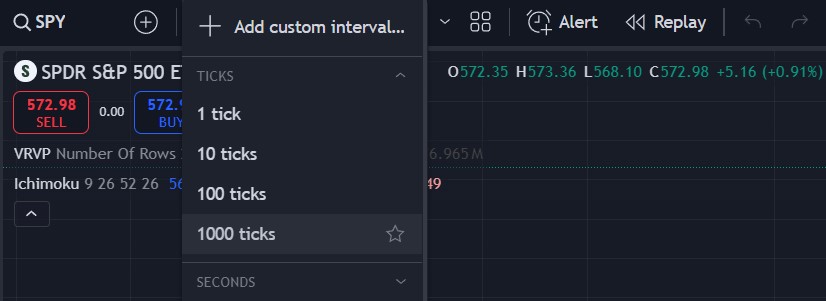
Four tick intervals are supported: 1T (a new bar every tick), 10T (every 10 ticks), 100T (every 100 ticks), and 1000T (every 1000 ticks). To switch a chart to a tick interval, type the interval directly on your keyboard while a chart is in focus (1T, 10T, 100T, or 1000T followed by Enter), or open the time interval dropdown above the chart and choose the desired tick option from the Ticks group. If the symbol does not have tick data available, the tick options are greyed out.
If you do not yet have an Expert, Elite, or Ultimate plan and want to test tick charts before upgrading, start a TradingView free trial on a higher tier and switch to a tick interval inside the trial window.
Tick Charts vs. the $TICK Index
A tick chart and the $TICK index are not the same thing, and the search results often blur them.
A tick chart is a chart whose bars form after a fixed number of transactions, regardless of how much time passes. A 100-tick chart on ES forms a new bar after every 100 trades, whether that takes ten seconds or ten minutes.
The $TICK index, posted as $USI:TICK on TradingView, measures the difference between NYSE stocks ticking up and stocks ticking down at any given moment. It is a market breadth indicator used to gauge whether buyers or sellers are dominating the broader market, not a chart interval.
If you came here looking for how to read the breadth indicator, see the FTW guide to the TICK index instead. The rest of this article is about tick interval charts.
How Are Tick Charts Created?
Each candlestick on a tick chart represents the price variation based on a specified number of consecutive ticks. For example, if you set the parameter to 100 ticks per candle, each candlestick on the chart is formed using 100 consecutive ticks. This precise representation lets you monitor price changes and transaction volume closely without relying on a fixed clock window.
Advantages of Tick Charts
Tick charts offer several key advantages for active traders:
- Enhanced precision in monitoring price changes during active tape
- Greater chart resolution during periods of high market activity
- Real-time visualization of transaction volume without a separate volume indicator
- Automatic compression of slow tape and expansion of fast tape, which keeps your chart readable throughout the session
Disadvantages and Limitations of Tick Charts
Tick charts are not the right tool for every situation. Three limitations worth weighing before switching from a 1-minute or 5-minute chart:
No fixed time reference. A tick bar can take five seconds in a hot futures session and five minutes in the overnight tape. Strategies that rely on a session structure (opening range breakouts, hourly pivots, end-of-day exits) translate awkwardly to a chart where time is non-uniform. If you need a clock, keep at least one time-based chart on the layout.
Data feed dependency. Tick bars only form correctly when the data feed delivers every individual transaction. Some forex feeds report aggregated quotes rather than true ticks, which means a 1T forex chart on TradingView is actually showing the broker’s tick definition, not raw transactions. Equity options data on consumer feeds is similar. Verify which data feed your chart is reading before sizing positions off a tick interval.
Learning curve and parameter sensitivity. A 100T chart and a 500T chart on the same symbol look like different markets. Picking the wrong interval makes the chart noisy at one end or laggy at the other. The next section covers practical starting points by market.
Tick charts are one tool for short-horizon execution, but most traders still anchor their setup decisions on a familiar time-based chart. If you are picking a starting frame, see the best time frame for intraday trading for a breakdown of the trade-offs.
Best Tick Chart Settings by Market
There is no single correct tick interval, but a starting point by market saves the trial and error.
ES (S&P 500 futures): start at 1000T for the regular trading session and step down to 500T or 233T if you scalp. The ES tape is dense enough that 100T bars form too quickly to read.
NQ (Nasdaq-100 futures): start at 500T. NQ has fewer transactions per bar than ES, so a 1000T setting tends to lag intraday moves. Step down to 233T for fast-pace scalping.
CL (crude oil futures): 233T to 500T depending on session and volatility. Pre-inventory-report sessions move so fast that 233T is often too granular to track.
Forex (EURUSD, GBPUSD): 100T to 500T, with the caveat above on data feed quality.
Stocks (large-cap, e.g., AAPL or NVDA): 500T to 1000T during regular hours, smaller for premarket and after-hours where tape is thinner.
Common rule of thumb: pick a setting where one bar takes roughly the same wall-clock time as the time interval you are migrating from. If your old chart was a 5-minute chart and a 500T bar usually closes in 4 to 6 minutes during the open, that is your starting interval. Calibrate from there.
Get Your Free Trading Resources
Grab the free trading journal template plus the same tools we use to stay organized, consistent, and objective.
- Free trading journal template
- Custom indicators, watchlists, and scanners
- Access our free trading community
Enter your email below to get instant access.
No spam. Unsubscribe anytime.
Implementing Tick Charts on TradingView with Custom Scripts
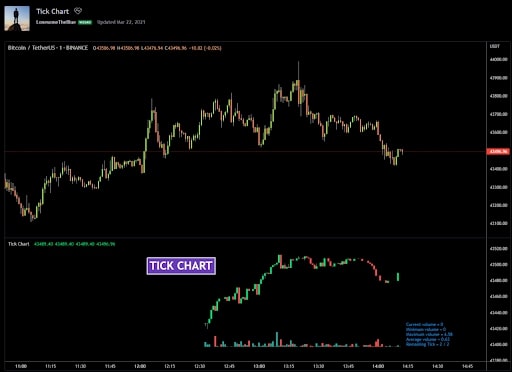
While TradingView offers native tick charts on paid plans, traders have also created community Pine Script indicators that approximate tick chart functionality for free. The Tick Chart script by LonesomeTheBlue generates tick charts based on real-time bars with customizable options for bar size, colors, and volume display.
The script lets you set the number of ticks per candle and customize chart aesthetics including body colors, wick colors, and volume bars. It also displays OHLC values and current, minimum, maximum, and average volumes per candle. Keep in mind that this script only works for real-time movements and resets if you close and reopen the chart, so it is not a substitute for the native tick data that paid plans provide.
Tick interval charts are one way to read order flow without subscribing to a depth-of-market terminal. Footprint charts on TradingView are another option, and they pair well on the same layout for traders who want per-price-level volume breakdown alongside transaction density.
TRADINGVIEW
Build Custom Tick-Based Scripts on TradingView
Pine Script access and higher-tier tick resolution both come with a paid TradingView plan, giving you more control over how your tick charts are built and displayed.
TradingView Tick Charts: Bottom Line
TradingView’s native tick charts are a strong tool for day traders who want bars that reflect actual market activity rather than the clock. The feature is available on Expert, Elite, and Ultimate plans with four intervals: 1T, 10T, 100T, and 1000T. For traders who are not ready to upgrade, the LonesomeTheBlue Pine Script indicator provides a functional free approximation on live data.
If you switch from time-based to tick-based charts, expect your win rate and average hold time to look different inside the Financial Tech Wiz Trading Journal until the new pattern stabilizes. Tag those trades distinctly so the analytics by symbol and hold duration stay clean.
TradingView Tick Charts FAQ
What plans support native tick charts on TradingView?
Native tick charts are available on the Expert, Elite, and Ultimate plans. Lower tiers (Essential and Plus) do not show tick intervals in the time interval dropdown.
How do I switch a chart to a tick interval?
Type 1T, 10T, 100T, or 1000T directly on your keyboard while a chart is in focus, then press Enter. You can also open the time interval dropdown above the chart and select an option from the Ticks group.
What is the difference between a tick chart and the $TICK index?
A tick chart forms new bars based on a fixed number of transactions. The $TICK index ($USI:TICK on TradingView) is a market breadth indicator that measures how many NYSE stocks are ticking up versus down. They share a name but answer different questions.
Can I get tick charts on TradingView for free?
No. Native tick intervals require an Expert, Elite, or Ultimate subscription. A free workaround is the community Pine Script Tick Chart indicator by LonesomeTheBlue, which approximates tick bars on a real-time chart, though it is limited to live sessions and does not produce true historical tick data.
What is the best tick chart setting for ES day trading?
A 1000T chart for the regular session and a 500T or 233T chart for scalping is a common starting point on ES. The right interval is the one where one bar usually takes about as long to close as the time-based chart you are migrating from.
Get Your Free Trading Resources
Grab the free trading journal template plus the same tools we use to stay organized, consistent, and objective.
- Free trading journal template
- Custom indicators, watchlists, and scanners
- Access our free trading community
Enter your email below to get instant access.
No spam. Unsubscribe anytime.







