Buy to Open vs. Buy to Close: Options Orders Explained

Buy to open and buy to close are the two order types that tell your broker whether you are starting an options position or getting out of one you already sold. They are not interchangeable, and picking the wrong one is one of the fastest ways to end up in a trade you did not intend to be in.
Below is what each order actually does to your account, worked examples for calls and puts, all four options order types side by side, and where these buttons live in the platforms most traders use.
Key Takeaways
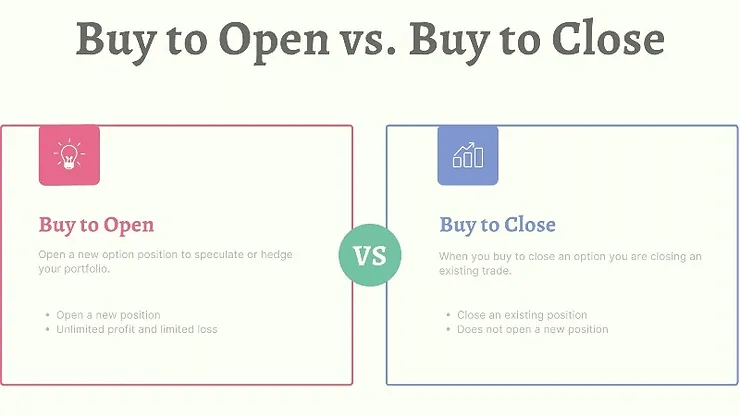
- Buy to open starts a brand new long option position and costs you a debit. Buy to close exits a short option you previously sold to open, and also costs you a debit.
- The word “buy” tells you cash direction. The words “open” and “close” tell your broker whether you already hold a position, which is why the wrong choice can double your exposure instead of flattening it.
- Buying to open adds to open interest when the trader on the other side is opening a new short. Buying to close reduces it when the trader on the other side is closing a long, because the contract is retired rather than passed along.
Track your opens and closes
Financial Tech Wiz Trading Journal
Every options trade has an open and a close, and the distance between them is where your results are actually decided. Import your fills from 25+ brokers and see win rate and P&L across your options positions, broken down by symbol and hold duration.
What Buy to Open Means
A buy to open order creates a new long option position that did not exist in your account a second earlier. You pay the premium, the contract lands in your account as an asset, and your maximum loss is capped at what you paid. Nothing about the order depends on what else you own, which is exactly why it is the default order type for anyone starting a trade.
Because you are the buyer, you want two things to move in your favor: direction and volatility. Direction is obvious. The volatility side is less so, and it catches new options traders out constantly. When implied volatility falls after you buy, the contract can lose value even when the stock moves the way you predicted, because the market is now paying less for the same optionality.
Buy to Open a Call: Worked Example
Say AAPL trades at 190 and you think it reaches 210 over the next several months. You buy to open one 200-strike call expiring in six months for 8.00, which costs 800 dollars plus commission for the one contract. That 800 dollars is the entire amount at risk. If AAPL closes at 225 at expiration, the contract is worth 25.00 intrinsic, or 2,500 dollars, for a 1,700 dollar gain. If AAPL sits at 195 at expiration, the call expires worthless and you lose the full 800.
Plenty of traders buy to open longer-dated contracts specifically to buy themselves room to be wrong on timing. Contracts with a year or more until expiration are usually called LEAPS, and they are the backbone of strategies like the poor man’s covered call, where a long-dated long call stands in for the 100 shares.
Buy to Open a Put: Worked Example
The put side works identically in reverse. Suppose you hold 100 shares of a stock trading at 60 and you want downside cover through earnings. You buy to open one 55-strike put for 2.00, or 200 dollars. If the stock drops to 45, the put is worth 10.00 intrinsic and covers a large part of the 1,500 dollar share loss. If the stock rallies instead, you lose the 200 dollars and keep the upside on your shares. That specific use of a long put has its own name and its own page: the protective put.
You can also buy to open a put with no shares behind it, purely as a directional bet that the stock falls. Same order type, same debit, entirely different intent. Your broker does not care which one you mean, and that is the point worth internalizing: the order type describes the mechanics, not the strategy.
Advantages of Buying to Open
Your loss is defined the moment the order fills. You know the worst case before you click, which is not true of most short options positions, and it is why long calls and puts sit near the bottom of the options permission tiers most brokers use.
You also get leverage without a margin loan. One contract controls 100 shares for a fraction of the share cost, so a modest account can express a view on an expensive underlying. And a long option cannot be assigned against you, so there is no overnight surprise where shares appear or disappear from your account.
Disadvantages of Buying to Open
You will lose more of these trades than you win. That is not a knock on the strategy, it is the arithmetic of buying an out-of-the-money contract that needs a specific move in a specific window. The payoff profile is built to make a small number of large winners cover a large number of small losers, which only works if you size accordingly.
Theta works against you every single day. Time decay pulls value out of the contract whether the stock moves or not, and it accelerates as expiration approaches. Over my years of trading options, the mistake I see most often is a directionally correct long call that still lost money because it was bought too close to expiration. Before you place the order, know the price the underlying has to reach for the trade to break even, which is what the options breakeven calculation is for.
What Buy to Close Means
A buy to close order does one thing: it retires a short option position you previously opened with a sell to open. You sold a contract and collected premium, you now owe that obligation, and buying an identical contract cancels it out. Your broker nets the two against each other and the position disappears from your account.
This order type only exists in the context of something you already hold short. If you do not have a matching short position, most platforms will either reject the order or, worse on some interfaces, silently open a brand new long position instead. That is the single most expensive confusion on this page.
Buy to Close a Covered Call: Worked Example
You own 100 shares and sold to open a 30-day covered call for 1.50, collecting 150 dollars. Three weeks later the stock has drifted sideways, the call now trades at 0.25, and there are seven days left. You buy to close it for 25 dollars and keep 125 dollars of the original 150.
Why pay to close something that might expire worthless anyway? Because the last 25 dollars is the worst-paid week of the trade. Buying it back frees the shares immediately so you can sell the next month’s call and start collecting a fresh, larger premium. Closing early and reopening further out is called rolling, and it is the mechanical core of income strategies like the wheel.
Buy to Close a Cash-Secured Put: Worked Example
The same logic applies on the put side. You sold to open a cash-secured put for 2.00 while holding the cash to buy the shares if assigned. The stock rallies, the put collapses to 0.30, and you no longer want the assignment risk into an earnings print next week. You buy to close for 30 dollars, book 170 dollars, and release the collateral.
Buying to close a short put is also the standard defensive move when the trade goes against you and you have decided you do not want the shares. You will pay more than you collected, which locks in a loss, but you cap the damage instead of carrying assignment risk into an event you cannot control.
All Four Options Order Types Side by Side
Buy to open and buy to close are two of four. Seeing all four together is what makes the naming convention click, because the pattern is completely regular once you separate the two halves: the verb is cash direction, and open or close is whether a position already exists.
| Order type | What it does | Position before | Position after | Cash effect | Open interest |
|---|---|---|---|---|---|
| Buy to open | Starts a new long option | Flat | Long | Debit, you pay | Increases |
| Sell to open | Starts a new short option | Flat | Short | Credit, you collect | Increases |
| Sell to close | Exits a long option | Long | Flat | Credit, you collect | Decreases |
| Buy to close | Exits a short option | Short | Flat | Debit, you pay | Decreases |
Read the table by column and the rule falls out. Every “open” order takes you from flat to a position. Every “close” order takes you from a position back to flat. Every “buy” is a debit. Every “sell” is a credit. There is no fifth combination to memorize. The two sell-side orders get their own walkthrough in our companion article on sell to open vs. sell to close.
How These Orders Affect Open Interest and Buying Power
Open interest is the count of contracts currently outstanding at a given strike and expiration. When you buy to open and the seller on the other side is also opening a new short, open interest ticks up by one. When you buy to close against a seller who is also closing a long, it ticks down. It moves only when contracts are genuinely created or retired, which is why volume can be enormous on a day when open interest barely budges.
The practical use is liquidity screening. A strike with healthy open interest tends to have a tighter bid-ask spread, so both your open and your close cost you less in slippage. A strike with almost no open interest can be easy to get into and genuinely painful to get out of, which is the trap in far-dated or far-out-of-the-money contracts.
Buying power moves differently for each order. A buy to open reduces cash by the premium and nothing more. A buy to close reduces cash by the premium but simultaneously releases whatever collateral the short position was tying up, which on a cash-secured put can be thousands of dollars freed the instant the order fills. That release is often the real reason to close early rather than wait for expiration.
Where These Order Types Appear in Your Broker Platform
Most explainers on this topic stop at the definitions and never tell you where the buttons actually are, which is odd, because that is where the mistakes happen. The labels differ more than you would expect.
On thinkorswim, the order entry ticket shows BUY and SELL with a separate TO OPEN or TO CLOSE selector, and it auto-selects the right one when it detects an existing position in the account. Trust it, but glance at it before confirming. Schwab’s web platform uses an explicit Action dropdown listing all four combinations by name, which is the least ambiguous implementation of the four discussed here.
tastytrade infers the intent from context: clicking on your existing position builds a closing order automatically, while clicking the option chain builds an opening one. Interactive Brokers behaves similarly and surfaces the distinction in the order preview rather than the ticket. Robinhood and Webull keep the terminology off the screen almost entirely, presenting a plain “Close position” flow instead of a buy-to-close order, which is friendlier for beginners but tells you less about what is being submitted on your behalf.
Whichever platform you use, build one habit: read the order preview, not the button. The preview states the position you will hold after the fill, and that sentence is the only thing that reliably catches a mis-selected order type.
Free Google Sheets template
Log the order type, not just the ticker
If you are still building the habit, write the orders down. The free trading journal template gives you columns for entry order, exit order, premium, and expiration, so a month later you can see exactly which trades you closed too early and which ones you never should have opened.
Common Mistakes and Rejected Orders
Four failure modes account for most mis-typed options orders, and they rarely show up in the standard definitions.
Using buy to open when you meant buy to close is the expensive one. Instead of flattening a short call, you now hold a long call and a short call at the same strike, which on some platforms nets to nothing and on others sits there as an open spread eating commissions. Check your positions page after any close, not just the fill confirmation.
Using sell to close when you meant buy to close is the mirror error, and it usually gets rejected outright because you have no long contract to sell. A rejection is the good outcome here. Read the rejection message rather than resubmitting with a different price.
Closing only part of a multi-contract position by leaving the quantity field at the default of one is quiet and common. If you sold five contracts and buy to close one, four are still working and still carry assignment risk over the weekend.
Finally, trying to buy to close a position that has already been assigned. Once assignment happens the option is gone and you hold or owe shares instead, so the close order has nothing to act on. Assignment notices often land overnight, which is why the first thing to check on a Monday is your share balance, not your options chain.
Tax and Assignment Notes Worth Knowing
The gap between your open and your close is also what determines the tax character of the trade, which is a detail most order-type explainers skip. In the United States, an option you buy to open and later sell to close inside a year is generally a short-term capital gain or loss, taxed at your ordinary rate. Hold it longer than a year before closing and it can qualify for long-term treatment, which is one of the quieter arguments for LEAPS over short-dated contracts.
Short options work differently. When you sell to open and later buy to close, the result is generally treated as short-term regardless of how long the position was open, because you never held an asset in the first place. And if a short option is assigned instead of closed, the premium usually folds into the share transaction rather than being booked as a separate gain: it lowers your cost basis on an assigned put and raises your proceeds on an assigned call. Rules vary by contract type and by situation, and none of this is tax advice: confirm the treatment of your own trades with a tax professional.
The practical takeaway is that “buy to close” and “let it expire” are not the same event on your tax return, even when the dollar outcome looks identical. That alone is a reason to record which one actually happened.
Logging Opens and Closes So Your Results Make Sense
Once you are running more than a couple of positions, order types stop being a vocabulary problem and become a record-keeping problem. A month of activity looks like a wall of fills, and without the open-and-close pairing you cannot answer basic questions: did the covered calls actually beat holding the shares, and are the early closes helping or costing you?
Two habits fix it. Record the intent alongside the order, because “bought back the call to roll” and “bought a call to speculate” are the same debit and completely different decisions. And review by pairs rather than by fill, so every open is matched to the close that ended it.
If you would rather not maintain that by hand, the Financial Tech Wiz Trading Journal imports your fills directly from your broker so the whole record lands in one place, and you can look at win rate and P&L across your options positions broken down by symbol and hold duration. Either way, the record is what turns a stack of orders into something you can learn from. For the strategies these orders actually build, start at our options trading strategies hub, and if you are running these for cash flow rather than speculation, the options trading for income guide covers how the pieces fit together.
Buy to Open vs. Buy to Close: Bottom Line
Buy to open starts something. Buy to close ends something you sold. Both cost you a debit, which is why the word “buy” alone never tells your broker what you want, and why the open-or-close half of the label is the part that matters.
If you are placing a new directional bet or buying protection, it is buy to open. If you are retiring a call option or put you previously sold to open, it is buy to close. When you are unsure, read the order preview and confirm what position you will be holding after the fill. Then run a couple of small positions through the full cycle before you scale up, and check that the options profit calculator math matched what actually landed in your account.
FAQ
What is an example of a buy to open order?
Buying one 200-strike AAPL call for 8.00 when you hold no AAPL options is a buy to open. You pay 800 dollars, you now hold a long call, and your maximum loss is that 800 dollars. Buying a 55-strike put on a stock you own to protect against a drop is also a buy to open, because in both cases you are creating a position that did not exist before.
What is the difference between buy to open and sell to open?
Both start a new position, but they put you on opposite sides of the contract. Buy to open makes you the holder: you pay a debit and your loss is capped at the premium. Sell to open makes you the writer: you collect a credit and take on an obligation, which means assignment risk and, on uncovered positions, a much larger potential loss.
Does buy to open mean buying at the market open?
No, and this is a common mix-up. “Open” refers to opening a position, not to the opening bell. You can buy to open at any point during the session, and the order type has nothing to do with the time of day you place it.
Can you buy to close an option you never sold?
No. A buy to close order needs a matching short position to retire. With no short position, most brokers reject the order. A few platforms will treat it as an opening order instead and give you a long contract you did not intend to buy, which is why you should confirm your positions after any close rather than relying on the fill notification alone.
Does buy to close increase or decrease open interest?
It decreases it, assuming the trader on the other side of your fill is also closing. Retiring a contract removes it from the outstanding count. Buy to open has the opposite effect and adds to open interest when the counterparty is opening a new short.
Where do I find buy to close in Schwab or thinkorswim?
On Schwab’s web platform, buy to close is a named entry in the Action dropdown on the options order ticket. On thinkorswim, you set BUY on the order and then choose TO CLOSE in the position selector, and the platform usually pre-selects it for you when it sees a matching short position in the account. In both cases the order preview states the resulting position, which is the fastest way to confirm you picked correctly.
Financial Tech Wiz / Free resources
Build a clearer picture of your trading.
Start with the free trading journal template. Keep your trades organized, review your results, and build a consistent review routine.
- Free Google Sheets and Excel trading journal template
- Indicators, watchlists, and scanners
- Access to the free trading community
Ready for automatic trade tracking? Explore the Financial Tech Wiz Trading Journal.
Free resources + trading emails. Unsubscribe anytime.