Option Omega Review 2026: Backtest, Automate, Pricing

Option Omega promises something most options tools cannot: backtest a strategy on 1-minute data going back to 2013, then push that exact strategy live and let it trade on its own. The question every serious options trader is really asking is whether the backtesting is accurate enough to trust and whether the automation is worth the monthly cost. This review walks through both, hands-on, with the 2026 pricing and the honest tradeoffs.
Full disclosure: the links in this review are affiliate links. My discounted link also auto-applies the FinancialTechWiz coupon code, which knocks 50% off your first year. You can read my standalone Option Omega discount code guide for more detail. If you want to see how Option Omega stacks up against the rest of the market, start with my best options backtesting software roundup.
Key Takeaways
- Option Omega’s edge is high-resolution (1-minute) historical data going back to 2013 plus no-code automation that runs a validated strategy live through a supported broker, which is rare in retail options backtesting.
- The backtester is deep (multi-leg, VIX and technical entries, profit targets, timed exits, portfolio combining), but overfitting is the real risk, so treat results as hypotheses, not guarantees.
- It is a paid tool aimed at active options traders, not beginners; the free trial is the right way to confirm the data and workflow fit your strategy before paying.

Key Features of Option Omega
- Backtest 10+ years of options strategies in minutes
- 1-minute historical data on SPX, SPY, QQQ, IWM, TSLA, and AAPL
- New Modeling tier with live payoff diagrams and Greeks
- Automate tier converts a backtest into a cloud-based live bot
- Combine multiple backtests in a single portfolio
- CSV export to Excel or Google Sheets for custom analysis
Option Omega plans start at $24.99/month billed annually for Modeling. With my affiliate link, you get 50% off your first year on any tier.
Get 50% Off Option Omega Now!What’s New in Option Omega (2026)
Option Omega has expanded well beyond its original historical backtest engine. For 2026, there are three changes worth calling out before anything else:
- Modeling tier: a dedicated plan for live strategy modeling with real-time payoff diagrams, Greeks, and scenario analysis. Designed for traders who want to build and vet a strategy before committing to a historical backtest.
- Automate tier: cloud-based live trading that takes a validated backtest and runs it as an automated bot through a supported broker, with no VPS or local setup.
- AAPL support: AAPL has joined SPX, SPY, QQQ, IWM, and TSLA as a supported ticker, which opens up single-stock options strategy testing on the largest name in the market.
The rest of the review walks through each of these plus the core backtest engine I have used since 2023.
Overview of Option Omega
Option Omega is an automated options backtesting platform that runs 10+ years of historical trades in minutes. It is particularly strong for 0DTE and 1DTE strategies because the underlying data is 1-minute granularity, not daily or 5-minute.
You build a test by defining your legs, entry conditions, exit rules, and portfolio allocation, and Option Omega runs it across your chosen date range. The platform then returns an equity curve, CAGR, max drawdown, win rate, premium capture rate, and a full trade log you can export to CSV. There are hundreds of combinations to tweak, and it is easy to spend hours refining a single strategy.
Pros and Cons of Option Omega
Pros
- Precise 1-minute historical backtesting back to January 2013.
- Sophisticated customization across entry, exit, strike, and allocation.
- New Modeling and Automate tiers cover strategy building and live execution.
- Strong educational support through Option Omega Academy and an active community.
Cons
- Limited to six tickers (SPX, SPY, QQQ, IWM, TSLA, AAPL).
- No support for morning expiry options on SPX.
- Automate pricing is meaningful and only makes sense once a strategy is validated.
Option Omega Modeling: Live Payoff Diagrams and Greeks
Modeling is the newest tier and it fills a gap that used to push traders out to separate tools like OptionNet Explorer or spreadsheets. Instead of running a historical test, you build a strategy against live market data and watch the payoff curve, risk profile, and Greeks update in real time.
The practical use case is strategy construction. If I want to add a new iron condor or diagonal setup, I can model the position live, see the initial Greeks exposure, drag strikes around, and confirm the shape of the payoff before deciding whether to run a multi-year historical backtest on it. It saves a lot of dead-end backtests. For a fast payoff and breakeven check on a single trade before you open Modeling, my free options profit calculator runs the same math in seconds.
Modeling on its own starts at $29.99 per month or $24.99 per month billed annually. If you are already on the Backtest tier, the Backtest + Model bundle is the cost-efficient upgrade.
Option Omega Automate: Cloud-Based Live Trading
Automate is the highest tier and it is the reason this review needed a full rewrite. Automate takes a strategy you have validated in the backtest engine and runs it as a cloud-hosted live bot through a supported broker. Entry, exit, stop, and take-profit logic all carry over from your backtest configuration, so there is no reprogramming.
Because it runs in Option Omega’s cloud, there is no VPS, no local Python script, and no TradeStation EasyLanguage to maintain. The workflow is: backtest a strategy to confirm it works, click to promote it to Automate, connect your broker, and monitor positions from the same dashboard.
Automate is $299.99 per month or $249.99 per month billed annually. It is priced for traders who are past the backtest-and-paper-trade phase and ready to deploy real capital against tested strategies. I track every live trade I run through it in the Financial Tech Wiz Trading Journal so I can review actual fills against backtest expectations.
How to Backtest on Option Omega: Full Walkthrough
To initiate a new backtest, you navigate the dashboard to select target tickers and specify the date range to test. Setup is structured to work for both first-time users and experienced traders.
Once you sign in, you will see tests and portfolios at the top left.

To begin your first backtest:
1- Click tests
2- Click the new backtest button
3- Begin setting your parameters
4- Be careful not to click off to avoid disrupting your parameters
Setting up Backtesting Parameters
The parameters are highly customizable. I recommend testing multi-leg strategies like iron condors and put credit spreads one leg at a time, then combining them in a portfolio. This is not strictly necessary but it is more efficient and easier to customize later.
Defining parameters is necessary so the backtest mimics real trading conditions. Parameters let you choose strikes, define entry and exit points, and adjust funds and allocation. Additional settings include commissions, slippage, and profit or loss caps, giving you a complete setup for each test.
I will walk through each parameter category below.
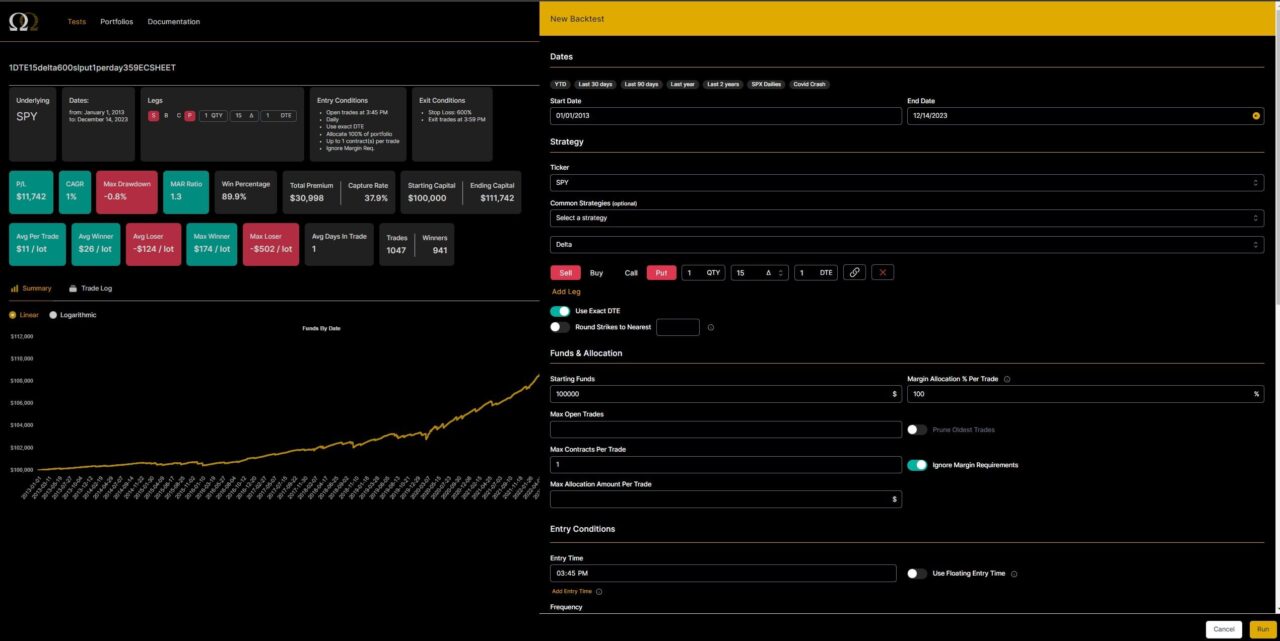
Date Range
Pick any date range from 1/1/2013 to yesterday. Option Omega also offers preset ranges like the covid crash, YTD, last year, and last 2 years.

Ticker
Option Omega supports SPX, SPY, QQQ, IWM, TSLA, and AAPL.
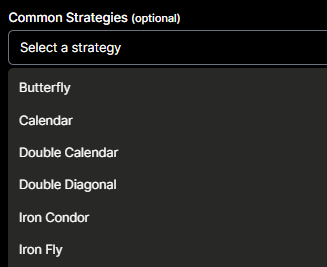
Common Strategies
You can optionally choose from preset strategies like iron condors, calendars, iron flies, and more.
Strike Selection
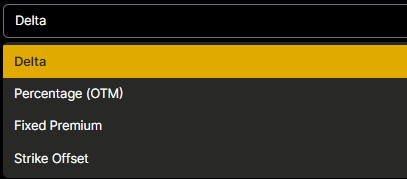
For strike selection, you can use delta, percentage OTM, a fixed premium amount (for example, always sell a $1 option), or a strike offset.
Add Leg
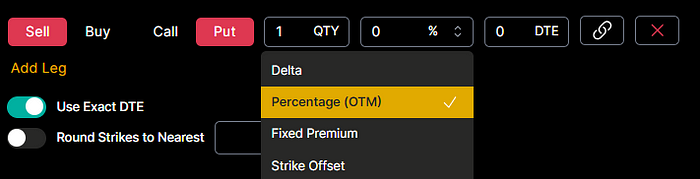
When you click add leg you get the following options to determine which strike is bought or sold in the backtest:
- Sell or buy to open the contract
- Call or put
- Quantity to sell or buy to open
- Which delta, % OTM, premium amount, or strike offset to use
- How many DTE to target (you can also specify to use exact DTE only)
- You can specify what number to round to the nearest strike
Funds and Allocation
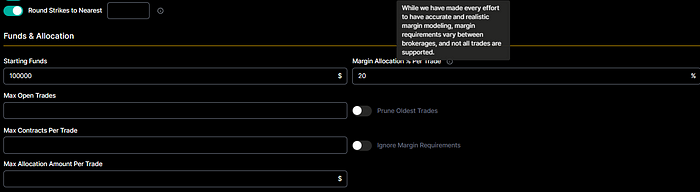
You can set starting funds, a margin allocation percentage per trade, max open trades, max contracts per trade, or a max dollar amount per trade.
Entry Conditions
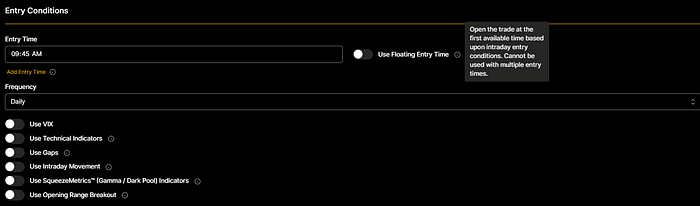
You can set an entry time and frequency to keep trades standardized. This is also useful if you only trade power hour strategies.
You can also implement the following entry conditions:
- VIX levels (max or min VIX levels)
- Technical indicators (RSI, EMA, and SMA support)
- Gaps (only trade if there are gaps up or down)
- Intraday movement (only trade if there is a min or max movement up or down intraday)
- SqueezeMetrics like Gamma and Dark Pool indicators
- Opening range breakout
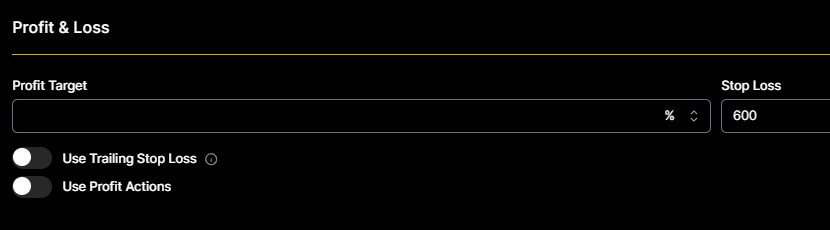
Profit and Loss
You can specify take profit levels in % or $ amounts, and do the same for stop-loss levels. You can even adjust stop-loss levels once the trade hits a specific profit threshold.

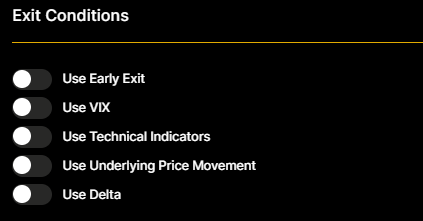
Exit Conditions
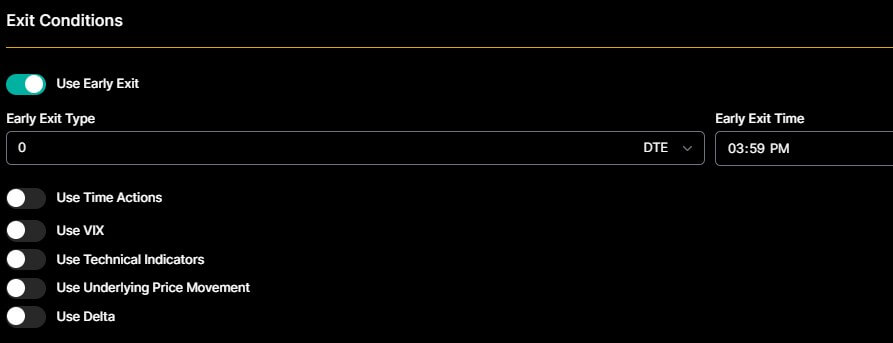
You can specify when to exit a trade in the backtest based on DTE, time in trade, VIX levels, delta, technical indicators, and price movement. For example, if your strategy says to exit when delta reaches a certain level or before the market closes, you can set that up directly.
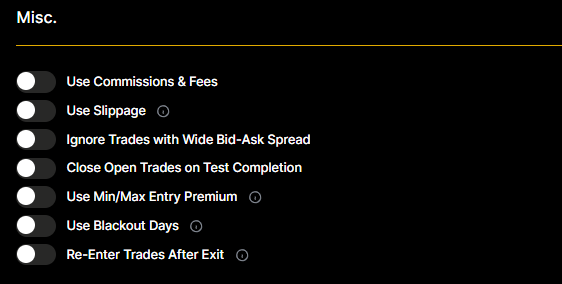
Misc
Under the misc category you can set slippage, commissions, bid-ask spread filters, whether to re-enter trades right after exit, and whether to close active trades when the test completes.
Advanced Testing Options
Option Omega also provides advanced testing features like technical indicators, SqueezeMetrics, and strategies such as the Opening Range Breakout (ORB). These give traders more insight and more detailed control over backtest conditions, which improves the predictive quality of a strategy before it goes live.
Analyzing Backtest Results
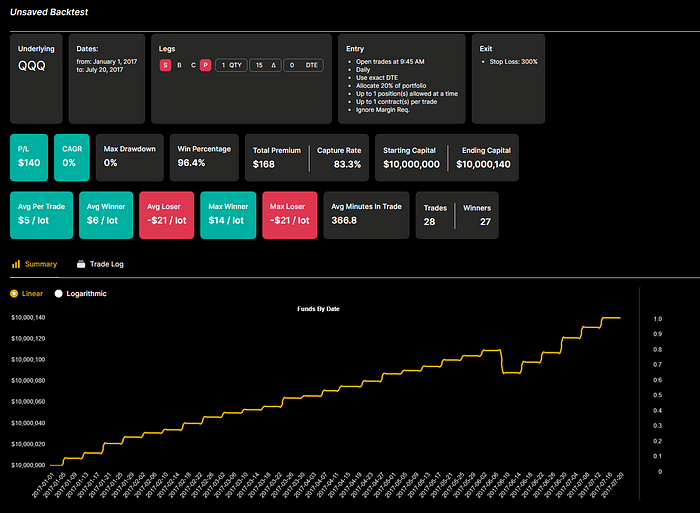
After a backtest runs, Option Omega returns a full analysis with key metrics like Profit/Loss, Compound Annual Growth Rate (CAGR), and Maximum Drawdown (MDD). You can customize the trade log, replay trades, and export results to CSV for deeper review.
Once the test completes you get a built-in equity curve showing how the strategy performed, plus the following metrics:
- CAGR
- Overall P/L
- Win percentage
- Premium capture rate
- Max and average winner
- Max and average loser
- Total number of trades and winners
SPX/SPY 1DTE Backtest Example
In this example we will test a 1-DTE short-put strategy on SPX and SPY. To account for the weekend when the market is closed, we will run a separate 3DTE test for Friday’s “1-DTE” trades.
In Option Omega, I set the start date to 1/1/2013 and the end date to yesterday. Next, I choose SPX, then add a leg. The leg will be:
- Sell
- Put
- 1 QTY
- 15 Delta
- 1 DTE (separate 3DTE Friday-only test)
- Daily frequency 15 minutes before close (weekly for Friday 3DTE)
- -600% stop loss
- Early exit at one minute before close
- 1 max contract per trade
- Ignore margin requirements
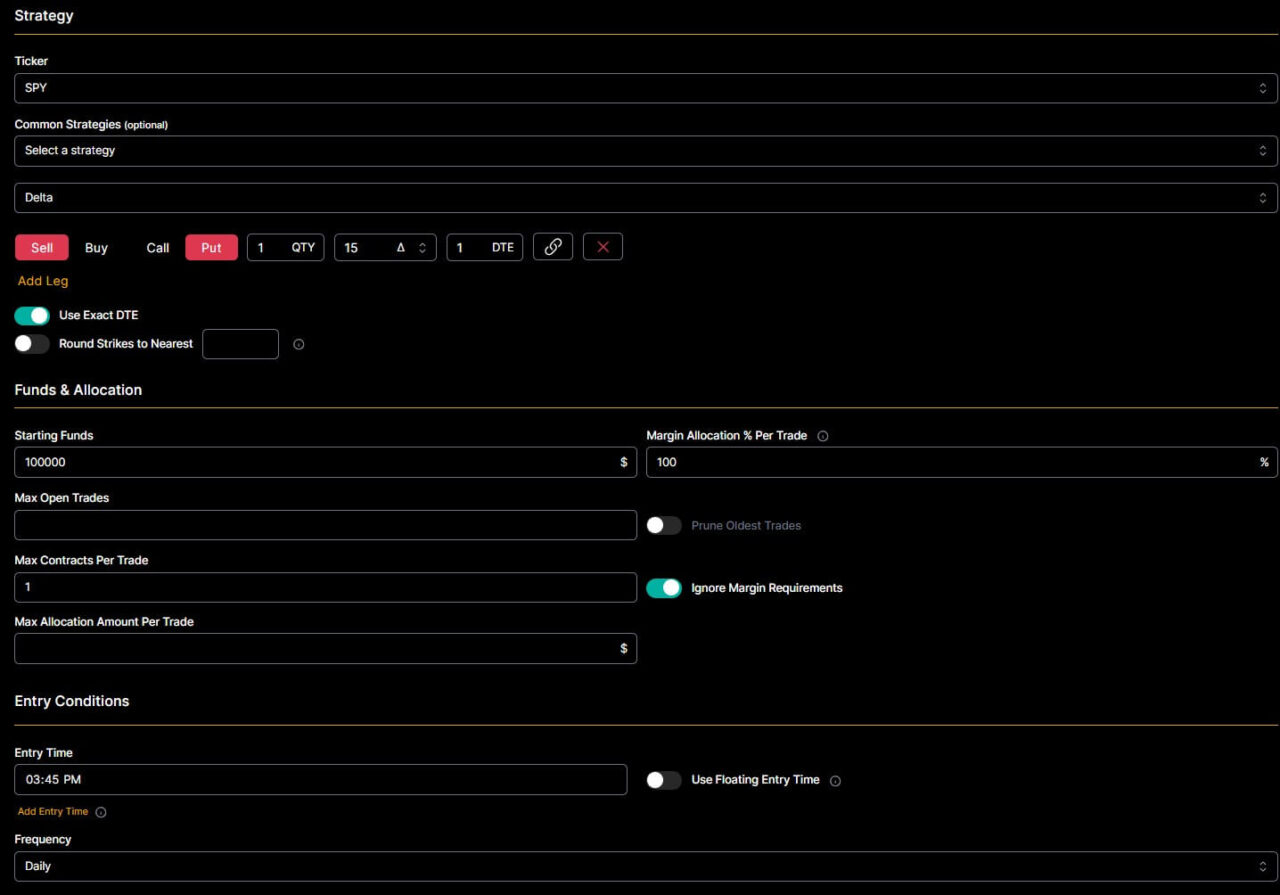
I check “use exact DTE” to ensure it only runs 1DTE trades. For starting funds, I usually go with a high number like $10,000,000 for the most flexibility.
I use 1 contract per day to remain consistent, and later in Google Sheets we adjust the number of contracts sold based on account size. You can do this by exporting the backtest data from Option Omega. You can view my Google Sheet for this SPY/SPX 1DTE backtest and make a copy if you want to use it as a template. If you want a ready-made structure for day-to-day trade tracking instead, grab my free trading journal template for Google Sheets.
You can customize commissions and fees to match your broker, plus control leverage based on notional value. For example, selling one SPY 400 strike put is $40,000 of notional. Setting leverage in the spreadsheet to 1 sells one contract for every $40,000 of net liquidity. You can also change the account net liq size.
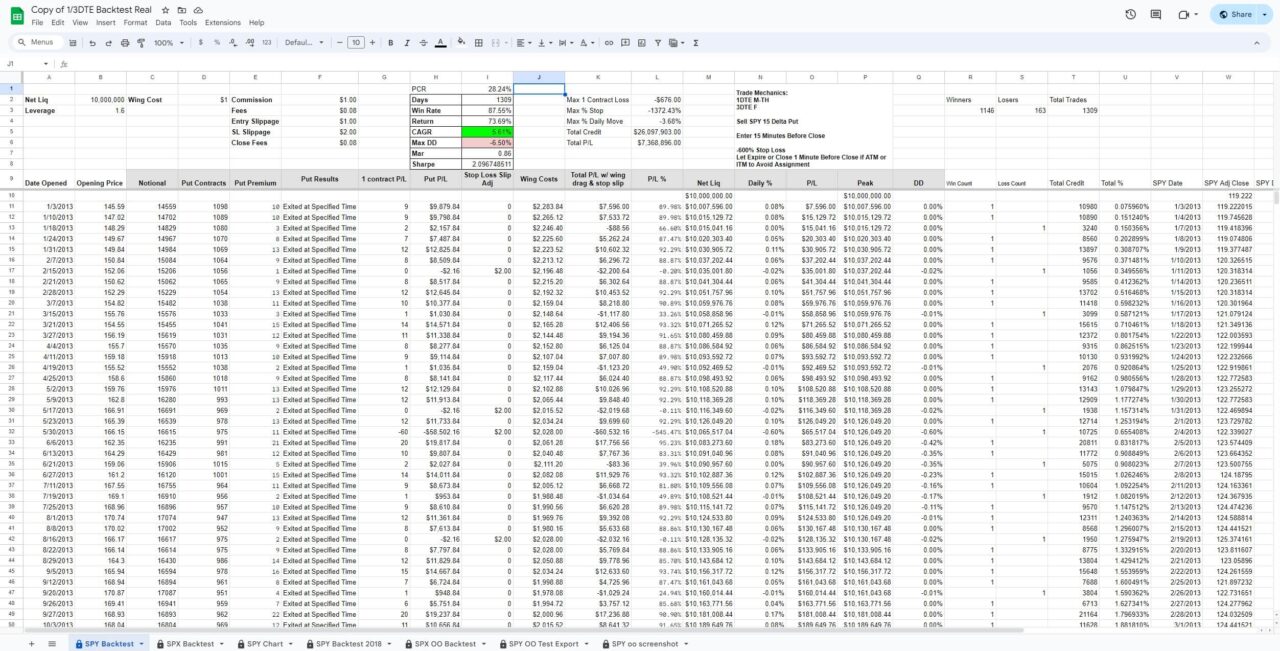
My sheet calculates the following based on your Option Omega export results:
- PCR (premium capture rate): Total profit / Total premium sold
- Win rate %
- Total return
- CAGR (compound annual growth rate)
- Max drawdown
- MAR ratio
- Sharpe ratio
- Max % stop loss hit
- Max one contract loss
- Max daily % drawdown
Combining Tests in Portfolios
Since I ran two backtests in this case (1 and 3DTE for Friday entries), I combine them into a single test using the portfolios feature. Click portfolios at the top left, then click New Portfolio.
You can customize starting funds and the start and end dates for the portfolio test. Next, check the two backtests you want to combine and click run.
This combines the 1 and 3DTE tests into a single test. From there you can click “Trade Log” and export to CSV for Google Sheets analysis. Sheets makes it easy to change commissions and leverage based on net liquidity, which you can do in my Google Sheets template.
Option Omega Academy
There is a vibrant community of real traders who offer courses through the Option Omega Academy. Topics include 0-DTE strategies, spreadsheeting, power hour strategies, and more. The academy and the supporting Discord show that the platform is built by traders for traders.
Option Omega Free Trial
New users can use my affiliate link to start an Option Omega free trial. You can test the platform’s workflow, though the trial is limited to backtesting QQQ options in 2017. Even with those limits, it is enough to confirm whether the platform supports your strategy before paying.
Option Omega Pricing (4 Tiers)
Option Omega now ships in four tiers. Every tier is 50% off your first year when you register through my affiliate link, and the FinancialTechWiz coupon code applies automatically.
| Plan | Monthly | Annual (Per Month) | Best For |
|---|---|---|---|
| Model | $29.99 | $24.99 | Live strategy modeling with payoff diagrams and Greeks |
| Backtest | $99.99 | $49.99 | Historical backtesting with 1-minute data back to 2013 |
| Backtest + Model | $129.99 | $74.99 | Build, model, then historically validate a strategy end-to-end |
| Automate | $299.99 | $249.99 | Cloud-based live trading of a validated strategy |
For a deeper breakdown of how the discount works and which tier is best for different traders, read my Option Omega discount code guide.
Option Omega Alternatives
| Platform | Pricing | Key Features |
|---|---|---|
| Option Omega | $24.99 to $249.99 per month billed annually (50% off first year with my link) |
|
| Option Alpha | $79 to $199 per month |
|
| OptionNet Explorer | $200 for 3 months, $660 per year (10% off with affiliate link) |
|
The closest no-code automation alternative is Option Alpha, which leans into bot-building and templates rather than Option Omega’s data resolution and backtest depth. If your priority is institutional-grade historical accuracy, Option Omega is the stronger backtester; if you want a guided bot library first, Option Alpha is worth a look.
For the full head-to-head analysis including tastytrade, ORATS, and eDeltaPro, see my best options backtesting software roundup.
Final Thoughts: Is Option Omega Worth It?
Option Omega is the tool I reach for whenever I need to validate an options strategy with real, 1-minute historical data. The new Modeling tier removes the friction of building strategies in a spreadsheet first, and the Automate tier closes the loop by letting a validated strategy run live through the cloud.
If you trade 0DTE, 1DTE, or any rule-based options strategy on SPX, SPY, QQQ, IWM, TSLA, or AAPL, Option Omega is worth the cost. Start with the free trial to confirm the platform fits your workflow, then use my affiliate link to lock in 50% off year one. If you just want the discount details, go straight to my Option Omega discount code page.
Track what you backtest
Financial Tech Wiz Trading Journal
A backtest is a hypothesis. Once an Option Omega strategy goes live, log the real fills in the Financial Tech Wiz Trading Journal and watch win rate and P&L across your options positions, broken down by symbol and hold duration, so you can see whether the live results actually match the model.
Start tracking your options tradesFrequently Asked Questions
How accurate is Option Omega 1-minute data?
Option Omega uses carefully sourced 1-minute historical options data going back to January 2013. It is accurate enough to test 0DTE and 1DTE strategies with confidence. The platform also lets you set realistic slippage, commissions, and bid-ask spread filters so your backtest matches live trading conditions.
What is Option Omega Modeling?
Modeling is a new Option Omega plan that lets you build and forward-test options strategies with live market data. You get real-time payoff diagrams, Greeks, and scenario analysis without running a historical backtest. It is a good starting tier for traders who want to explore and build strategies before committing to a full backtest workflow.
What is Option Omega Automate?
Automate is Option Omega’s cloud-based live trading tier. You can convert a backtested strategy into a live bot that executes trades automatically through a supported broker. The bot runs in the cloud with no VPS or local setup, and you manage everything from the Option Omega dashboard.
What tickers does Option Omega support?
Option Omega supports SPX, SPY, QQQ, IWM, TSLA, and AAPL. The SPX and SPY datasets are the most complete and go all the way back to January 2013 with 1-minute historical data.
Can I export Option Omega backtest data to analyze elsewhere?
Yes. Every backtest and portfolio test can be exported to a CSV file so you can analyze it in Excel or Google Sheets. This is how I run custom P&L, CAGR, and drawdown calculations across different net liquidity sizes using my own spreadsheet template.
What is floating time entry and intra-minute stop loss?
Floating time entry lets you enter a position based on a condition such as a VIX level or technical indicator rather than at a fixed clock time. Intra-minute stop loss (IMSL) checks whether your stop would have been hit inside the 1-minute candle rather than only on the close, which gives a more realistic exit price for fast-moving trades.
How do I get the best Option Omega discount?
The cheapest way to access Option Omega is through my affiliate link, which automatically applies a 50% discount on your first year. The coupon code is FinancialTechWiz if you need to enter it manually. Full details are on my Option Omega discount code page.
Is Option Omega worth it compared to free tools?
For serious options traders running 0DTE, 1DTE, or portfolio-level backtests, Option Omega is worth it because of the 1-minute data, automation, and portfolio feature. Free tools like tastytrade’s backtester are fine for casual testing, but they do not match Option Omega’s depth of customization or data granularity.
Financial Tech Wiz / Free resources
Build a clearer picture of your trading.
Start with the free trading journal template. Keep your trades organized, review your results, and build a consistent review routine.
- Free Google Sheets and Excel trading journal template
- Indicators, watchlists, and scanners
- Access to the free trading community
Ready for automatic trade tracking? Explore the Financial Tech Wiz Trading Journal.
Free resources + trading emails. Unsubscribe anytime.