
TrendSpider vs thinkorswim: Which Platform Fits Your Trading Style?

TrendSpider and thinkorswim are two of the most talked-about platforms in active trading circles, but they’re built for different jobs. One is a dedicated charting and analysis tool you layer on top of your broker; the other is a full broker platform with solid built-in charting. If you’re trying to figure out which one belongs in your setup, here’s a clear breakdown.
Key Takeaways
- TrendSpider is a paid charting platform with AI-driven analysis, automated trendlines, and multi-timeframe scanning that works alongside any broker.
- thinkorswim is free with a Schwab account and excels at options analytics and execution.
- If you’re focused on finding setups, TrendSpider wins. If you need execution with solid charting included, thinkorswim is hard to beat at $0.
CHARTING PLATFORM
TrendSpider
Automated trendlines, multi-timeframe analysis, and Sidekick AI for traders who want their charting platform to do more of the heavy lifting.
Try TrendSpider Use code FTW25 for 25% offTrendSpider Overview
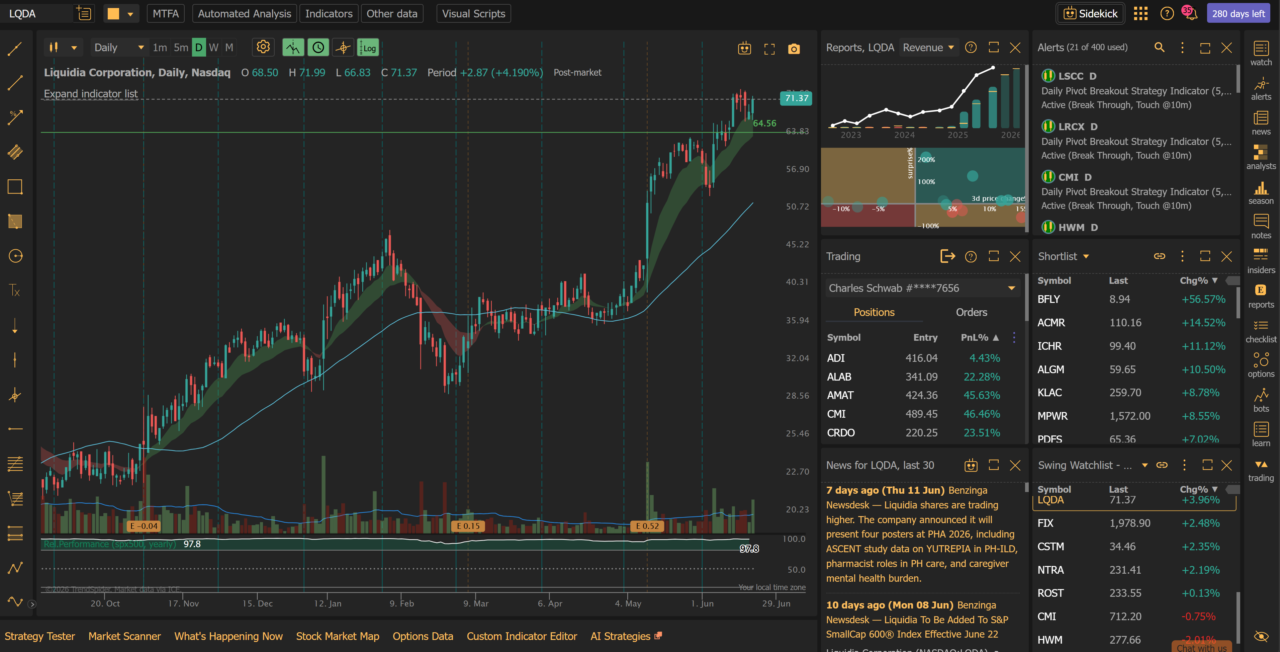
TrendSpider is a standalone charting and technical analysis platform. You connect it to a data feed, run your analysis, and execute through whichever broker you use. It doesn’t hold your positions or route your orders.
The platform’s signature features are automated trendlines, multi-timeframe analysis (MTF), Raindrop Charts, and algorithmic alerts. The alert system lets you set conditions like “alert me when this trendline breaks on the 4-hour and the daily simultaneously,” which would take constant manual monitoring otherwise.
TrendSpider’s Sidekick AI is a conversational tool that lets you ask questions about a chart, scan for patterns, and set up alerts using plain language. It’s particularly useful for screening across hundreds of tickers quickly without building complex filter logic manually.
Pricing on annual billing: Standard $54/month, Premium $91/month, Enhanced $122/month, Advanced $399/month. Monthly billing runs higher: $89, $149, $197, and $447 respectively. Use coupon FTW25 for 25% off. See the full TrendSpider pricing breakdown for a plan-by-plan comparison.
For a more detailed look at the platform’s full feature set, read the TrendSpider review.
thinkorswim Overview
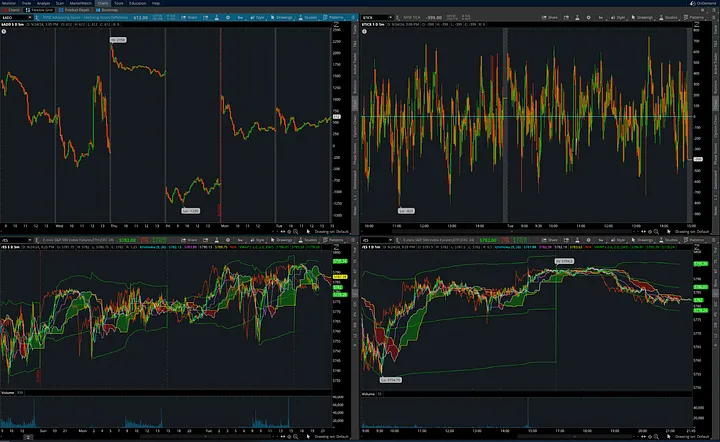
thinkorswim is Schwab’s trading platform, available free with a Schwab brokerage account. It handles equities, options, futures, and forex from one interface. The options analytics are genuinely strong: the thinkScript language lets you build custom indicators, scans, and strategies without a programming background.
Paper trading is built in, which makes it useful for testing strategies before putting real capital to work. Commissions on stocks and ETFs are $0. Options trades run $0.65 per contract with no base fee.
The platform is desktop-heavy. A web version and mobile app handle the basics, but neither matches the desktop experience for complex analysis work. If you came over from TD Ameritrade, the interface is familiar. Schwab completed its TD Ameritrade account migration in 2023-2024. For a broker-level comparison, see Schwab vs thinkorswim.
Key Differences
Platform Type
TrendSpider is charting-only. thinkorswim is a broker platform with integrated charting. You can’t execute trades through TrendSpider; you can’t run TrendSpider’s multi-timeframe scans through thinkorswim. Some traders run both simultaneously: TrendSpider for analysis, thinkorswim for execution.
Markets
Both cover U.S. equities. thinkorswim adds options, futures, and forex natively through Schwab’s execution infrastructure. TrendSpider covers equities, ETFs, forex, and crypto for charting and analysis purposes, but you still need a broker to actually trade those markets.
Charting
TrendSpider has the deeper charting toolset: automated trendlines, Fibonacci auto-detection, Raindrop Charts, and multi-timeframe overlays. thinkorswim has a strong indicator library and thinkScript for custom work, but the automation and MTF features aren’t there. If chart analysis is your primary activity, TrendSpider is built specifically for that workflow.
Automation and Alerts
TrendSpider’s alert system is condition-based and multi-timeframe. You can set an alert that fires when a price crosses a trendline on a specific timeframe, or when a pattern forms across multiple charts simultaneously. thinkorswim has alerts, but they’re configured manually per chart and don’t offer the same cross-timeframe conditional logic.
Backtesting
TrendSpider includes a strategy tester that lets you backtest rules-based strategies on historical data without writing code. You build conditions visually and run them against price history. thinkorswim has thinkBack for options backtesting, which is strong if you’re testing options strategies with historical IV data. For non-options technical strategy testing, TrendSpider’s tool is more accessible.
Stock Screener
TrendSpider’s screener lets you filter for technical conditions including pattern-based scans across hundreds of tickers. thinkorswim’s scan engine is powerful for options traders who need to filter by implied volatility, options volume, and Greeks. For pure technical pattern screening, TrendSpider has the edge. For options-specific screening, thinkorswim’s scan engine is more purpose-built.
Sidekick AI vs thinkorswim’s Research Tools
TrendSpider’s Sidekick AI is a conversational interface layered on top of the charting platform. You can ask it to identify patterns on a chart, surface setups matching certain criteria, or build alerts from plain language descriptions. thinkorswim doesn’t have a comparable AI layer. Schwab’s broader platform offers research tools and analyst ratings, but nothing on the Sidekick side of the workflow.
Mobile App
thinkorswim’s mobile app is more capable for monitoring positions and executing trades on the go. TrendSpider’s mobile experience is functional for checking charts, but not designed for complex multi-timeframe analysis on a small screen. If mobile-first trading is part of your routine, thinkorswim has the stronger app.
Costs
thinkorswim is free with a Schwab account. TrendSpider costs $54 to $399 per month on an annual plan, or $89 to $447 per month billed monthly. Use code FTW25 for 25% off any plan. The cost decision comes down to whether TrendSpider’s automation and scanning tools are worth the subscription for the way you actually trade.
Feature Comparison
| Feature | TrendSpider | thinkorswim |
|---|---|---|
| Platform Type | Charting/Analysis only | Broker + Charting |
| Best For | Technical analysis, pattern scanning | Options trading, execution + analysis |
| Charting Tools | Automated trendlines, MTF, Raindrop Charts | thinkScript, large indicator library |
| Automation/Alerts | Multi-timeframe, condition-based | Manual, per-chart |
| Backtesting | Strategy tester (no code required) | thinkBack (options-focused) |
| Stock Screener | Technical/pattern-based scans | Options-optimized scan engine |
| AI Tools | Sidekick AI (conversational) | None comparable |
| Mobile App | Basic chart review | Stronger for execution and monitoring |
| Broker Required | No (works with any broker) | Yes (Schwab account required) |
| Cost | $54-$399/mo annual; $89-$447/mo monthly | Free with Schwab account |
| Discount | Code FTW25: 25% off | No subscription to discount |
Automated Analysis vs Manual Charting
The clearest dividing line between these two platforms is how much chart work they do for you. thinkorswim gives you a deep, professional toolkit and expects you to drive it. You draw your own trendlines, place your own Fibonacci levels, and build your own scans in thinkScript. For traders who like full manual control and already know exactly what they want on a chart, that is a feature, not a limitation.
TrendSpider takes the opposite approach. It auto-detects trendlines, plots Fibonacci levels for you, and flags patterns as they form across the timeframes you care about. The point is to cut the repetitive part of chart prep so you can look at thirty charts in the time it would normally take to mark up five. If your edge depends on scanning a wide universe quickly and consistently, automation changes how much ground you can cover in a session.
Neither approach is objectively better. The honest question is whether you trust an algorithm to mark up your charts the way you would, or whether you want to do it yourself every time. Discretionary traders who treat chart reading as the craft tend to prefer thinkorswim’s manual control. Traders who treat charting as a screening step on the way to a decision tend to get more out of TrendSpider’s automation.
Learning Curve and Onboarding
Both platforms are deep, but they ask for different kinds of effort up front. thinkorswim has a steeper initial wall. The desktop interface is dense, the layout is fully customizable to the point of being overwhelming on day one, and getting real value out of scans and custom studies means learning thinkScript. The payoff is high once you are fluent, but expect to spend time with the platform before it feels natural. The built-in paper trading account is the safest place to learn it, since you can practice navigation and order entry without risking capital.
TrendSpider is faster to get comfortable with on the charting side because so much of the setup is automated, and Sidekick AI lets you describe what you want in plain language instead of building filter logic by hand. The deeper features (the strategy tester, multi-timeframe alert conditions, custom scan criteria) still take time to master, but the floor is lower. A new user can open a chart and see useful automated analysis within minutes.
If you are early in your trading and want to start tracking results while you learn either platform, the free trading journal template is a simple place to begin recording your trades before you commit to a paid analytics workflow.
Data and Asset Coverage
Because thinkorswim is a broker platform, the data you see is the data you trade on. Quotes, options chains, the Greeks, and execution all run through one pipe tied to your Schwab account. For options traders that integration matters: the analytics you study and the orders you place share the same live data, so there is no gap between what you analyze and what you fill.
TrendSpider is a charting and analysis layer, so its coverage is about what you can study rather than what you can trade. It handles U.S. equities and ETFs, plus forex and crypto for charting purposes, with historical data deep enough to run meaningful backtests. What it does not do is execute. You still route orders through a separate broker, which is exactly why some traders pair TrendSpider for analysis with a broker platform for fills.
One practical note for options traders specifically: TrendSpider is built around price-action charting, not options chain analytics. If implied volatility, the Greeks, and multi-leg structure are central to how you trade, thinkorswim’s native options data is the stronger foundation, and no charting overlay replaces it.
Running Both Together
This is not strictly an either/or decision, and plenty of active traders do not treat it as one. A common setup is TrendSpider for the analysis and screening stage, then thinkorswim (or whichever broker you use) for execution. You scan a wide universe in TrendSpider, let the automated trendlines and pattern alerts surface candidates, then move to your broker to place and manage the trade with live options data and order routing.
The two platforms do not talk to each other directly; there is no live sync between them. In practice that rarely matters, because the workflow is sequential anyway: find the setup in one tool, execute it in the other. The tradeoff is paying for a TrendSpider subscription on top of a free broker platform, which only makes sense if the screening and automation genuinely save you time or surface setups you would otherwise miss.
Whichever combination you land on, the piece that ties it together is a record of what actually happened. Charting tells you what might work; your own closed trades tell you what does. Logging every fill, win or loss, in the Financial Tech Wiz Trading Journal lets you see which setups and which platform actually produce results for you, broken down by symbol and hold duration, instead of guessing.
Who Should Choose TrendSpider
TrendSpider fits your workflow if you analyze multiple tickers and timeframes as part of your setup process, want automated trendlines and pattern detection to reduce manual chart work, trade through a broker other than Schwab, or want a screener that identifies technical setups rather than filtering by fundamental data or options Greeks.
The subscription cost is real. But for active traders who spend hours on chart analysis, the automation side reduces that time significantly. There’s a 14-day paid trial available. For a plan-by-plan breakdown, see TrendSpider plans before committing.
Who Should Choose thinkorswim
thinkorswim is the better call if you’re an options trader who needs depth on Greeks, IV, and multi-leg structure analysis; if you already have a Schwab account or are willing to move your brokerage; if you want a $0 platform with no monthly subscription; or if you want to paper trade before putting real money at risk.
For options-focused traders, thinkorswim’s analytics are hard to beat at any price. The thinkScript language is genuinely flexible, and the scan engine for options conditions outperforms most paid platforms on that specific use case. If your edges come from options strategies rather than pure chart pattern work, thinkorswim is a better fit.
TRADE TRACKING
Financial Tech Wiz Trading Journal
Whether you trade through thinkorswim or another broker, the Financial Tech Wiz Trading Journal imports your trades automatically via SnapTrade. Track performance, review setups, and find patterns in your own data.
Start Tracking Trades $19/mo or $9.91/mo annualFrequently Asked Questions
Is TrendSpider better than thinkorswim?
It depends on what you’re using it for. TrendSpider is the stronger pure charting and analysis platform: more automation, better multi-timeframe tools, and AI-assisted pattern recognition via Sidekick. thinkorswim is the better all-in-one platform if you want execution, options analytics, and charting together without paying a monthly subscription. Many active traders run both at the same time.
Does TrendSpider work with thinkorswim?
TrendSpider and thinkorswim are separate platforms and don’t directly connect to each other. You would run TrendSpider for analysis and use thinkorswim for execution through your Schwab account. The two tools are complementary in that workflow: TrendSpider finds the setup, thinkorswim executes it. There’s no data sync or integration between them.
What is a good alternative to thinkorswim for charting?
TrendSpider is one of the strongest alternatives for dedicated charting work, particularly if you want automated trendlines, multi-timeframe analysis, and a screener that surfaces technical setups. For a broader look at the options, see best charting software for stocks, which covers TradingView, TC2000, and others alongside TrendSpider.
Is thinkorswim free to use?
Yes. thinkorswim comes free with a Schwab brokerage account, with no monthly platform fee. Stock and ETF trades are commission-free, and options carry a small per-contract fee. The full platform, including paper trading and thinkScript, is available at no extra cost once your account is open. TrendSpider, by contrast, is a paid subscription because it is a standalone analysis tool rather than a broker.
Can TrendSpider replace a broker platform?
No. TrendSpider is a charting and analysis platform, not a brokerage, so it cannot hold positions, route orders, or fill trades. You always need a broker (thinkorswim or another) to actually execute. TrendSpider replaces the charting and screening part of your workflow, not the account where your money sits and your orders are placed.
Is TrendSpider good for day trading?
It can be, with a caveat. TrendSpider’s multi-timeframe alerts and automated trendlines are useful for spotting intraday setups across a watchlist without staring at every chart, and the scanner can flag technical conditions as they trigger. The caveat is execution: you still place day trades through your broker, so for fast scalping where every second on the order ladder counts, a broker platform like thinkorswim handles the entry and exit side better. Many day traders use TrendSpider to find and monitor setups, then route the actual orders through their broker.
Can you use TrendSpider for options trading?
TrendSpider is built around price-action charting rather than options analytics, so it does not offer the options chain, Greeks, and implied volatility tools that an options-focused trader needs. You can use it to chart the underlying and time entries, but the options-specific analysis still happens in a platform like thinkorswim. If options are the core of your trading, treat TrendSpider as a charting supplement, not a replacement for an options-capable broker platform.
Get Your Free Trading Resources
Grab the free trading journal template plus the same tools we use to stay organized, consistent, and objective.
- Free trading journal template
- Custom indicators, watchlists, and scanners
- Access our free trading community
Enter your email below to get instant access.
No spam. Unsubscribe anytime.







