
How to See Implied Volatility (IV) Rank on thinkorswim

Discover the difference between IV rank and IV percentile and how you can add IV rank to the thinkorswim platform. thinkorswim’s options analytics are built on its institutional roots at TD Ameritrade, now owned by Schwab; for a full feature comparison with Schwab’s web platform, see the Schwab vs. thinkorswim breakdown.
Key Takeaways
- thinkorswim shows IV percentile by default; IV rank requires a custom study like the tastytrade TTIV indicator covered below.
- IV rank above 50 favors premium selling (credit spreads, iron condors, short strangles); IV rank below 30 favors premium buying (long calls, debit spreads, calendars).
- Log the IV rank at entry on every options trade so the pattern between IVR zone and return surfaces in your journal over time.
Recommended Tool
Financial Tech Wiz Trading Journal
Tag every options trade with the IV rank at entry and the Analytics tab will surface win rate and P&L by symbol, strategy, and hold duration. Built for options traders who want to know which IVR zones actually pay. Starting at $9.91/month billed annually.
Try It FreeWhat are Implied Volatility and Historical Volatility
Before we get into implied volatility rank (IVR), we must understand implied volatility (IV) and historical volatility (HV). HV is also known as realized volatility.
The implied volatility of an underlying stock is a measure of the market’s expectation of future price movement. Implied volatility is a component of the Black-Scholes model used to determine option prices.
A stock with high implied volatility is expected to move a lot and have high option premiums and vice versa.
Historical volatility measures how far a stock’s price moves away from its average. Essentially, the higher the realized volatility of a stock, the riskier it is.
What is Implied Volatility Rank (IVR)
IVR is a measurement used by options traders to determine how the current implied volatility of a stock compared to the last 52 weeks. IVR is measured on a scale of 0-100. 0 is the lowest IV in the past year, and 100 is the highest in the past year.
Option traders utilize IVR to determine if implied volatility is high or low compared to what it usually trades at. Generally, you should sell options with high IV to take advantage of the elevated premiums.
What is IV Percentile (IVP)
IVP is a similar metric to IVR, except it measures the percentage of days over the last 52 weeks that implied volatility was lower than its current level. For example, if the IVP of a stock is at 25%, that means 75% of the time over the last year, IV was higher.
IV Rank vs. IV Percentile
Both IVR and IVP are valuable metrics for options traders to use. The difference is that IVP measures a percentage of days, while IVR measures IV itself.
How to Calculate IV Rank
To determine the IV rank of a stock, you must figure out the range implied volatility traded between the last 52 weeks. For example, let’s say that a stock’s IV traded between 20% and 40% over the previous 52 weeks.
If the current implied volatility is 30%, the stock’s IV rank is 50.
How to Use IV Rank in Your Options Strategy
IV rank is not an entry signal on its own. It is a context filter that tells you whether options on a stock are expensive or cheap relative to the last year. Pair that read with a directional thesis and a strategy that matches the IVR zone.
Three rough zones cover most of the decision:
High IVR (above 50): options are expensive. Favor strategies that collect premium: short straddles and strangles, iron condors, iron butterflies, credit spreads, and short puts. You are selling overpriced insurance. A tastytrade-style approach waits for IVR above 50 before opening any premium-selling position on that underlying. Learn the structural difference between two common premium-selling trades with the iron condor vs iron butterfly breakdown.
Mid IVR (roughly 30 to 50): neutral territory. Neither premium selling nor premium buying has a structural edge. Trade size down, or wait for IVR to move toward one of the extremes.
Low IVR (below 30): options are cheap. Favor strategies that pay up for premium: long calls, long puts, debit spreads, calendars, and diagonals. You are buying underpriced optionality. Event-driven setups (earnings runs, FDA catalysts) often pay the best when you enter while IVR is low and exit as IV expands.
For a strategy built around volatility, see my guide to the long strangle.
IV rank also moves on a calendar, not just on news. It compresses into monthly options expiration as the largest block of open interest rolls off, then resets the week after, so reading IVR during expiration week means knowing what OpEx is and when it lands.
IV rank is symbol-specific. SPY at IVR 60 means something very different from TSLA at IVR 60, because TSLA’s baseline IV range is 3 to 4 times higher than SPY’s. Always compare a ticker’s IVR against its own history, not across tickers. For automated options backtesting alongside IV rank analysis, Option Omega is worth evaluating.
Track which IVR zone you entered at and what the strategy returned. Over time you will see patterns: maybe your credit spreads win rate collapses below IVR 40, or your long calls only pay at IVR under 20. Log the IVR on every trade in the Financial Tech Wiz Trading Journal and the Analytics tab will surface those patterns automatically across symbol and hold duration.
Not yet using a dedicated journal? The free options trading journal template is a Google Sheets starter that tracks IVR entry zone, strategy, and P&L at no cost.
Financial Tech Wiz / Free resources
Build a clearer picture of your trading.
Start with the free trading journal template. Keep your trades organized, review your results, and build a consistent review routine.
- Free Google Sheets and Excel trading journal template
- Indicators, watchlists, and scanners
- Access to the free trading community
Ready for automatic trade tracking? Explore the Financial Tech Wiz Trading Journal.
Free resources + trading emails. Unsubscribe anytime.
How to Add Implied Volatility Rank to thinkorswim
If you use thinkorswim to trade options, you may realize there is no default indicator for IV rank, which is a real gap given where it sits on any honest list of which indicators actually matter for options. However, thinkorswim does have IV percentile by default, which is similar, but not exactly the same as explained above.
Luckily, you can add a tastytrade IV rank custom indicator to thinkorswim by using the code at the bottom of this article. Even with this custom IV rank indicator, the exact readings on thinkorswim and the tastytrade brokerages do not match.
As of early 2026, a quick snapshot of AAPL shows how the default IV percentile, the custom tastytrade IV rank, and the tastytrade IV percentile can diverge on the same underlying. Here are the IV rank and IV percentile readings of AAPL stock at the same time on both platforms:
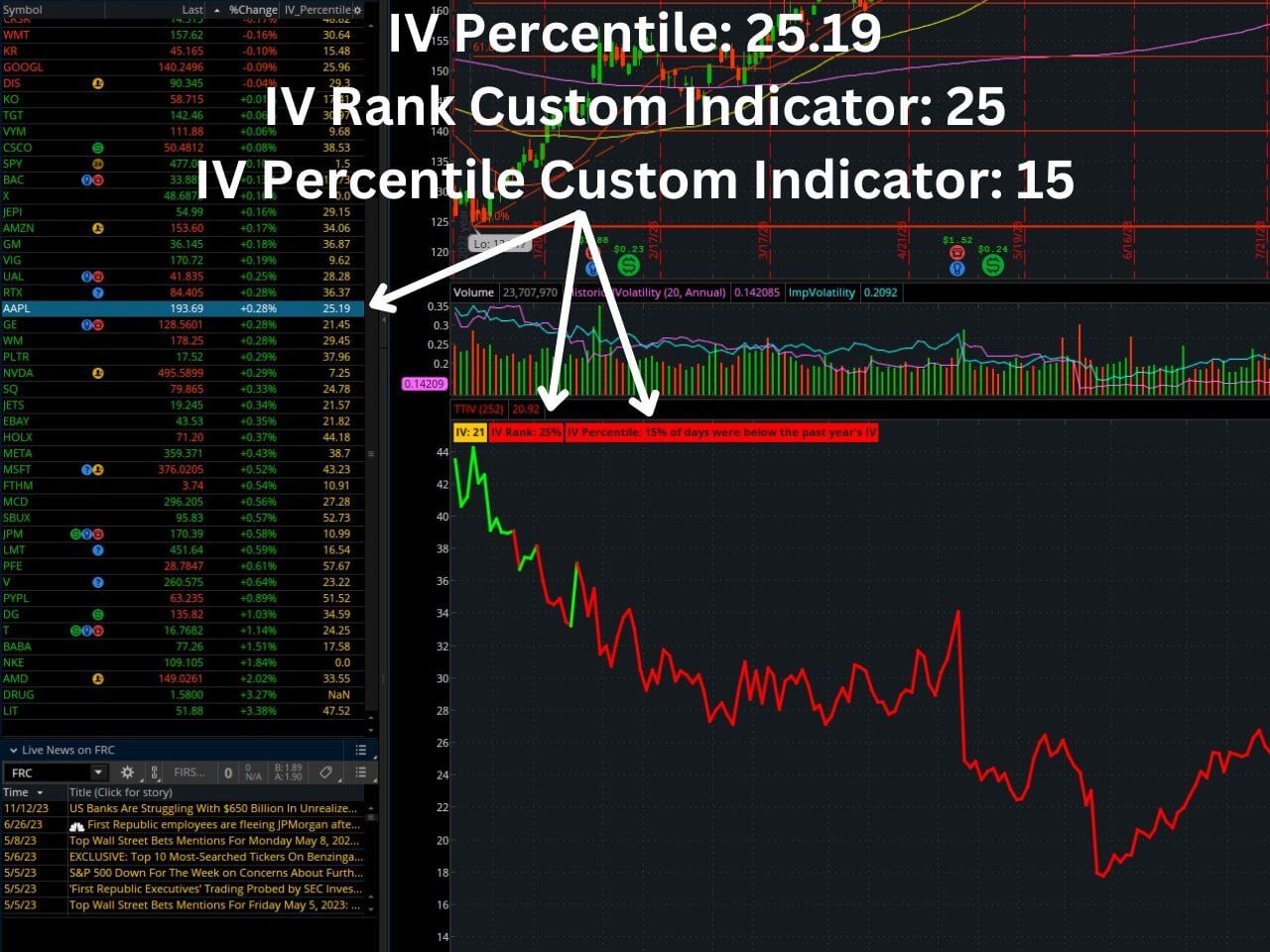
- AAPL stock thinkorswim IV percentile default – 25.19%
- AAPL stock thinkorswim IV rank custom tastytrade indicator – 25%
- AAPL stock thinkorswim IV percentile custom tastytrade indicator – 15%
As you can see from the image and numbers from thinkorswim above, the default IV percentile option essentially matches the reading of the custom tastytrade indicator. Therefore, adding it isn’t of much benefit unless you want to see it plotted on a chart.
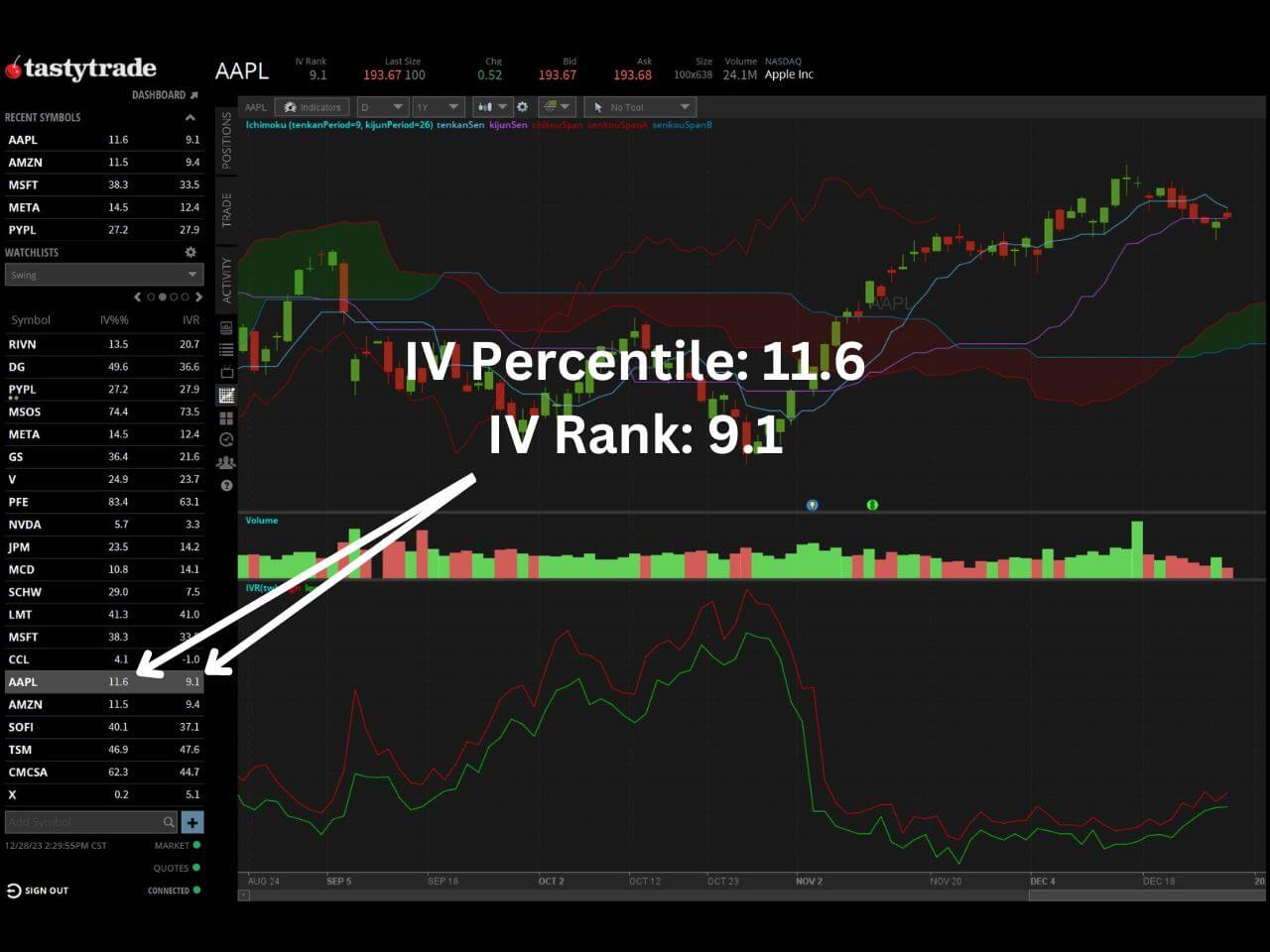
- AAPL stock tastytrade IV rank – 9.1%
- AAPL stock tastytrade IV percentile – 11.6%
As you can see from the tastytrade image and IV readings above, the IV rank and IV percentile are quite different from the readings from thinkorswim. In fact, none of them match, which tells us that stressing over these exact IV numbers is pointless.
Instead of worrying about the differences, simply stick to one platform or the other, so that you are not comparing apples to oranges when comparing the IV of different stocks.
The Custom tastytrade Indicator for thinkorswim
In the thinkorswim image above, you may notice that I am utilizing a custom indicator called TTIV (tastytrade IV). The indicator displays both an IV percentile and IV rank calculation.
I have concluded that the IV readings between thinkorswim and tastytrade do not match and are not worth deciphering. However, if you want access to the custom indicator to add to thinkorswim, I will leave the code and instructions at the bottom of this post.
My advice is to pick one method of tracking the IV rank or IV percentile and stick with it so it is the same for all of your trades.
Otherwise, you can plot the normal implied volatility indicator (not rank or percentile) on your chart and determine whether you believe the implied volatility is elevated or low.
How to Add the tastytrade Custom Indicator to thinkorswim
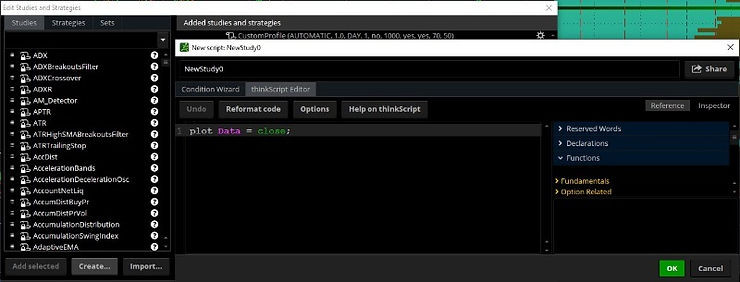
To add the tastytrade (TTIV) custom indicator to your thinkorswim charts, follow these steps:
- Chart tab -> studies (beaker) -> create -> enter name (TTIV) -> delete the default code and paste in the code at the bottom of this article.
How to Scan for Implied Volatility Rank in thinkorswim
thinkorswim has a built-in stock scanner that allows you to discover stocks with high IV rank/IV percentile. To utilize it, follow these steps:
- Scan tab -> add filter -> volatility -> IV_percentile
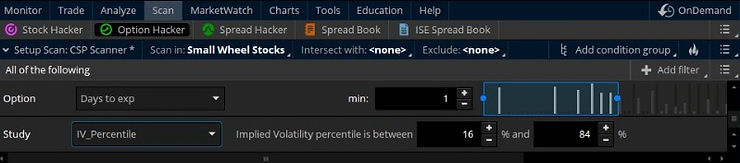
Once you add this study, you can scan for stocks that have a specific range of IVR/IVP.
For a production-ready setup, build the scan with three layers. From the Scan tab, add the custom TTIV indicator as a study filter, set IV Rank greater than 50, and intersect with a liquidity filter such as Volume greater than 500,000 or average daily volume greater than 1 million so the scanner only surfaces tradable names. Name the scan, save it to a public watchlist, and refresh it daily. Pair the scan output with a directional bias from a separate technical scan, for example volatility contraction pattern setups, so you are not trading IVR in isolation. Traders combining IV rank with options flow often also monitor order book and DOM data for confirmation.
Implied Volatility Rank on TradingView
If you prefer to use TradingView charts, there are custom IV rank and IV percentile indicators available for TradingView. You can learn how to add it by checking out our article on how to add IV rank and IV percentile to TradingView. If you also use TradingView, that walkthrough covers how to pull the same IV time series outside thinkorswim.
However, if you want to take full advantage of the features TradingView has to offer, you can sign up for a free trial for a premium subscription using my affiliate link. You will also get a credit toward your subscription.
Exclusive Deal: 30-Day FREE Premium Access + Bonus Credit
Don’t Miss Out – Sign up for TradingView Now!
- Advanced Charts
- Real-Time Data
- Track all Markets
# ————————START BELOW THIS LINE————————–
#
# tastytrade/dough Research Team
# Michael Rechenthin, Ph.D.
# Follow me on twitter: @mrechenthin
#
# IV Rank is a description of where the current IV lies in comparison
# to its yearly high and low IV
#
# IV Percentile gives the percentage of days over the last year, that
# were below the current IV. If the IV Rank is above 50%, then
# the script will highlight it green; otherwise red.
#
# For information on the two, see Skinny on Options Data Science,
# titled “IV Rank and IV Percentile (w/ thinkscript)” on Nov 12, 2015
# http://ontt.tv/1Nt4fcS
#
# version 3.2
#
declare lower;
declare hide_on_intraday; # do not display when using intra-day plots
input days_back = 252; # it is most common to use 1-year (or 252 trading days)
def x;
if GetAggregationPeriod() > AggregationPeriod.DAY {
x=1;
} else {
x=2;
}
AddLabel(yes, if (x==1) then “This script should be used on daily charts only” else “”);
# implied volatility
# using proxies for futures
def df = if (GetSymbol() == “/ES”) then close(“VIX”) / 100
else if (GetSymbol() == “/CL”) then close(“OIV”) / 100
else if (GetSymbol() == “/GC”) then close(“GVX”) / 100
else if (GetSymbol() == “/SI”) then close(“VXSLV”) / 100
else if (GetSymbol() == “/NQ”) then close(“VXN”) / 100
else if (GetSymbol() == “/TF”) then close(“RVX”) / 100
else if (GetSymbol() == “/YM”) then close(“VXD”) / 100
else if (GetSymbol() == “/6E”) then close(“EVZ”) / 100
else if (GetSymbol() == “/6J”) then close(“JYVIX”) / 100
else if (GetSymbol() == “/6B”) then close(“BPVIX”) / 100
else if (GetSymbol() == “/ZN”) then close(“TYVIX”) / 100
else if (Getsymbol() == “/ZW”) then close(“WIV”) / 100
else if (Getsymbol() == “/ZB”) then imp_volatility(“TLT”)
else if (Getsymbol() == “/ZC”) then imp_volatility(“CORN”)
else if (Getsymbol() == “/ZS”) then imp_volatility(“SOYB”)
else if (Getsymbol() == “/KC”) then imp_volatility(“JO”)
else if (Getsymbol() == “/NG”) then imp_volatility(“UNG”)
else if (Getsymbol() == “/6S”) then imp_volatility(“FXF”)
else imp_volatility();
def df1 = if !IsNaN(df) then df else df[-1];
# display regular implied volatility
# —————————
AddLabel(yes, “IV: ” + Round(df1 * 100.0, 0), Color.ORANGE);
# calculate the IV rank
# —————————
# calculate the IV rank
def low_over_timespan = Lowest(df1, days_back);
def high_over_timespan = Highest(df1, days_back);
def iv_rank = Round( (df1 – low_over_timespan) / (high_over_timespan – low_over_timespan) * 100.0, 0);
AddLabel(yes, “IV Rank: ” + iv_rank + “%”, if iv_rank > 50 then Color.GREEN else Color.RED);
# calculate the IV percentile
# —————————
# how many times over the past year, has IV been below the current IV
def counts_below = fold i = 1 to days_back + 1 with count = 0
do
if df1[0] > df1[i] then
count + 1
else
count;
def iv_percentile = Round(counts_below / days_back * 100.0, 0);
plot IVs = df1 * 100;
IVs.SetLineWeight(3);
IVs.AssignValueColor(if iv_rank > 50 then Color.GREEN else Color.RED);
AddLabel(yes, “IV Percentile: ” + iv_percentile + “% of days were below the past year’s IV”, if iv_percentile > 50 then Color.GREEN else Color.RED);
# thanks to Kevin Osborn for the following line
AddLabel(yes, if (GetSymbol() == “/6S” or GetSymbol() == “/ZB” or GetSymbol() == “/ZC” or GetSymbol() == “/NG” or GetSymbol() == “/ZS” or GetSymbol() == “/KC”) then “* ETF based” else “”, Color.BLACK);
# ————————END ABOVE THIS LINE————————
Sizing a high IV rank position also means knowing what your broker will hold against it, which comes down to initial margin versus maintenance margin.
Frequently Asked Questions
Does thinkorswim have IV rank by default?
No. thinkorswim only shows IV percentile by default under Today’s Options Statistics on the Trade tab. To see IV rank you need to add a custom study such as the tastytrade TTIV indicator covered above.
What is a good IV rank for selling options?
Most options sellers look for IV rank above 50, which means current implied volatility is in the upper half of the past year’s range. Above 70 is considered rich and attracts premium-selling strategies like iron condors, short strangles, and credit spreads.
Is IV rank the same as IV percentile on thinkorswim?
No. thinkorswim labels its default reading IV percentile but the calculation is closer to IV percentile (percentage of days below current IV) than IV rank (current IV’s position in the high-low range of the past 52 weeks). The numbers can match at times but diverge when IV spikes or collapses quickly.
Can I scan for high IV rank stocks on thinkorswim?
Yes. Use the thinkorswim Scan tab, add the custom TTIV indicator as a study filter, set IV Rank greater than your threshold (typically 50), and layer in a liquidity filter so the scanner only returns tradable names.
Does the custom tastytrade IV rank indicator match the tastytrade platform?
Not exactly. The tastytrade platform uses its own IV rank formula based on its internal volatility data, while the thinkorswim custom indicator calculates from thinkorswim’s implied volatility feed. Readings are usually within a few points but can diverge on illiquid underlyings.
Financial Tech Wiz / Free resources
Build a clearer picture of your trading.
Start with the free trading journal template. Keep your trades organized, review your results, and build a consistent review routine.
- Free Google Sheets and Excel trading journal template
- Indicators, watchlists, and scanners
- Access to the free trading community
Ready for automatic trade tracking? Explore the Financial Tech Wiz Trading Journal.
Free resources + trading emails. Unsubscribe anytime.







