
Financial Tech Wiz Member Resources
Swing Trading Watchlists
- Swing Trading Watchlist
- TrendSpider Swing Trading Watchlist Import
Custom Swing Trading Scanners
- Bullish Ichimoku Scanner – View in Discord
- Breakout Scanner – View in Discord
Sheets Templates
- Trading Journal Template Download
- Automated DCF Template Download
Custom Indicators
- Ichimoku Extension Indicator for TradingView
- Ichimoku Extension Indicator for TrendSpider
Trading Community
- Join our Free Trading Community
Trading Course by Financial Tech Wiz
Chapter 1 – Basics of Investing
Lesson 1 – What is the stock market
The Stock Market Explained
The U.S. stock market is where you can buy and sell shares of public companies. For example, if you are a big fan of Apple’s products, you can buy a share of Apple and receive a portion of its profits.
You can make money in the stock market via dividends and capital appreciation of the stocks you purchase. A dividend is when a company will pay you cash just for owning company shares. Investing in dividend stocks is the most passive form of income imaginable.
Lesson 2 – How to start investing in the stock market
Steps to Start Investing
Opening a brokerage account is the first step to investing in the stock market. A brokerage account is like a bank account that lets you trade stocks.
Next, you must decide which companies or funds you want to invest in. The best way to get started is to invest in funds and ETFs.
Index funds and ETFs (exchange-traded funds) take care of stock picking for you and are the least risky investments you can make in the stock market.
Lesson 3 – Best brokerages for trading/investing
Popular Brokerages for Investors
- tastytrade – best for investors who are more active, trade options, and enjoy free educational content. You can sign up using my referral link to receive a sign-up bonus.
- Robinhood – best for investors who want the simplest way to buy stocks and ETFs, without too many advanced features. You can usually get a free share of stock when you use my referral link.
- Charles Schwab – one of the largest stock brokerages and owns TD Ameritrade plus the thinkorswim platform.
- IBKR – best for advanced traders who want to automate strategies.
- Fidelity – another large brokerage that is great for long-term investors.
Lesson 4 – ETF/index fund investing
Exchange-Traded Fund (ETF) Investing Explained
Investing in an index fund or ETF is like purchasing a basket of companies in one stock. The benefit of investing in funds is that you never have to pick single stocks, and the indexes cannot go out of business.
For example, if you invest in Apple, they can technically go out of business any day. An index fund automatically invests in many companies for you, and if one goes out of business, it will be removed from the index.
Picking a fund to invest in is easy. You can invest in the total stock market, the top 500 companies on the stock market (S&P 500 index), or the top 100 companies on the stock market (Nasdaq 100 index).
There are many ETFs and mutual funds to choose from, but the only reason for this is so financial advisors and institutions can charge more money and expense fees. Vanguard is known for its low-cost ETFs, and simply investing in VTI or VOO is a great way to gain exposure to the entire stock market and simplify your investing journey.
Popular Low-Cost ETFs
- Total stock market ETF – VTI
- S&P 500 ETF – VOO/SPY
- Nasdaq 100 ETF – QQQ
Lesson 5 – Dollar Cost Averaging into ETFs
What is Dollar-Cost Averaging (DCA)?
Now that you know the best funds to invest in, you should start dollar-cost averaging them. This means consistently investing money daily, weekly, or monthly into the fund.
For example, you can set a recurring investment on Robinhood or tastytrade to automatically invest as little as $1 per day into an ETF like VTI or VOO.
If possible, you should invest a minimum of 10% of your income. So, if you make $5,000 per month, you should invest at least $500 per month. The more you invest, the quicker your gains will grow and compound over time.
Setting up Automatic Recurring Investments
Most brokerages allow you to set up a recurring investment, so you never even have to worry about transferring the money. You can set this recurring deposit for $500 monthly, $250 bi-weekly, or even $15 daily.
Most importantly, you are consistently adding money to the stock market. Over time, you will start getting larger dividend payments, and the funds will increase in value.
Lesson 6 – Exponential Growth in the Stock Market
Exponential Growth Explained
Have you ever seen a snowball roll down a hill while it gradually gets bigger and bigger? That is exactly how investing in the stock market works.
Your portfolio starts as a small snowball, and as you receive more dividend payments and dollar-cost average, it slowly gets bigger and bigger.
It will initially seem slow and like a waste of time. However, once your portfolio becomes large enough, the dividend payments will be able to cover a large portion of your expenses.
Additionally, once you start accumulating a lot of shares, you can start selling covered calls to generate some additional protection and income in your portfolio. We will discuss covered calls in the options strategy section.
Famous Compound Growth Quote
“Compound interest is the eighth wonder of the world. He who understands it earns it. He who doesn’t pays it.”
This quote is from Albert Einstein, and it explains how money works perfectly. Investing in stocks and assets allows you to benefit from coupon interest and exponential growth. On the other hand, going into credit card debt or taking out loans with interest payments makes compound interest work AGAINST you. You want compound interest and your money to work FOR you, not AGAINST you.
Lesson 7 – Investing Portfolio Example
The Ideal Investment Portfolio
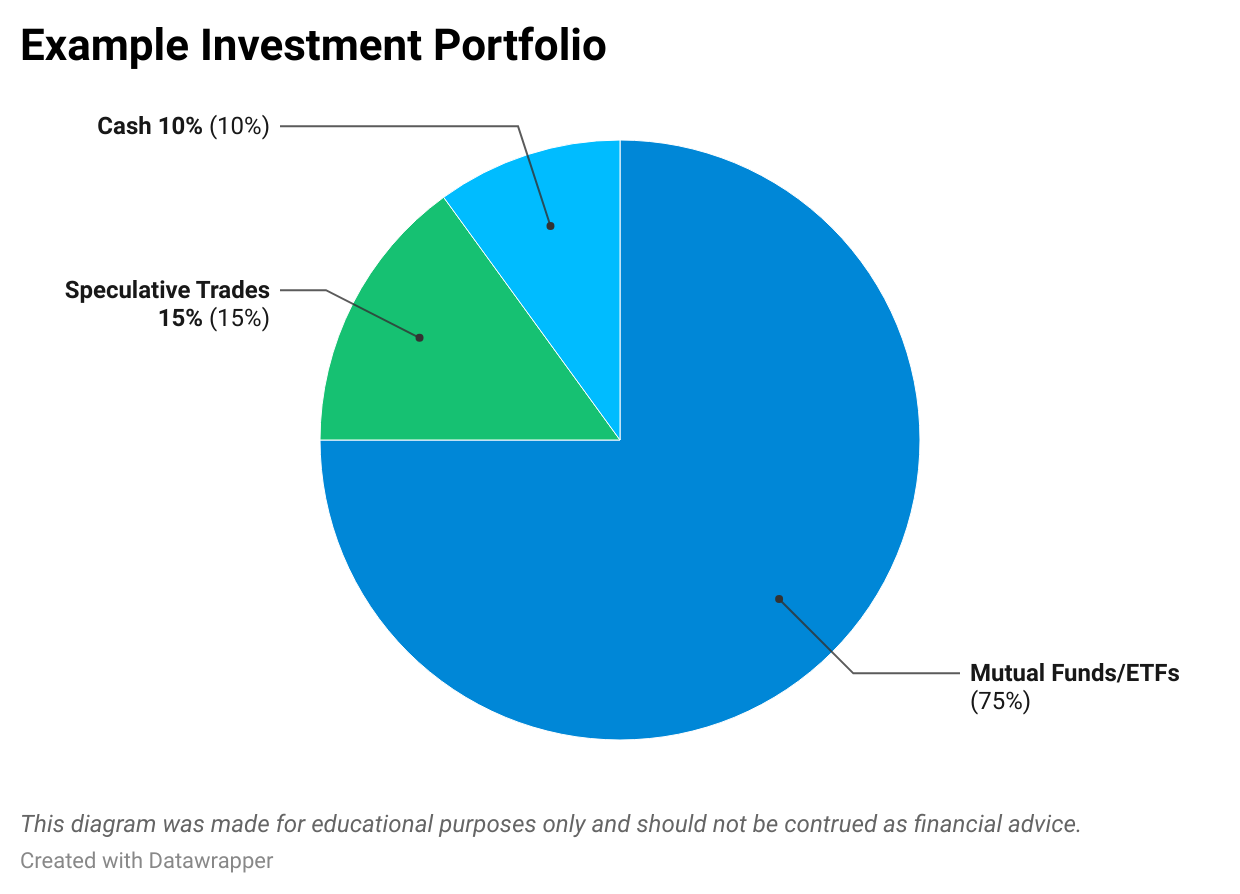
Keep in mind nothing in this course should be construed as financial advice, but in my opinion, the ideal investment portfolio is something like this:
- 75% ETFs/Mutual Funds
- 15% Swing/Speculative/Options Trades
- 10% Cash
Why ETFs?
ETFs are the ‘least risky’ investment and are a great base for your investment portfolio. It will grow over time without you having to manage it at all, other than continually buying more shares. I think most people should have a solid portfion of their portfolio in ETFs because attempting to pick single stocks can easily go south, no matter how ‘safe’ the companies you are buying might be.
Swing/Speculative/Options Trades Explained
Some investment managers will claim that most people shouldn’t even consider trying to pick stocks, and to simply stick with ETFs. This isn’t bad advice, but taking trading positions with a small portion of your account can be fun, profitable, and is a great skill to learn over time. In the worst case, you may make some bad trades with a small % of your account, but you will still learn from it.
The rest of this course will cover options trading strategies like the covered call and cash-secured put, which compliment an investment portfolio perfectly. Additionally, you will learn how to find good swing trades with a combination of fundamental and technical analysis (charting).
Why Cash?
I think holding some of your portfolio in cash is great for peace of mind and to deploy when assets really decide to tank. The amount of cash you hold depends on your goals and risk tolerance, but I think it is great to hold some cash for times like the Covid crash where you could have deployed it to ‘buy the dip.’ Depending on the interest rates, many brokerages like Robinhood will even pay you on your uninvested cash, which is another great reason to have some handy.
Lesson 8 – Basics of investing summary
- Open a brokerage account.
- Pick a fund you would like to invest in or invest equally into all of them (SPY,QQQ,VTI).
- Set up a recurring deposit into the fund(s).
- Let exponential growth take over, and watch your portfolio grow.
- IF you want, use a small % of your portfolio to take some speculative trades.
- Once your portfolio is large enough, live off the dividend payments.
- Pass down your investment to your loved ones.
Chapter 2 – Technical analysis strategies
TradingView Introduction
TradingView is the most popular charting software for all markets, making it easy to track any assets you trade.
It runs on a freemium model, making it completely free to use, but you can also upgrade to a premium subscription for more advanced features.
I highly recommend you sign up using our affiliate link, so if you ever decide to upgrade, you will get a bit of a discount. If you upgrade, we may be compensated at no extra cost to you.
Key features of TradingView include:
- 100s of indicators to perform technical analysis on any asset
- Custom Pine Script programming language to build custom indicators and strategies
- Backtest strategies manually or with code
- Advanced indicators like the volume profile work on all assets
- Ability to chart all assets including stocks, crypto, forex, futures, etc.
How to Use TradingView Indicators
To add indicators on TradingView, pull up any chart by typing in a ticker in the search. Next, click on indicators at the top of the chart.
From there, you can type in the indicator(s) you want to add and click on them to add them to the chart.

From there, you can type in the indicator(s) you want to add and click on them to add them to the chart. In the next lessons we will cover some of the best TradingView indicators and how to use them effectively!
Volume Profile Indicator
The volume profile indicator is extremely powerful because it shows you volume by price, instead of the traditional volume by time. Therefore, you can see which price levels traders are interested in, and not interested in.
There are two main types of volume profiles that traders use:
- Session Volume Profiles (SVP) – SVPs are used by day traders, and show a separate profile for each session (day). The pioneers of the market profile and volume profile (Jim Dalton & J. Peter Steidlmayer) will generally recommend using the 30-minute timeframe to analyze session volume profiles.
- Visible Range Volume Profile (VRVP) – The VRVP is great for all timeframes and shows volume by price for the entire viewable chart. For example, if you use the daily timeframe and show the past year, you will see volume by price for an entire year of trading data as seen in the chart below. This is great for swing trading, but keep in mind volume data is generally best used for shorter-term price movements.


The volume profile is one part of the market profile that J. Peter Steidlmayer created. As of recently, Jim Dalton is one of the main educators on the market profile and recommends using the 30-minute timeframes for session profiles. Therefore, we will use the 30-minute timeframe for day trading with the SVP. The VRVP can be used on any timeframe.
The main components of the volume profile include:
- Volume Point of Control (VPOC) – The price level with the highest amount of trading volume. Indicated by the red line on my charts.
- High Volume Nodes (HVN) – Price levels with high volume, spotted by long horizontal volume bars.
- Low Volume Nodes (LVN) – Price levels with low volume, spotted by short horizontal volume bars.
- Value Area (VA) – Price range where 70% of the volume has transacted, shown as the highlighted area on the volume bars. You can also add the Value Area High (VAH) and Value Area Low (VAL) lines to make spotting it easier.
To customize these components, you can hover over the indicator name on the top left of your TradingView chart and click the gear icon.

From there, you can change the color of the point of control and more to your liking.
Ichimoku Cloud Indicator
What is Ichimoku?
Ichimoku is an all-in-one dynamic trend-following indicator. The indicator provides entry and exit points, support and resistance levels, and allows you to determine the trend of an asset at a glance. The indicator is also known as Ichimoku Kinko Hyo, which translates roughly to “one look equilibrium chart” in English. I love this indicator because it aligns great with my favorite setups, the volatility contraction pattern (VCP) and cup and handle patterns, which is very similar. I even created my own custom version of it called the Ichimoku Extension, which makes it easier to read. You can access it on TradingView when you connect your TradingView account to whop as part of this premium membership. You can check out the Ichimoku Extension indicator page here.
The components of Ichimoku are:
- Conversion Line (Tenkan-Sen) – calculated by adding the highest and lowest point of the last 9 periods and dividing the sum by 2, similar to a 9-period EMA.
- Base Line (Kijun-Sen) – calculated by adding the highest and lowest points of the last 26 periods and dividing by 2, similar to a 26-period EMA.
- The Cloud (Made up of the Span A & Span B Lines) – the area of the indicator with the red and green filling. When the Span A line is on top of the Span B, there is a green cloud, and vice versa.
- Span A Line – calculated by combining the Base and Conversion line, then dividing by two and plotting the line 26 periods in the future.
- Span B Line – calculated by adding the highest and lowest prices over the last 52 candle period, dividing by two, and plotting the line 26 periods in the future.
- Lagging Line (Chikou Span) – takes today’s closing price and plots it 26 periods in the past.
All of these lines represent support and resistance levels, which you can use to determine stop loss and exit points for your trades. While the Conversion and Base Lines resemble moving averages, they are technically not “true” moving averages. Instead of averaging closing prices (as traditional moving averages do), these lines calculate the midpoint of the high-low range over specific periods. This distinction makes the Ichimoku Cloud a unique type of trend-following indicator, offering a different perspective on price action.
Finding Entry & Exit Points With the Ichimoku Cloud
The Ichimoku Cloud provides entry and exit signals based on TK crossovers. A TK crossover occurs when the conversion line crosses above or below the base line. Crossovers can be used on any time frame, but are most commonly used on the daily chart for swing traders. For day traders, the 5-minute and 1-minute charts are commonly used.
When the conversion line crosses above the base line, that is a buy signal. As shown in the WMT chart below, around 12/27/2023, WMT had a bullish TK crossover, indicating a buy signal. The Ichimoku Extension indicator makes this incredibly easy to spot with the long banner circled in white. The default Ichimoku indicator does not have these banners.

When the conversion line crosses below the base line, that is a sell signal. The JPM chart below shows that a bearish TK crossover occurred around 8/17/2023, indicating a short entry signal.

Once you enter a position based on a TK crossover, you can use all of the lines as support and resistance levels to determine when to use a stop loss. For example, if you entered a short position on JPM, you can set your stop loss above the conversion or the base line. If the price breaks above these resistance lines, the TK crossover is invalidated.
If you have a high risk tolerance, you can use the furthest line to determine your stop loss, and vice versa for a lower risk tolerance. You should also be wary of fakeouts. Price can break above a resistance line temporarily and then come back below it. If you still have conviction in the crossover, you can re-enter the short position once it comes back below the resistance line.
Scanning For TK Crossovers/VCP Using TradingView
My favorite way to find TK crossovers and VCP setups are with the TradingView scanner. Ichimoku TK crossovers on the daily chart generally tend to align with the VCP, but not always. The key is to use this scanner but cherry pick the VCP patterns out. Breakout plays are also great, we will cover the VCP/Cup and Handle/Breakout plays in the next lesson.
In the #ichi-scanner chatroom in the Financial Tech Wiz Discord, it also automatically scans for these crossovers in real-time as you can see in the image below, so you won’t even have to set up your own scanner.

However, you can follow the steps below to set up your own TradingView scanner as well:
You can set up a scan to find these crossovers on TradingView quite easily. Simply head to the stock scanner, and you can use the following scan setup (make sure you are using the daily timeframe):
All Scan Filters

TK crossover scan

Price > Base Line & Conversion Line

Additional Screening Filters
Market cap > $2b
Perf 1Y > 5%
SMA (200) < Price
Exchange: All Except OTC
Volatility Contraction Pattern Strategy
What is the Volatility Contraction Pattern?
The volatility contraction pattern (VCP) is a bullish continuation breakout pattern made popular by Mark Minvervini in his book “Think & Trade Like a Champion.” The VCP shares similarities with other technical patterns, such as certain Wyckoff accumulation structures. This strategy is great, and combining it with the Ichimoku Cloud indicator is a great way to help you determine entries, exits, and stop loss levels.
The VCP is not just a technical setup, it is a great technical setup combined with a great fundamental setup as well. The stock should have some sort of recent fundamental metrics like good forward guidance, consistently beating earnings, or a new breakthrough product that is garnering attention.
How to Identify the Volatility Contraction Pattern
Here is how you can identify a VCP:
- Strong long-term uptrend & fundamentals: The stock must have a strong long-term uptrend and solid fundamentals.
- Pullback: The uptrend should stall, and the stock should pull back and start to consolidate. This is caused by profit takers due to the recent price increase. The peak of the uptrend is the breakout level, also referred to as the pivot point.
- Volume contraction: During the consolidation period volume and volatility should decrease and traders take profits. Since the stock has solid fundamentals and a long-term uptrend, the buyers won’t let it drop too hard, and sellers are taking winnings off the table.
- High volume breakout: After a consolidation, the stock should break above its breakout level with high volume. This is where you enter.
Trading the VCP With Ichimoku
The VCP pattern is awesome, but without a set of rules you can still get burned, especially on fake breakouts. Therefore, you must have a solid risk management strategy in place. You can use the Ichimoku lines as stop-loss levels, so if price breaks below them, you stop out of the trade to limit your losses. You can also use the breakout point as your stop loss.
Fake breakouts are common, and tend to cause traders to stop out, which is fine, because if the stock breaks out after your stop loss hits, you can just get back in. You need to understand that minimizing losses is crucial, and be willing to get back into a trade if you were the victim of a fake breakout. This way if it ends up being a failed breakout you don’t end up holding a bag.
Additionally, you can view the Ichimoku Cloud section of this course to view my scan setup based on this indicator. It makes finding these VCP setups much easier.
Identifying Strong Fundamentals for the VCP
The best VCP example I have seen in the recent years is with $TSLA. As most investors are aware, $TSLA went from an incredibly unprofitable company to generating consistently positive operating cash flow (OCF). Additionally, it was catching the attention of nearly every investor due to its CEO (Elon Musk) and the fact that it was in a revolutionary market (electric vehicles).
OCF is my preferred method of identifying a business with good fundamentals over something like P/E ratios or net income. OCF is cash flow generated by the business operations, while net income is the revenue – expenses. Generally, OCF is more accurate because it means the business itself is profitable, even if the company is spending lots of money on expansion and growth.
OCF is also used for discounted cash flow analysis (DCF), which is what many fundamental analysts use to caluclate the intrinsic value of a company. OCF was engrained into my head from multiple finance professors as I got my finance degree. This is why my Ichimoku/VCP scanner filters out companies with negative OCF.
The image from Stock Rover below clearly shows that $TSLA began generating a strong OCF uptrend around 2020.

Now that you understand the fundamental part of $TSLA, let’s cover the chart setup during this same time period, which happens to be a textbook VCP.
VCP Example ($TSLA 2020)
The image below is a chart of $TSLA in 2020.

Let’s go over the setup using the same bullets we covered in identifying the VCP:
- Strong long-term uptrend & fundamentals: There is clearly a strong long-term uptrend on the chart. Additionally, the OCF turned from negative to consistently positive, along with a massively popular CEO running a business in a revolutionary market (EVs).
- Pullback: The uptrend stalled and formed a pivot point.
- Volume contraction: Price started consolidating with decreasing volume and volatility.
- High volume breakout: Price reached the breakout (pivot) level again and broke above it with high volume. This is the entry point. The TradingView volume candles make identifying the increased volume much easier, since wider candles = higher volume.
If you look close, there was somewhat of a fake breakout. Right after the price broke out for the first time, there was a red candle that dropped below the breakout level. You may have used a stop-loss here, and then got back in as price broke back above the breakout level shortly after. However, sometimes the breakout is a failed breakout, and may not have ever broke back above. The key is to always minimize losses, even if it means stopping out then getting back in at a higher price.
Detailed VCP Trading Guidelines
- Where to enter: You should enter into a VCP trade after/during the high volume breakout
- Where to use stop losses: Your stop loss should be either slightly below the breakout level, or slightly below an Ichimoku support level whether it bs the baseline or conversion line. This part depends on your risk tolerance and each individual setup. Once the trade is in profit, you should move the stop loss to breakeven (your entry price) to protect yourself from a loss.
- When to take profit: You can either slowly sell off your position into strength, or wait until the stock breaks support (Ichimoku baseline or conversion line). As price increases, the Ichimoku lines will rise with it, likely above your entry level, so you can simply move your stop loss slightly below them.
Remember that taking a small loss and getting back in is fine to protect yourself from failed breakouts.
Scanning for VCP Setups
I like to scan and identify VCP setups using the Ichimoku scanner, which isn’t always going to provide strict VCP setups, but you can easily cherry pick them out based on this scanner. The easiest way to view these scan results without manually creating one is to visit the #ichi-scanner channel in the Discord, which will provide the results of this scanner in real-time. I also give my thoughts on the good ones in this channel. I then take the good scan results, and put them into the official Financial Tech Wiz swing watchlist you can access here: https://www.financialtechwiz.com/swing-watchlist/
Scanning for VCP Breakouts
Once they are in this list, I have another scanner that searches for breakouts for stocks in this watchlist, and you can view these in the #breakout-scanner channel in the Discord. This scan is based on a custom indicator I have made and is not currently available to the public, so the only way to see the breakout scan results is currently in the Discord channel.
If you want to set up an Ichimoku scan for yourself, there is also a section about scanning for these setups in the Ichimoku section of this course, but I wanted to drop the scan filters here as well. The scan searches for Ichimoku TK crossovers on the daily chart. It will also filter out fake crossovers by ensuring the price is above both the conversion line and the baseline. It also has some other filters, which I will list and post screenshots of here:
All Scan Filters

TK crossover scan

Price > Base Line & Conversion Line Scan

Additional Screening Filters
Market cap > $2b
Perf 1Y > 5%
SMA (200) < Price
Exchange: All Except OTC
Using Our Custom Scanners
#Ichi-Scanner Channel Explained
This channel searches for bullish Ichimoku TK Crossovers based on a proprietary watchlist of stocks that are generated with specific technical criteria. All the results will be pushed to the #ichi-scanner in real time and I give my analysis on the best looking ones.
For any that I see potential in, I will add them to the official Financial Tech Wiz swing watchlist, which you can access here: https://www.financialtechwiz.com/swing-watchlist/ . The setups I add to this watchlist are generally cherry picked VCP setups that I am watching for breakouts, or sometimes just stocks I am interested in and see potential with.
Once stocks are in this list, another scanner is watching it and pushing results to the next scanner channel called the #breakout-scanner.
#Breakout-Scanner Channel Explained
The #breakout-scanner channel searches for new highs on stocks in our official watchlist. Since most of the stocks I add to the official watchlist are VCP setups, this scanner is useful to find ones that are breaking out.
I think this is the most useful scanner because most of the work is done for you in identifying swing setups, and then this channel automatically alerts of stocks we are watching that are breaking out, or at least making new highs. I will also provide my analysis of them in real time.
Introduction to Options
What are Options?
Option contracts allow the buyer to buy or sell 100 shares of stock at a specific price by a specific date.
Learning how options work can be incredibly confusing, but I think the easiest way to learn them is to study the covered call and cash-secured put strategies. We will cover these strategies in the next lesson, but the following information and terms are crucial to know before diving in. Feel free to jump around between these lessons as you wish.
For now, let’s start with the two types of option contracts:
- Call Options
- Give the buyer the right to buy 100 shares of stock at a specific price by a specific date.
- Traders buy calls to speculate that a stock will increase in price by a specific date.
- Put Options
- Gives the buyer the right to sell 100 shares of stock at a specific price by a specific date.
- Traders buy puts to hedge their portfolio or bet that a stock will go down by a specific date.
Key Options Terms
- Strike price – the strike price is the price both parties agree to either buy or sell 100 shares of stock at.
- Premium – the price of the option contract.
- Intrinsic Value – the value an option will have if it were to be exercised today (Current Share Price – Strike Price). Only ITM options have intrinsic value. OTM options do NOT have intrinsic value, only extrinsic (time) value.
- Let’s say you bought a $70 strike call on AMD for $6.00 per contract (6 * 100 = $600) in premium.
- AMD is currently trading at $75.
- The $70 strike call option has $5 of intrinsic value ($75 – $70 = $5).
- Extrinsic Value – the difference between the premium and its intrinsic value (Current Premium – Intrinsic Value).
- Using the example above, we would calculate the extrinsic value as follows:
- Extrinsic Value = $6.00 (current premium) – $5.00 (intrinsic value) = $1.00
- Using the example above, we would calculate the extrinsic value as follows:
- ITM ( in the money) – refers to an option that has intrinsic value. A call option is ITM when the strike price is below the stock’s current market price. A put option is ITM when the strike price is above the stock’s current price.
- OTM (out of the money) – a call option is considered OTM when the strike price is above the current market price of the stock.
- The option seller NEVER has the ability to exercise.
- The option buyer can exercise their right at ANYTIME.
- Days Until Expiration (DTE) – the number of days left until a contract expires. Expirations range from 0-300+ days depending on the underlying.
Option Greeks Guide
- Delta – percent chance the option will expire ITM (0.20 = 20% chance)/
- 2nd definition – the amount the contract will increase for every $1 move up in the stock price.
- Gamma – a measure of the rate of change of the options delta.
- High gamma means it is more risky and contains larger price swings.
- Theta – the amount of value an option will lose due to time decay.
- As days pass, the extrinsic value/time premium of the option will decrease, meaning the price of the option will decrease.
- Vega – expresses the change in the price of an option for every 1% change in the stock volatility.
- Charm – a measure of how much delta decreases over time. Charm is also referred to as delta decay and is a second-order Greek.
Implied Volatility & Option Pricing
- Implied volatility is an estimate of expected volatility in the underlying asset’s price.
- It is derived from current option prices and reflects market expectations.
- Higher IV typically leads to higher option premiums, reflecting greater risk yet greater reward for option sellers.
- The relationship between IV and option prices is dynamic and influenced by market conditions, sentiment, and the options market activity itself.
- You can use implied volatility rank and percentile to determine if a stock’s IV is high or low based on its historical levels.
- Implied volatility rank (IVR)
- IVR compares the current IV of an option to its IV range over a specific historical period, typically one year.
- Implied volatility percentile (IVP)
- IVP measures the percentage of days in the past year when the IV was lower than the current IV.
- You can view IVR and IVP using TradingView, tastytrade, or thinkorswim.
- How to view IVR and IVP on TradingView
- How to view IVR and IVP on thinkorswim
- tastytrade has IVR and IVP built into the platform
Index Options vs. Stock Options
Examples of index options include options traded on the SPX and NDX.
Examples of stock options include options traded on individual stocks and ETFs like SPY and AAPL.
- Index options cannot be exercised since you cannot own shares of an index.
- Instead, index options are cash settled at expiration, meaning instead of being exercised, you simply keep the premium for what it is worth.
- They are essentially the same thing as equity options, except you cannot be assigned shares.
- Index options also have tax advantages.
- 60% of profits from index options are taxed at longer-term tax rates.
- The other 40% is taxed at shorter-term tax rates.
- Index options come with additional fees on top of commissions.
Cash Secured Puts
What is a Cash-Secured Put?
A cash-secured put is essentially getting paid a premium to promise to purchase a stock at a lower price than it is currently trading.
The maximum profit of a cash-secured put is the total premium you collect initially from selling it.
The maximum downside of a cash-secured put is being assigned 100 shares of stock at the strike price.
- Benefits of cash-secured puts:
- Benefit from theta decay
- Ability to potentially purchase a stock for a lower price than its current price
- Downsides of cash-secured puts:
- Miss out on upside potential compared to owning 100 shares of the stock outright
Cash-Secured Put Example
Let’s say AMD is trading at $80.
You decide to sell a $70 put that expires in a month for $0.50/contract (Strike price is $70).
- 2 Things can happen:
- AMD stays above $70 in a month, and it expires worthless, allowing you to keep the $50.
- AMD drops below $70, and you are forced to buy 100 shares at $70 but still keep the $50 as income.
Cash-Secured Put Tips
- Only sell puts on stocks you don’t mind owning forever and have liquid options.
- Selling puts when implied volatility is high allows you to collect more premium.
- Selling puts on SPY will be the most consistent as it avoids individual stock risk.
Trade Sizing for CSP’s
- You can sell CSP’s with your entire account value since you are not using margin.
- CSP’s require you to set aside enough cash to purchase 100 shares at the strike price.
- For this reason, it is virtually impossible to overallocate.
- If you have a high-tier margin account, your buying power will only be reduced by around 20% of the cash-secured amount.
- This means with a margin account you can easily over-allocate and put yourself in a bad situation.
CSP Expiration and Strike Selection
- Selling weekly options requires more management time while selling monthly options is more passive.
- Many traders prefer to sell puts with a delta between 0.15 and 0.30. However, consider backtesting different deltas and DTE’s with Option Omega to refine your strategy.
When to Take Profit on CSP’s
- You can take profit before the option expires by buying it to close. Traders generally like to take profit early and sell a new put when the premium drops by 50% or more.
- For example, if you sold a put for $1.00 in credit, you could take profit when it goes down to $0.50.
- I highly recommend setting good until canceled (GTC) orders to take profit automatically for you upon trade entry.
Risk Management for CSP’s
- You can usually roll your CSP’s to a further expiration date and a lower strike price for an additional credit before they go ITM.
- You can also accept assignment if it goes ITM and proceed to sell covered calls on your new 100 shares of stock.
- The worst-case scenario with CSP’s is being assigned 100 shares of stock at a much higher price than the current stock price and not being able to sell covered calls at or above the price you own the shares at.
Covered Calls
A covered call is composed of two parts
- Owning 100 shares of a stock.
- Selling a call option, and promising to sell those shares at the strike price in exchange for receiving the premium.
Covered Call Example
- Let’s say you own 100 shares of AMD at $70 per share.
- You decide to sell a $80 call that expires in a month for $0.50/contract (Strike price is $80).
- 2 Things can happen:
- AMD stays below $80 in a month, and it expires worthless, allowing you to keep the $50.
- AMD goes above $80, and you are forced to sell your 100 shares at $80 but still keep the $50 as income.
- In this example, you make $10 per share from selling the stock and an additional $50 of premium.
Covered Call Strike Price and Expiration Selection
- When selling covered calls, traders generally prefer to sell calls with a delta ranging from 0.15 to 0.30.
- Selling covered calls with a higher delta will allow you to collect more premium, but you are more likely to be called away.
- Expiration dates can wildly vary, but generally, weekly options will require more management, while monthly options require less time to manage.
- Going to longer expiration dates also allows you to collect more premium per contract and sell higher strike prices due to increased extrinsic value.
When to Take Profit With Covered Calls
- Similar to CSP’s, traders will look to secure profit on a covered call trade when they collect 50% or more of the premium.
- For example, if you sold a covered call for 0.50, you could buy it back to close it when it reaches 0.25.
Risk Management for Covered Calls
- You can usually roll a covered call to a further date and a higher strike price for additional credit before it goes ITM.
- If your covered call is ITM, consider allowing the shares to be called away.
Options backtesting
What is Backtesting?
Backtesting is when you create a set of trading parameters and go back in the time and see how the strategy would have performed. The parameters could include metrics like specifying the DTE you will use for each trade, what % of profit you will take, what stop loss % you will use, along with many other potential parameters.
Why Backtest?
You should backtest your options strategies before deploying them because it will give you a sense of how much volatility and potential profits to realistically expect. However, backtests are only useful if you follow the exact strategy you tested to the tee.
How to Backtest?
There are many ways to backtest including software like Option Omega, the tastytrade backtesting feature, thinkorswim’s backtesting feature, and many other software. I think Option Omega is by far the best option because it uses 1-minute data (most use 5min+), it is automated (takes a few minutes to backtest 10+ years), and you can easily export the trades to a CSV to analyze them further in a Google Sheet. In the next lessons, we will cover how to backtest using Option Omega and several strategy examples.
More content for options backtesting is coming soon! However, for options backtesting my favorite software to use is Option Omega. You can read my review of the software here. You can also get 50% off your Option Omega subscription using this referral link. We may be compensated if you purchase a subscription using this link.