
TradingView vs thinkorswim 2026: Which Is Better?

TradingView and thinkorswim are two of the most popular tools in retail trading, but they solve different problems: TradingView is a standalone, cloud-based charting platform that connects to many brokers, while thinkorswim is a desktop powerhouse bundled free with a Charles Schwab brokerage account (for a Schwab-specific breakdown, see the Schwab vs. thinkorswim comparison). The right pick depends on what you trade, how you analyze, and where you execute. This 2026 comparison breaks down charting, screeners, scripting, backtesting, options tools, and pricing, so you can decide in a few minutes.
Key Takeaways
- TradingView is a cross-device charting platform that works with many brokers; thinkorswim is a desktop platform bundled free with a Charles Schwab account.
- TradingView wins on cloud charting, Pine Script, and broad market coverage; thinkorswim wins on options analysis, backtesting with OnDemand, and execution depth.
- Many active traders run both: chart and plan in TradingView, execute in thinkorswim, then track every trade in one place to see what is actually working.
Track trades from any platform
Whether you chart in TradingView or execute in thinkorswim, the Financial Tech Wiz Trading Journal logs every trade and shows your win rate and P&L by symbol and hold duration, with AI insights on what is working and what is not.
Start journaling your trades| Feature | TradingView | thinkorswim |
|---|---|---|
| Type | Standalone cloud charting platform | Desktop platform tied to Charles Schwab |
| Account required | Free account; works with many brokers | Free with a Charles Schwab brokerage account |
| Charting | Best-in-class, cross-device, web and mobile | Deep and customizable, desktop-first |
| Scripting | Pine Script (large public library) | thinkScript |
| Backtesting | Strategy Tester (bar replay, Pine strategies) | OnDemand (replay historical sessions live) |
| Options analysis | Solid; broker-dependent execution | Advanced (risk profiler, analyze tab) |
| Screeners | Stocks, crypto, forex; cloud scanners | Powerful desktop scans on US markets |
| Asset coverage | Global stocks, crypto, forex, futures | US stocks, options, futures, forex (no crypto) |
| Pricing (2026) | Free tier; paid Essential $14.95 to Ultimate $239.95/mo | Free with a Schwab account |
| Best for | Cross-device charting and multi-broker traders | Options and futures traders on Schwab |
I personally prefer to use a combination of TradingView for charting and either Schwab, Robinhood, or tastytrade to place my trades.
TradingView
- Chart all assets for free on a single platform
- Use footprint, volume profile, and market profile (TPO) charts
- Access to screeners, economic calendars, watchlists, heatmaps, and more
- Access community-made custom indicators built with Pine Script
- Paid plans range from $14.95 to $239.95 per month for additional features
thinkorswim
- Get free real-time data if you have a funded Schwab account
- Create custom indicators and studies with thinkscript
- Place trades on the platform through your Schwab account
Exclusive Deal: 30-Day FREE Premium Access + Bonus Credit
Don’t Miss Out – Sign up for TradingView Now!
- Advanced Charts
- Real-Time Data
- Track all Markets
TradingView vs thinkorswim – Charting Features
When it comes to charting features, TradingView and thinkorswim both offer plenty of features and customizability, but TradingView offers more advanced charting features like automated trendlines and footprint charts.
thinkorswim allows you to use tons of indicators and create custom ones with thinkscript. TradingView also allows you to use thousands of indicators and even use community-made custom indicators built with its proprietary Pine Script language.
Overall, TradingView wins when it comes to charting features. It allows you to use advanced charting features like volume footprint and TPO charts, which most charting platforms lack. However, thinkorswim allows you to add many more charts per layout compared to TradingView. If you like to have 8+ charts on a single monitor, thinkorswim will be your best option.
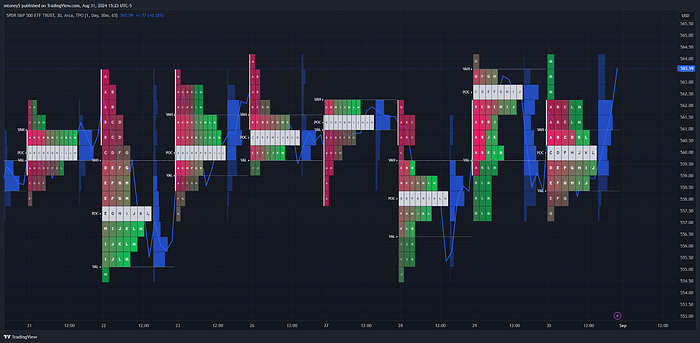
It is easier to navigate and manipulate charts on TradingView, as you can zoom in and out with your scroll wheel, while on thinkorswim, you have to click and drag areas to zoom in. TradingView also runs a lot smoother, while thinkorswim can be laggy and slow at times.
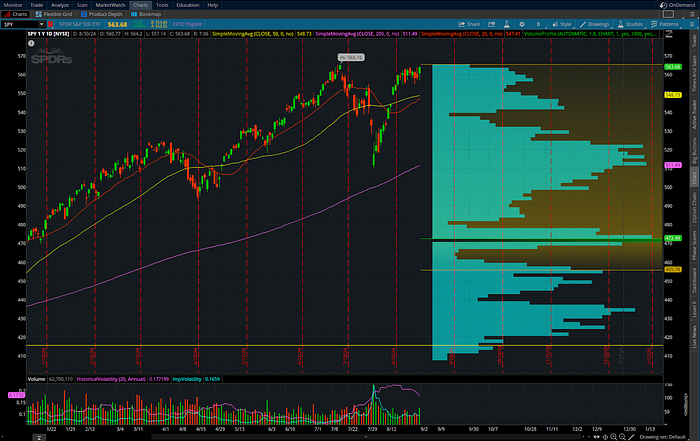
TradingView vs. thinkorswim Screeners
Both TradingView and thinkorswim offer screeners, but they support different assets and functions.
TradingView Screeners
TradingView offers screeners for stocks, ETFs, crypto, forex, and bonds. You can scan for tons of metrics like P/E ratios, dividend yields. beta, volume, and many more for stocks and ETFs.
The crypto scanner allows you to filter for metrics like Tx volume, stablecoins, smart contract platforms, and much more.
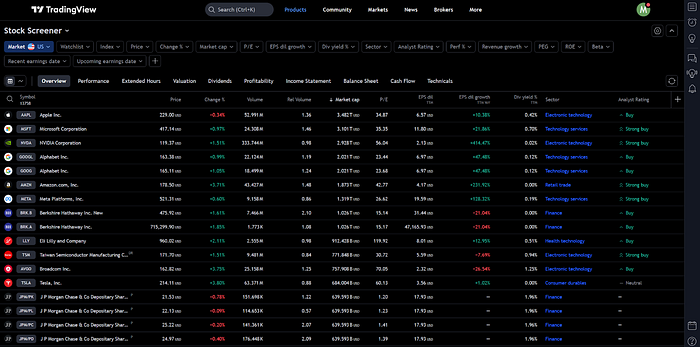
thinkorswim Screeners
thinkorswim offers stock hacker and option hacker screeners, which allow you to screen for stocks, ETFs, and options. You can use various metrics, including fundamental data like P/E ratios, market cap, dividend yield, and many more.

Backtesting: thinkorswim OnDemand vs TradingView Strategy Tester
Both platforms let you test ideas against history, but they take different routes. thinkorswim OnDemand replays past market sessions in real time so you can practice execution exactly as it would have happened, which is valuable for discretionary and options traders refining timing. TradingView leans on its Strategy Tester and bar-replay tool: you code a strategy in Pine Script, run it across historical data, and read a performance report (net profit, drawdown, win rate). TradingView is the better fit if you want rule-based, repeatable backtests you can tweak and re-run; thinkorswim OnDemand is the better fit if you want to rehearse live decision-making in a lifelike environment. Either way, a backtest only tells you what a strategy did in the past; pairing it with a journal of your real, live trades is what shows whether you are actually executing the edge.
Scripting: Pine Script vs thinkScript
TradingView uses Pine Script, a readable, widely documented language with one of the largest public libraries of community indicators and strategies in retail trading, so you can usually find and fork an existing script instead of writing from scratch. thinkorswim uses thinkScript, which is powerful for custom studies and scans inside the Schwab ecosystem but has a smaller public community and a steeper ramp. If building or borrowing custom indicators matters to you, TradingView and Pine Script have the broader head start; if you are committed to the thinkorswim desktop and its scan engine, thinkScript will do the job.
TradingView vs. thinkorswim Performance & UX Compared
When it comes to performance and UX TradingView is easily the winner. thinkorswim was made back in the ’90s and has hardly been updated since. thinkorswim is laggy and has a much more dated UX when compared to TradingView.
I practically never experience lag on TradingView, and the user interface is great. However, that is not to say that thinkorswim is not a great charting platform. thinkorswim is still just as customizable as TradingView, but the lack of updates throughout the years definitely shows.
TradingView vs. thinkorswim Accessibility & Pricing
TradingView is accessible to everybody, while thinkorswim is only accessible to those with a Charles Schwab brokerage account. If you have a funded Schwab account, you will also get real-time data for free.
TradingView provides real-time data wherever possible for free, which is available on most popular assets down to the 1-minute charts. You can also opt to purchase additional real-time data directly from the exchanges if the free data source TradingView provides isn’t cutting it for you.
TradingView is free to use on its basic plan, and it offers four paid tiers for traders who want more (2026 pricing): Essential at $14.95/mo, Plus at $34.95/mo, Premium at $69.95/mo, and Ultimate at $239.95/mo, with roughly 13 to 17% off when billed annually and a 30-day free trial on the paid plans. For a full plan-by-plan breakdown, see the TradingView pricing guide.

What Assets do TradingView & thinkorswim Support?
TradingView and thinkorswim support a wide range of assets, including stocks, ETFs, crypto, forex, futures, and more. thinkorswim allows you to trade all of its supported assets through your Schwab account.
TradingView allows you to analyze and chart all of its supported assets, but to trade directly from TradingView, your connected broker must support them. Here is a list of the supported assets of each platform:
TradingView Supported Assets
TradingView supports the following assets:
- Stocks
- ETFs
- Futures
- Options
- Crypto
- Stock Indexes
- Forex
- Bonds
thinkorswim Supported Assets
thinkorswim supports the following assets:
- Stocks
- ETFs
- Futures
- Options
- Futures options
- Crypto futures
- Forex
- Bonds
Both platforms support all of the popular asset classes, but depending on what you’re interested in trading will determine which is best for you. For example, thinkorswim doesn’t allow you to chart or trade cryptocurrencies directly as TradingView does.
How TradingView and thinkorswim Differ
TradingView is a freemium service that provides you with charting, news, stock screeners, advanced indicators, and many more features. It also integrates with various brokers and offers trading for most asset classes, including cryptocurrencies. Many people use TradingView for charting, and place their trades on a separate brokerage account. TradingView is not a brokerage, but a software traders use for charting and other tools.
- Full TradingView Review: Read my full review of TradingView
thinkorswim is also a charting platform, but it is owned by the brokerage Schwab, meaning you must have an funded Schwab or TD Ameritrade account to use the platform. thinkorswim is a free platform that only works with Schwab and TD Ameritrade and offers trading for stocks, options, bonds, futures, currencies, and Bitcoin futures.
| Platform | Compatible Brokers | Assets Offered | Options Trading | Pricing |
|---|---|---|---|---|
| TradingView | Various brokers, including Interactive Brokers, Tradovate, AMP Global, OANDA, Forex.com, and Gemini | Stocks, bonds, commodity futures, currencies, and cryptocurrencies | Analyze nearly live options chains and risk diagrams | Freemium service with paid plans from $14.95 to $239.95 per month (Essential to Ultimate). |
| thinkorswim | Only TD Ameritrade & Schwab | Stocks, bonds, commodity futures, currencies, and Bitcoin futures | Supported with options chain data and P&L charts | Free platform for TD Ameritrade & Schwab customers. |
TradingView vs thinkorswim Pros & Cons
TradingView
Pros
- View free charts with nearly real-time data for stocks, futures, crypto, and forex
- Supports trading for stocks, bonds, commodity futures, currencies, and cryptocurrencies
- Integrates with a variety of brokers, such as Interactive Brokers, Tradovate, AMP Global, OANDA, Forex.com, and Gemini
- Allows you to trade directly from the charts or use paper trading to practice without risking real money
Cons
- The level of integration may vary depending on the broker and the asset class
- Does not support options trading, but does provide options analysis tools
- Requires a paid subscription to access advanced features and services
thinkorswim
Pros
- Supports trading for stocks, options, bonds, commodity futures, currencies, and Bitcoin futures
- Fully integrated with Schwab or TD Ameritrade’s brokerage services and account management
- Supports options trading and includes options chain data and risk diagrams for multi-leg options strategies
Cons
- Only works with Schwab (formerly TD Ameritrade) and requires a TD Ameritrade or Schwab account to use the platform
- Does not support cryptocurrency trading or provide cryptocurrency price data
- May have higher commissions and fees than some other brokers
TradingView vs. thinkorswim: Which Trading Platform Is Better for You?
Overall, TradingView is the better platform since it offers more features and the user interface is much more modern. It also offers tons of features for crypto, while thinkorswim only supports the charting of crypto futures.
thinkorswim is great if you already have a funded Schwab account, since you will be able to access real-time stock and futures data for free. You can also place trades directly through the thinkorswim platform, which routes through your Schwab account.
Ultimately, I recommend you try out both platforms to determine which suits your needs better.
Exclusive Deal: 30-Day FREE Premium Access + Bonus Credit
Don’t Miss Out – Sign up for TradingView Now!
- Advanced Charts
- Real-Time Data
- Track all Markets
Do you need both TradingView and thinkorswim?
A lot of traders do not pick one; they run both. A common setup is to do chart analysis, alerts, and multi-device watchlists in TradingView, then place options and futures trades in thinkorswim where the analysis and execution tools are strongest. The catch is that your trade history then lives in two places, which makes it hard to see your real win rate and P&L. That is exactly the gap a dedicated journal fills: with a tool like the Financial Tech Wiz Trading Journal you can import or log every trade from either platform and review performance in one place.
Not ready for an app yet?
Start with the free Financial Tech Wiz trading journal template: a Google Sheets tracker you can use to log trades from TradingView or thinkorswim and spot your patterns before upgrading.
Get the free templateGet Your Free Trading Resources
Grab the free trading journal template plus the same tools we use to stay organized, consistent, and objective.
- Free trading journal template
- Custom indicators, watchlists, and scanners
- Access our free trading community
Enter your email below to get instant access.
No spam. Unsubscribe anytime.
FAQ: TradingView vs thinkorswim
Is TradingView compatible with TD Ameritrade?
No, TradingView is not compatible with TD Ameritrade. TradingView works with a variety of different brokers, but TD Ameritrade is not one of them. On the contrary, thinkorswim is exclusive to TD Ameritrade and Schwab clients and only allows trading through a TD Ameritrade or Schwab account.
Is TradingView the best charting tool?
TradingView is widely regarded as one of the best charting tools available online. Technical analysts favor it for its wide range of technical indicators, drawing tools, and charting features that can be customized. It also supports the automation of trading strategies through its Pine Script programming language.
Can I trade directly from TradingView?
Yes, you can trade directly from TradingView if you have an account with one of the supported brokers. TradingView integrates with brokers such as Interactive Brokers, Tradovate, AMP Global, OANDA, Forex.com, and Gemini. You can also use paper trading to practice your skills without risking real money.
How much is TradingView a month?
TradingView offers both free and paid subscription plans. The free version provides access to basic features, while the paid plans unlock additional features and data. The paid plans range from $14.95 to $239.95 per month (Essential, Plus, Premium, and Ultimate), depending on the tier and billing frequency, with a discount for annual billing. If you use my link, you can get a discount on your premium subscription!
Do I need a broker for TradingView?
No, you can use TradingView’s charting features without a broker. However, if you want to place trades, you will need a brokereage account, which TradingView does not provide. TradingView does not provide brokerage services itself but rather connects you with various brokers that offer different asset classes and trading conditions. See our guide to the best brokers for TradingView if you are choosing one.
Do I need TradingView if I have thinkorswim?
Not necessarily, but many traders use both. A common workflow is charting, alerts, and cross-device watchlists in TradingView, with order execution and options analysis in thinkorswim. If you are happy with thinkorswim charts and only trade on Schwab, you can skip TradingView; if you want cloud charting you can reach from any device, TradingView is the add-on most traders choose.
What are the pros and cons of thinkorswim vs TradingView?
thinkorswim pros: free with a Schwab account, deep options and futures tools, OnDemand replay; cons: desktop-first, US-market focus, no crypto, tied to Schwab. TradingView pros: best-in-class cloud charting, Pine Script library, works with many brokers, broad asset coverage; cons: advanced features sit behind paid tiers, and execution depends on your connected broker.
Why do traders choose thinkorswim over TradingView?
Traders who lean toward thinkorswim usually want its advanced options analysis (the analyze tab and risk profiler), its OnDemand replay for rehearsing execution, and the fact that it is free with a Schwab brokerage account. If options and futures are your focus and you already bank with Schwab, thinkorswim removes a subscription and keeps analysis and execution in one desktop app.
Get Your Free Trading Resources
Grab the free trading journal template plus the same tools we use to stay organized, consistent, and objective.
- Free trading journal template
- Custom indicators, watchlists, and scanners
- Access our free trading community
Enter your email below to get instant access.
No spam. Unsubscribe anytime.







