TradingView Review (2026): Is It Worth It?

TradingView is the most widely used charting platform in retail trading, and for most people reading this, you already know that. What you want to know is whether the free plan is enough, whether the paid plans are worth it, and how TradingView actually stacks up once you have moved past the basics. This review covers all of it, including the features most reviews skip, from live broker integrations to the community tools that can save you hours of analysis time.
TradingView is a charting powerhouse, but it is only one piece of the puzzle. If you are still deciding where to trade, start with our roundup of the best trading platforms for 2026.

Key Features of TradingView
- I rate TradingView as the best overall charting software after using nearly every charting platform.
- It offers a freemium model, allowing users to create an account and use most features entirely for free.
- Track stocks, futures, crypto, forex, and more on a single platform.
- Large selection of indicators and the ability to create custom indicators.
- Advanced charting tools like footprint charts, market profile (TPO) charts, volume profile, and more!
- Seamless performance and a modern UX suited for both beginners and advanced traders.
- Use up to 8 charts per layout on non-professional plans, and up to 16 on professional plans.
Get a $15 referral credit and a free trial by using my affiliate link below!
Get Your Free Trial and $15 Credit!Key Takeaways
- The free plan is genuinely useful for most chart analysis, but real-time data and multi-chart layouts require a paid plan
- TradingView’s charting tools, screener, and alert system are among the strongest available for active traders; it is not a broker and does not execute trades on its own
- Paid plans range from $12.95/month (Essential) to $59.95/month (Premium+), with meaningful feature jumps between tiers
Trading Journal
Financial Tech Wiz Trading Journal
Trade on TradingView? If you use TradeStation, Alpaca, Tradier, or tastytrade, you can import your trades directly into the Financial Tech Wiz Trading Journal and track your performance with AI-powered analytics.
Start Tracking Free →Pros and Cons
TradingView does a lot well, but it is not perfect. Here is the breakdown before getting into specifics.
Pros
- Best-in-class charting interface, usable in the browser with no download required
- Free plan covers most chart types, indicators, and drawing tools
- Screener, alerts, and watchlists work across stocks, ETFs, futures, forex, and crypto from a single interface
- Large community with thousands of public scripts and published ideas
- Live trading now available through select brokers (TradeStation, Alpaca, Tradier, tastytrade)
- Pine Script lets you build and share custom indicators without running your own server
Cons
- Real-time data for US stocks requires a paid plan (or a broker data add-on); free users get 15-minute delayed data by default
- The free plan limits you to one chart layout and three indicators per chart
- The mobile app is functional but limited compared to the desktop experience
- Customer support is slow; most issues get resolved through the community or help documentation
- Backtesting via Pine Script is not beginner-friendly; there is a learning curve to interpreting strategy results correctly
What Is TradingView?
TradingView is a web-based charting platform and financial data network that launched in 2012. It runs entirely in your browser, with optional desktop apps for Windows, Mac, and Linux. You do not need to download or install anything to start using it.
The platform supports over 50 exchanges and more than 100,000 financial instruments, covering US and international stocks, ETFs, indices, futures, forex pairs, cryptocurrency, bonds, and economic data. Charts pull data from exchanges and data providers directly; TradingView itself is not a brokerage and does not custody funds.
The business model is freemium. A free account gets you access to most of the charting and analysis tools but limits features like the number of indicators per chart, real-time data feeds, and layout slots. Paid plans unlock progressively more of those limits.
More than 60 million traders use TradingView. It has become the default reference point for retail chart analysis the same way Google Docs became the default for shared documents. Whether you are comparing it to thinkorswim, Trade Ideas, or TrendSpider, TradingView is usually the baseline everything else gets measured against.
To get the most out of TradingView, start with the TradingView tutorial and check the best TradingView indicators guide once you are ready to build out your chart setup.
TradingView Pricing in 2026
TradingView offers five paid tiers in 2026, plus the free plan. All paid plans include real-time US stock data (free plan uses 15-minute delay by default). Prices below are monthly; annual billing reduces the cost significantly.
| Plan | Monthly Price | Annual Price/Mo | Key Upgrade |
|---|---|---|---|
| Free | $0 | $0 | 1 chart layout, 3 indicators/chart, 15-min delay |
| Essential | $12.95/mo | $9.95/mo | 2 chart layouts, 5 indicators, real-time data |
| Plus | $24.95/mo | $19.95/mo | 4 chart layouts, 10 indicators, volume profile |
| Premium | $49.95/mo | $39.95/mo | 8 chart layouts, 25 indicators, Bar Replay |
| Premium+ | $59.95/mo | $49.95/mo | Unlimited charts, 50 indicators, priority support |
The Essential plan at $9.95/month billed annually is the best entry point for most active traders. It gets you real-time data and unlocks enough indicators for a complete technical setup. The Plus plan makes sense if you are running volume profile or want to monitor four instruments at once. Premium and Premium+ are for traders who run systematic setups across many charts simultaneously.
The free plan is genuinely useful for occasional chart review, learning the platform, or publishing ideas to the community. If you are trading daily and want real-time data, Essential is the minimum.
For a full breakdown of what each plan includes, see the TradingView pricing guide. If you want to try before you commit, check the TradingView free trial page for the current trial offer.
Key Features
Charting Tools
TradingView’s charting interface is the strongest part of the platform. You get access to over 100 chart types, including Heikin Ashi, Renko, Point and Figure, Range bars, and standard OHLC and candlestick charts. The drawing tools library covers trend lines, channels, Fibonacci retracements, Gann fans, Elliott Wave labels, and dozens of other pattern-drawing tools, most of which sync across your saved chart layouts.
On paid plans you can open multiple charts in a grid layout, watching different symbols or timeframes side by side without switching tabs. On the free plan you are limited to one chart at a time.
Pine Script, TradingView’s proprietary scripting language, lets you write custom indicators and strategy scripts directly in the browser. The community has published over 100,000 scripts that you can add to any chart at no cost. This is one of TradingView’s most underrated features: you can access complex custom indicators, including order flow and supply/demand zone detectors, without paying for a separate data service. Browse the best TradingView indicators to find the highest-rated community scripts.
Screener
The TradingView stock screener is one of the most complete free screeners available. You can filter by price, volume, market cap, sector, technical signals (like stocks above their 200-day moving average or showing RSI divergence), fundamental metrics (like P/E ratio or EPS growth), and dozens of custom conditions. The screener covers US stocks, international equities, ETFs, crypto, and forex from a single interface.
The screener updates in real-time on paid plans. On the free plan, screener results reflect the delayed data feed, which matters if you are screening for intraday setups but is fine for swing trading or overnight scanning.
You can save screener filters and return to them as a watchlist, which is a practical workflow for traders who run the same scan repeatedly.
Alerts
TradingView’s alert system is one of its strongest competitive advantages over desktop-only platforms. Alerts run on TradingView’s servers, not your local machine, so they fire even when your browser is closed. You can set alerts on price levels, indicator crossovers, drawing tool touches (like price hitting a trend line), and custom Pine Script conditions.
On the free plan, you are limited to one active alert. Essential and Plus plans unlock more simultaneous alerts. Premium and Premium+ support hundreds of concurrent alerts, which matters if you are running alerts across a large watchlist.
Alerts deliver to your browser, email, mobile push notification, or webhook. The webhook option integrates with automation tools like Zapier and enables semi-automated trading setups through third-party services.
Bar Replay
Bar Replay lets you rewind any chart to a historical date and replay price action bar by bar. You can pause, adjust speed, and annotate as you replay. This is primarily a backtesting and education tool: it is how most traders practice reading price action setups without needing to wait for live markets.
Bar Replay is available on Premium and Premium+ plans. It is one of the features that makes the Premium tier worth considering for traders who do serious setup review.
Community and Published Ideas
TradingView has a public-facing social layer built directly into the platform. Traders can publish chart ideas, annotated with their analysis, directly from the chart editor. Other users can follow, comment, and replicate setups. The Ideas feed is filterable by asset, timeframe, and author reputation.
For newer traders, seeing how experienced analysts mark up a chart and write up their thesis is a legitimate learning tool. For experienced traders, the Ideas feed surfaces unusual setups and sentiment on specific assets without requiring a separate news terminal.
Can You Trade Live on TradingView?
TradingView added live order execution in 2024 and 2025 through a set of integrated broker partnerships. As of 2026, you can place and manage trades directly from a TradingView chart through the following brokers: TradeStation, Alpaca, Tradier, tastytrade, Interactive Brokers, Webull, and a growing list of international brokers.
The execution workflow is straightforward. You connect your brokerage account through TradingView’s broker panel, and then you can enter orders, set stops and limits, and monitor open positions directly on the chart. Orders appear as labeled lines at the entry price, and filled positions show in a portfolio panel below the chart.
This is not a full trading terminal. TradingView does not replace a dedicated order management system for active futures traders or anyone running complex bracket orders. But for equity and options traders who want to draw a setup and click to enter without switching to a separate platform, it works well.
If you use one of these brokers, you can also import your available trade history into the Financial Tech Wiz Trading Journal. That connects your TradingView-compatible broker account to the journal, syncing trades automatically so your performance data stays current.
Who Is TradingView Best For?
Day traders: TradingView’s real-time data, multi-chart layouts, server-side alerts, and screener make it a strong day-trading platform for equities and crypto. It is not ideal for futures day traders who need Level II order flow or DOM data, since those tools require either an add-on or a dedicated futures platform like Tradovate or NinjaTrader.
Swing traders: The free plan is often enough for swing traders who are not relying on intraday tick data. The Essential plan removes the real-time delay and is worth the cost for anyone trading more than a few times a month.
Options traders: TradingView has an options chain view and a strategy builder for multi-leg payoff diagrams. It works well for charting underlyings and running basic payoff analysis alongside a dedicated options platform.
Beginner traders: TradingView has the most accessible learning curve of any professional charting platform. The free plan lets you explore without commitment, the community provides annotated chart examples, and the interface is browser-based with nothing to install or configure.
TradingView is not the best fit for: Futures traders who need DOM and order flow depth, traders who need fundamental research integrated with charts, and traders who need automated order execution through a strategy backtester (TradingView’s strategy tester is educational, not a live execution engine).
TradingView vs. the Competition
TradingView is not the only option. Here is how it compares to the most common alternatives.
TradingView vs. TrendSpider: TrendSpider is the better choice if you want automated pattern recognition, dynamic price alerts based on pattern completion, or an AI-assisted analysis workflow. TradingView beats TrendSpider on community, Pine Script flexibility, and breadth of asset coverage. For traders who use both, TradingView handles the chart library and watchlist while TrendSpider handles systematic scanning, and the two workflows complement each other rather than overlap.
TradingView vs. TC2000: TC2000 is stronger for US equity screening with a focus on fundamental plus technical filtering. TradingView beats TC2000 on international markets, Pine Script, community, and the free plan. TC2000 is more commonly used by CANSLIM-style growth traders; TradingView is more broadly used.
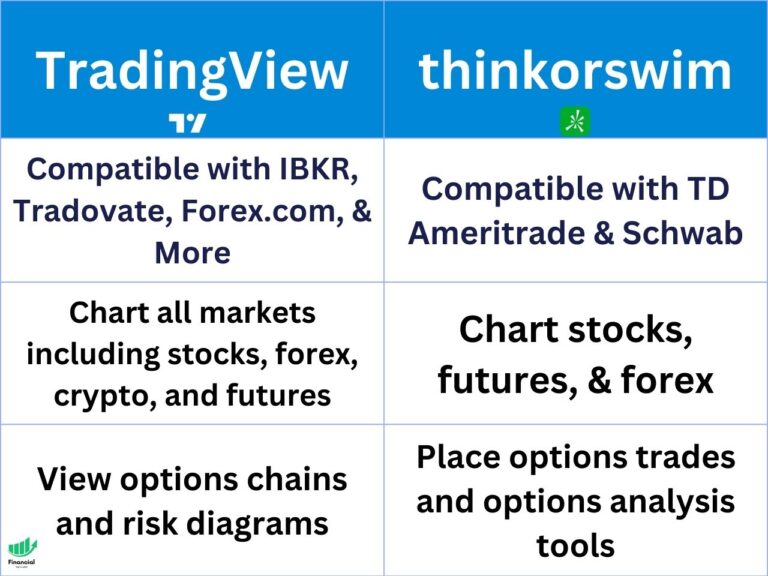
TradingView vs. thinkorswim: thinkorswim is a full broker platform with a built-in order management system, paper trading, and ThinkScript for custom indicators. It requires a Schwab account. TradingView is platform-agnostic: you can use it with any broker. For charting and scripting flexibility, TradingView and thinkorswim are roughly equivalent at the professional level. For ease of use and browser accessibility, TradingView wins.
For deeper comparisons, the FTW site has dedicated head-to-head reviews of TrendSpider vs. TradingView, TradingView vs. TC2000, and TradingView alternatives.
Track Your TradingView Trades
Charting is where you find and plan a trade. Your journal is where you learn from it.
If you trade through a TradingView-connected broker (TradeStation, Alpaca, Tradier, or tastytrade), you can sync your full trade history directly into the Financial Tech Wiz Trading Journal. The journal tracks win rate and P&L across your positions, broken down by symbol and hold duration, with AI-powered insights that show you which setups are actually working over time.
Financial Tech Wiz / Free resources
Build a clearer picture of your trading.
Start with the free trading journal template. Keep your trades organized, review your results, and build a consistent review routine.
- Free Google Sheets and Excel trading journal template
- Indicators, watchlists, and scanners
- Access to the free trading community
Ready for automatic trade tracking? Explore the Financial Tech Wiz Trading Journal.
Free resources + trading emails. Unsubscribe anytime.
Is TradingView Worth It?
For most traders, yes. The free plan covers enough for chart review and occasional analysis. The Essential plan at $9.95/month billed annually removes the real-time data delay and unlocks the setup needed for daily trading. The Plus and Premium tiers make sense specifically for traders who need multiple simultaneous chart layouts or who rely heavily on Bar Replay for setup review.
The paid plans are competitively priced compared to alternatives. TrendSpider starts at $39/month for comparable features. TC2000 Basic is free but its advanced plan is $23.99/month with fewer community tools. thinkorswim is free but requires a Schwab account and locks you into their ecosystem.
If you are already using the TradingView free plan and hitting the indicator limit or waiting on delayed data, the Essential plan is an easy upgrade. If you have never tried TradingView at all, start with the free plan and upgrade when the limits start affecting your workflow.
FAQ
Is TradingView worth it?
For active traders who chart more than a few times a week, yes. The Essential plan at $9.95/month billed annually gets you real-time data and enough chart layout slots to run a complete technical analysis workflow. The free plan is genuinely functional for occasional users and beginners. Premium and Premium+ are worth considering if you run multi-chart setups or use Bar Replay heavily for setup review.
Is TradingView safe?
TradingView is a legitimate data platform used by more than 60 million traders worldwide. The platform does not hold funds, execute orders on your behalf, or have direct access to your brokerage account (broker integrations are handled through the connected broker, not TradingView itself). Published ideas and community content are user-generated and not investment advice.
Does TradingView have a trading journal?
TradingView does not have a built-in trade journal with performance analytics. The platform has a trades log under the broker integration panel that shows executions, but it does not analyze your win rate, P&L patterns, or performance over time. For that, you need a dedicated journal. If you trade through a TradingView-connected broker, the Financial Tech Wiz Trading Journal imports your trade history automatically.
Is TradingView good for day trading?
Yes, for equities and crypto day trading. TradingView’s real-time data, multi-chart layouts, server-side alerts, and stock screener are well-suited to intraday workflows. The platform is not ideal for futures day traders who need Level II order flow or DOM data, since those require either a TradingView add-on or a dedicated futures platform like Tradovate or NinjaTrader.
What is the best free TradingView plan?
The free plan is the only free TradingView tier. It includes one chart layout, three indicators per chart, 15-minute delayed US stock data, one active alert, and access to the screener and community. For most beginners and casual analysts, it is enough. If you are actively trading and need real-time data or more than three indicators on a chart, the Essential plan at $9.95/month billed annually is the minimum upgrade that makes a practical difference.
Financial Tech Wiz / Free resources
Build a clearer picture of your trading.
Start with the free trading journal template. Keep your trades organized, review your results, and build a consistent review routine.
- Free Google Sheets and Excel trading journal template
- Indicators, watchlists, and scanners
- Access to the free trading community
Ready for automatic trade tracking? Explore the Financial Tech Wiz Trading Journal.
Free resources + trading emails. Unsubscribe anytime.