
E*TRADE vs. thinkorswim (2026): Which Broker Wins?

E*TRADE and thinkorswim solve different problems for different traders. E*TRADE, owned by Morgan Stanley since 2020, pairs a clean Power E*TRADE workflow with strong long-term investor research. thinkorswim, now part of Charles Schwab through the TD Ameritrade acquisition, is the deeper platform: institutional-grade charting, custom thinkScript indicators, paper trading, and the option chain analytics that active and options traders actually need. If you are trying to decide between traditional broker platforms and thinkorswim, the Schwab vs. thinkorswim comparison covers which platform makes sense for different trader profiles. If you are weighing E*TRADE against another full-service broker rather than thinkorswim, the E*TRADE vs. Fidelity comparison breaks down the same axes.
Quick Verdict
- Choose E*TRADE if you are a long-term investor or casual options trader who wants $0 commissions, solid mobile apps, and Morgan Stanley research without the platform learning curve.
- Choose thinkorswim if you are an active options or futures trader who needs custom scripting, advanced charting, paper trading, and the deepest scanner stack of any zero-commission broker in 2026.
- Open both if you can: a Schwab account for thinkorswim and a separate E*TRADE account, then track all of it in one place using the Financial Tech Wiz Trading Journal.
Key Takeaways
- E*TRADE and thinkorswim both charge $0 stock and ETF commissions and $0.65 per options contract; the real differences are platform depth, futures pricing, and access to forex.
- thinkorswim is the better fit for active traders who want institutional-grade charting, paper trading, and a customizable scanner stack; E*TRADE is the better fit for investors who want a simple, fast workflow with strong research.
- Whichever broker you pick, post-trade analytics live outside the broker; pair either platform with a dedicated trading journal so you can review your entries, exits, and tagged setups in one place.
Recommended Tool
Financial Tech Wiz Trading Journal
Both brokers connect via SnapTrade for bulk import of your full E*TRADE or Schwab/thinkorswim trade history. Get AI-powered insights, equity curve vs. S&P 500 benchmarking, and tag-based setup review without leaving the dashboard. Starting at $9.91/month billed annually.
Try It FreeAre E*TRADE and thinkorswim the Same Company?
No. They are different companies under different parents. E*TRADE was founded in 1982 and went on to pioneer retail electronic trading; in October 2020, Morgan Stanley acquired the firm, and E*TRADE has operated as Morgan Stanley’s retail brokerage arm ever since. thinkorswim has a different lineage: Tom Sosnoff and Scott Sheridan launched it in the late 1990s, sold it to TD Ameritrade in 2009, and TD Ameritrade was then acquired by Charles Schwab in 2020. The TD Ameritrade-to-Schwab account migration finished in 2024, which folded thinkorswim under the Schwab umbrella.
So today, E*TRADE is a Morgan Stanley brokerage and thinkorswim is the trading platform shipped with a Charles Schwab brokerage account. They are different parent companies, different account systems, and different logins. The two are sometimes confused because both originated in the early electronic-trading era, but you cannot use an E*TRADE login on thinkorswim or vice versa. thinkorswim is included with every Charles Schwab brokerage account at no extra cost, which is one reason the platform has stayed competitive after the TD Ameritrade acquisition. If you want a head-to-head between the two parent brokerages instead of E*TRADE and Schwab’s thinkorswim platform, the E*TRADE vs. Schwab breakdown covers it.
E*TRADE vs. thinkorswim Side-by-Side
| Feature | E*TRADE | thinkorswim |
|---|---|---|
| Parent company | Morgan Stanley | Charles Schwab |
| Best for | Long-term investors, casual options traders | Active options, futures, and forex traders |
| Platform availability | Web, Power E*TRADE web, Power E*TRADE Pro desktop, mobile | thinkorswim desktop, web, mobile, paperMoney |
| Stocks & ETFs commission | $0 | $0 |
| Options commission | $0.65/contract ($0.50 active-trader tier) | $0.65/contract |
| Futures commission | $1.50/contract | $2.25/contract |
| Futures options commission | Phone activation required | $2.25/contract |
| Forex | No | Yes |
| Paper trading | No | paperMoney (full simulator) |
| Scanner depth | Standard screeners | Custom thinkScript scanners + 250+ studies |
| Custom scripting | No | thinkScript |
| Tradeable assets | Stocks, ETFs, mutual funds, options, futures, futures options, crypto futures, spot crypto ETFs, bonds | Stocks, ETFs, mutual funds, options, futures, futures options, forex, bonds, crypto futures (/BTC, /ETH) |
| Education depth | E*TRADE Knowledge, Morgan Stanley research integration | thinkorswim Learning Center, Schwab research feeds |
| Branch network | Limited (transitioning to Morgan Stanley) | 300+ Schwab branches nationwide |
Trading Platforms Compared
What is E*TRADE?
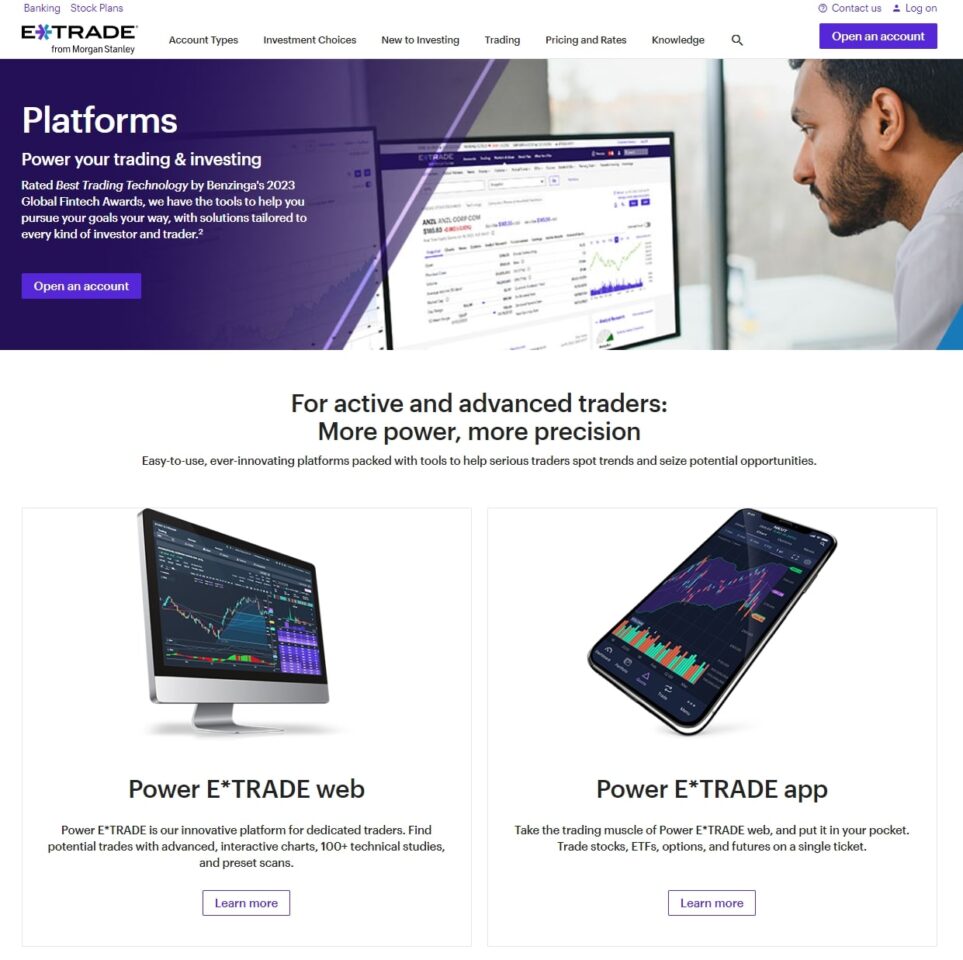
E*TRADE, founded in 1982, was among the first companies to bring electronic trading to retail investors. Today it operates as Morgan Stanley’s retail brokerage and caters to long-term investors and active traders through Power E*TRADE web, Power E*TRADE Pro desktop, and a two-app mobile setup. Strong research, low fees, and a clean workflow make it a good default for investors who do not want to manage a deep customization layer.
What is thinkorswim?
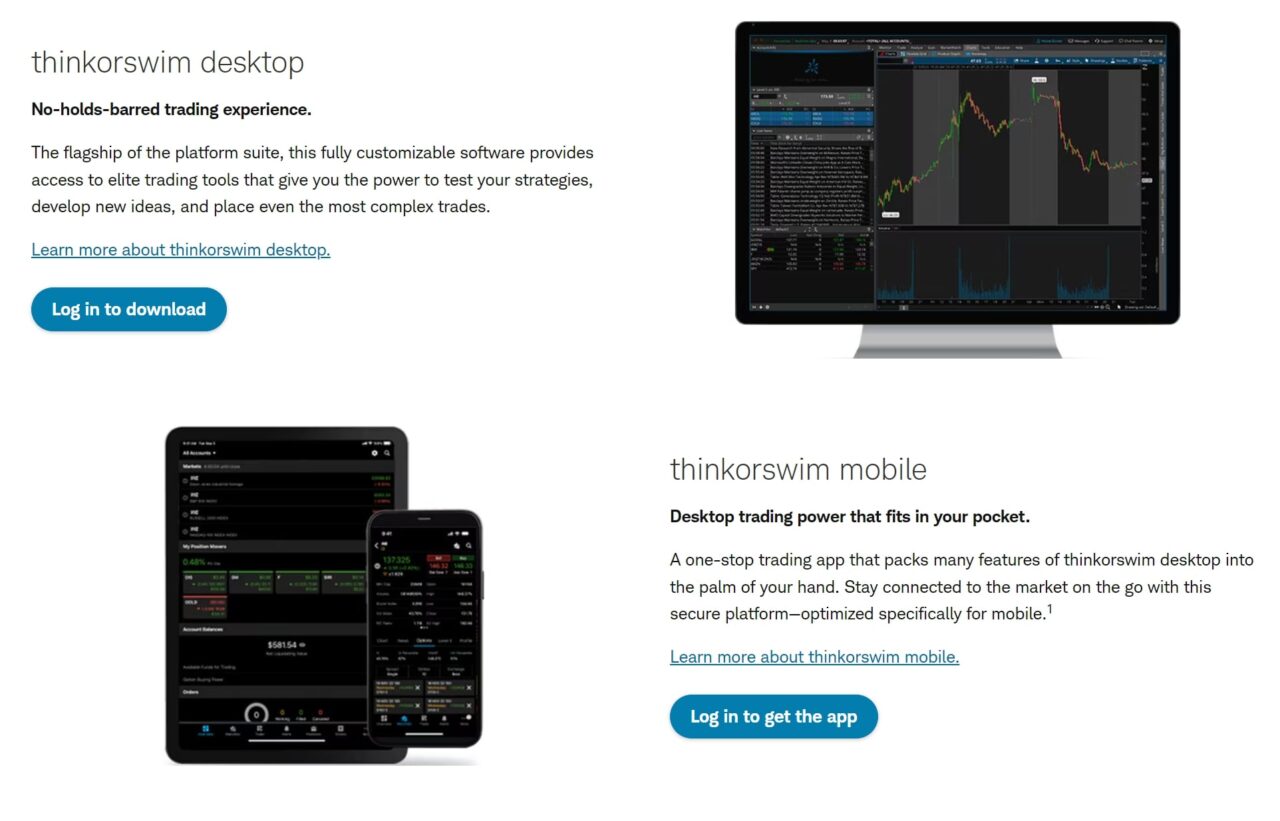
thinkorswim was founded in the late 1990s by Tom Sosnoff and Scott Sheridan, sold to TD Ameritrade in 2009, and migrated to Charles Schwab after Schwab’s 2020 acquisition of TD Ameritrade. It is a trading platform aimed at active traders, known for advanced charting, custom thinkScript indicators, scanners, deep option chain analytics, and paperMoney paper trading. It is included with every Schwab brokerage account at no extra cost.
E*TRADE Platform Features
E*TRADE offers a brokerage stack via the Power E*TRADE web client, the Power E*TRADE Pro desktop application, the standard E*TRADE.com web dashboard, and two mobile apps. It supports stocks, ETFs, mutual funds, options, futures, futures options, crypto futures and spot crypto ETFs (no direct spot crypto), and bonds. Real-time data is available with a funded account.
thinkorswim Platform Features
Schwab’s thinkorswim ships as a downloadable desktop client, a web client, a mobile app, and a separate paperMoney simulator. It is included with every Charles Schwab brokerage account at no extra cost and is built around custom thinkScript indicators, advanced charting, level 2 data, and the deepest option chain analytics in retail brokerage. If you want a Schwab account but a different chart engine, the round-up of thinkorswim alternatives covers TradingView, TrendSpider, and a handful of other options.
Power E*TRADE Pro vs thinkorswim Desktop
Power E*TRADE Pro is E*TRADE’s downloadable desktop client built around clean workflows for options traders. The platform delivers risk-graph analysis, paper trading is not available, and customization is limited to layout choices and standard indicator selection. There is no scripting layer, so you cannot author or import custom indicators. Multi-monitor support is workable but not a primary design goal.
thinkorswim Desktop is the densest workspace in retail brokerage. The platform supports unlimited custom thinkScript indicators, full multi-monitor layouts, drag-and-drop linked windows, advanced scanner stacks, on-demand market replay, and risk profile and analyze-trade tools that go several levels deeper than Power E*TRADE Pro. The trade-off is the learning curve: thinkorswim assumes you are willing to invest a few weekends in customization, where Power E*TRADE Pro assumes you want it to work on day one.
Web Browser Platforms
E*TRADE.com is a clean trading and account-management web client tuned for investors. Power E*TRADE web sits one tier up with deeper option chain tooling and faster order entry. thinkorswim Web is a slimmer browser version of the desktop client; it does not match the desktop’s depth, but it carries over the chart engine and most option chain analytics. For most active traders, thinkorswim Desktop is the recommended entry point and the web client is for travel days.
Mobile Apps
E*TRADE runs a two-app mobile setup. The standard E*TRADE Mobile app is built for casual investors and account management, while Power E*TRADE Mobile is the active-trader counterpart with options chains, technical analysis, and faster order entry. Some users find the two-app split confusing because features are spread across both. thinkorswim runs a single mobile app that mirrors most desktop features: full chart engine, scanner access, option chain analytics, and live trading. The single-app model is simpler, and the chart engine on mobile is meaningfully better than either of E*TRADE’s apps.
Trading Tools and Features
E*TRADE Trading Tools
E*TRADE pairs Power E*TRADE web and Pro with technical analysis, real-time data, and option chain tools tuned for clarity over depth. The two mobile apps cover everyday market analysis and are backed by phone, email, and chat support. DRIP (dividend reinvestment) is available account-wide, which makes the platform easier to set-and-forget for long-term holdings.
thinkorswim Trading Tools
thinkorswim is built around customization. paperMoney is a full virtual-account simulator with the same chart engine, scanner stack, and option chain as live thinkorswim. Level 2 data, risk profile graphs, the analyze-trade tool, and on-demand market replay sit in the platform by default. Forex trading is supported on thinkorswim and is not available on E*TRADE.
Charting and Technical Analysis
This is the cleanest separator between the two platforms. thinkorswim ships 250+ studies, full thinkScript custom indicator authoring, market replay, on-demand historical replay back more than a decade, and a chart engine that matches dedicated charting tools like TradingView and TrendSpider in core capability. Drawing tools, multi-timeframe analysis, and study cloud sharing are all native to the platform.
Power E*TRADE charting covers most needs for casual options traders. The platform delivers around 60 studies, standard drawing tools, and the time frames most retail traders use day-to-day. There is no scripting layer, no market replay, and no community indicator library. If you want to build, test, or backtest a custom indicator, thinkorswim is the platform that supports the workflow; if you mostly look at moving averages, RSI, and a few drawing tools, Power E*TRADE handles it.
Fees and Commissions in Detail
General Trading Fees
Both thinkorswim and E*TRADE offer free stock, ETF, and mutual fund commissions. Both charge $0.65 per options contract at the standard tier. They charge differently for futures: $1.50 per contract on E*TRADE versus $2.25 per contract on thinkorswim. Neither platform charges inactivity fees.
Active-Trader Tier and Margin
E*TRADE runs a $0.50 per contract active-trader options tier for accounts that complete 30+ options trades per quarter. The discount is automatic once you cross the threshold. thinkorswim does not run a tiered options pricing structure: every contract clears at the flat $0.65 regardless of volume. Margin base rates on both brokers track the broader Schwab and Morgan Stanley schedules and run roughly 10% to 14% depending on debit balance, with larger balances qualifying for lower tiers.
| Fee Category | E*TRADE | thinkorswim |
|---|---|---|
| Equity commission | Free | Free |
| Options commission | $0.65/contract ($0.50 active-trader tier at 30+ contracts/quarter) | $0.65/contract |
| Futures commission | $1.50/contract | $2.25/contract |
| Futures options commission | Phone activation required | $2.25/contract |
| Margin base rate | ~10-14% depending on balance | ~10-14% depending on balance |
| Inactivity fees | None | None |
Investment Options and Asset Classes
Both brokers cover the full set of major asset classes for U.S. retail traders: stocks, ETFs, mutual funds, options, futures, futures options, and bonds. Crypto exposure differs. E*TRADE offers crypto futures via CME contracts and a handful of spot crypto ETFs (IBIT, FBTC, and similar bitcoin and ether ETFs); E*TRADE does not offer direct spot crypto. thinkorswim offers crypto futures via /BTC and /ETH (and the micro contracts /MBT and /MET) but does not offer direct spot crypto either. Forex is available on thinkorswim and is not available on E*TRADE. Fractional shares are not native to either trading platform: Schwab Stock Slices is a separate feature on the parent Schwab brokerage, not inside thinkorswim itself.
Research, Education, and Customer Support
E*TRADE leans on Morgan Stanley research integration: equity research notes, sector reports, and analyst ratings flow into the brokerage UI. The E*TRADE Knowledge library covers basic and intermediate trading topics with written articles and a few video courses. Customer support is mostly digital, available by phone, email, and chat, and the in-person branch footprint has thinned in 2026 as the platform consolidates under Morgan Stanley.
thinkorswim ships Charles Schwab research feeds inside the platform, including third-party equity research and ratings coverage. The thinkorswim Learning Center is one of the deepest free trading education libraries in retail brokerage, with thinkScript tutorials, paper trading walkthroughs, and recorded webinars. The platform also benefits from Schwab’s 300+ branch network for in-person support, which is a meaningful differentiator for clients who want to talk to a person about complex account questions.
How to Track Your Trades at E*TRADE or thinkorswim
Neither broker ships a dedicated trade journaling layer. E*TRADE provides standard transaction history and a basic gain/loss summary, but no tag-based setup review, equity curve, or cohort analytics. thinkorswim’s MarketWatch tab and Trade Activity panels are useful for in-platform reference, but they are designed for trade execution and account review, not journaling. Track every E*TRADE trade in one place using SnapTrade to bulk-import the full account history into the Financial Tech Wiz Trading Journal.
The same workflow runs for thinkorswim accounts; the dedicated thinkorswim trading journal walkthrough covers the Schwab-side SnapTrade import step by step. Once your fills are in, the journal builds an equity curve benchmarked against the S&P 500, breaks down P&L by symbol, time of day, asset type, and hold duration, and surfaces tagged setups so you can isolate which strategies actually drive your returns.
Pair either platform with the Financial Tech Wiz Trading Journal for AI-powered insights and a single equity curve across both brokers. AI Daily Insights summarizes your last trading day, the Trading Coach chat answers questions about your trade history, and the trades tab supports tag-based and note-based filtering for setup review.
Get Your Free Trading Resources
Grab the free trading journal template plus the same tools we use to stay organized, consistent, and objective.
- Free trading journal template
- Custom indicators, watchlists, and scanners
- Access our free trading community
Enter your email below to get instant access.
No spam. Unsubscribe anytime.
Frequently Asked Questions
Is E*TRADE the same as thinkorswim?
No. E*TRADE is a brokerage owned by Morgan Stanley since October 2020. thinkorswim is a trading platform owned by Charles Schwab since the 2020 TD Ameritrade acquisition. Different parent companies, separate accounts, separate logins. The two are sometimes confused because both originated as electronic-trading pioneers in the 1980s and 1990s.
Which platform has better charting: Power E*TRADE or thinkorswim?
thinkorswim. Power E*TRADE Pro covers most needs for casual options traders with around 60 studies, drawing tools, and standard time frames, but thinkorswim’s chart engine ships 250+ studies, custom thinkScript indicator authoring, market replay, and on-demand historical replay. Any trader who wants to build, test, or backtest a custom indicator will prefer thinkorswim.
Is thinkorswim free with E*TRADE?
No. thinkorswim is included with a Charles Schwab brokerage account, not E*TRADE. To use thinkorswim you need to fund a Schwab account; once funded, all four thinkorswim surfaces (desktop, web, mobile, paperMoney) are included at no additional cost. E*TRADE clients use Power E*TRADE and the E*TRADE mobile app.
Which is better for options trading, E*TRADE or thinkorswim?
thinkorswim wins for active options traders. The option chain analytics, risk profile tool, custom strategy builder, and free paper trading via paperMoney are all deeper than what Power E*TRADE offers. E*TRADE has an edge for occasional options traders who want a simpler interface and qualify for the $0.50 per contract active-trader tier (30+ options trades per quarter).
Does E*TRADE or thinkorswim offer paper trading?
thinkorswim does. paperMoney is a full virtual-account simulator built into the thinkorswim platform with the same chart engine, scanner stack, and option chain as live thinkorswim. E*TRADE does not currently offer a public paper trading product on Power E*TRADE or the E*TRADE mobile app.
Can I use the same trading journal for both E*TRADE and thinkorswim accounts?
Yes. The Financial Tech Wiz Trading Journal connects to both via SnapTrade (the E*TRADE connection imports E*TRADE accounts; the Schwab connection imports thinkorswim accounts because thinkorswim trades clear through your Schwab brokerage account). Run the import once per broker and your full historical fills land in a single performance dashboard with equity curve, win rate, and tag-based setup review.
Related Trading Platform Comparisons
Interactive Brokers vs. thinkorswim
For a full rundown of the top options, see our best mobile trading apps 2026 guide.
Get Your Free Trading Resources
Grab the free trading journal template plus the same tools we use to stay organized, consistent, and objective.
- Free trading journal template
- Custom indicators, watchlists, and scanners
- Access our free trading community
Enter your email below to get instant access.
No spam. Unsubscribe anytime.







