TradingView vs Finviz: Which Is Better in 2026?

TradingView and Finviz show up in the same “best trading tools” conversations constantly, but they are not really built for the same job. TradingView is a full charting and technical analysis platform covering stocks, crypto, forex, and futures. Finviz is a fast fundamental screener built around a stock heat map. Over my years of trading I have kept both open in different tabs for different reasons, and this guide breaks down exactly where each one wins so you are not paying for a platform you do not need.
Choose the tool that fits the job
Finviz for stock screening
Filter stocks by fundamentals and technical signals, then scan market performance with heat maps.
Visit FinvizTradingView for charting
Explore interactive charts, technical indicators, and tools across stocks, crypto, forex, and futures.
Try TradingView Free- TradingView wins on charting, indicators, and asset coverage (stocks, crypto, forex, futures); Finviz is stock-only and keeps intraday charting behind its Elite plan.
- Finviz wins on speed for a quick fundamentals screen and its heat map view; TradingView’s screener covers more markets but takes longer to set up for a fundamentals-only scan.
- Most active traders run TradingView as their primary charting platform and use Finviz as a secondary screen, not the other way around.
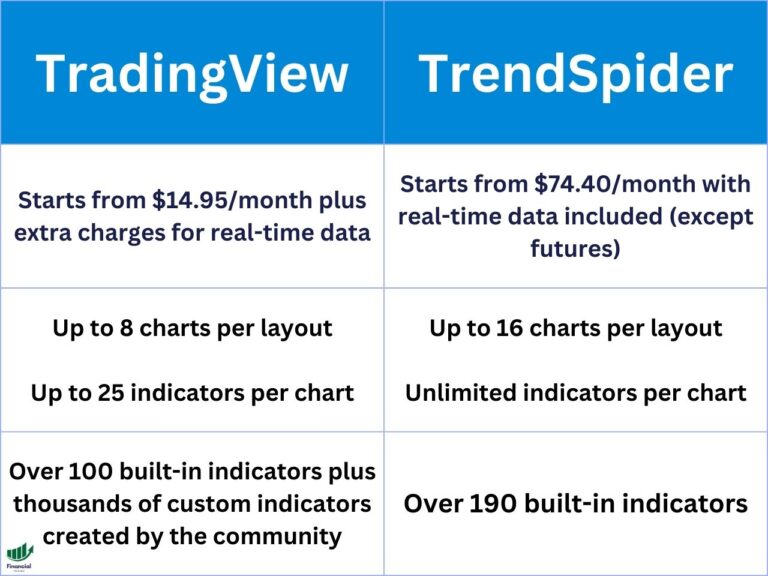
TradingView vs Finviz at a Glance
| TradingView | Finviz | |
|---|---|---|
| Best for | Charting and technical analysis | Fast fundamental screening |
| Asset coverage | Stocks, crypto, forex, futures, bonds | Stocks only |
| Real-time charting on free plan | Yes, most assets | No, delayed data, intraday charts require Elite |
| Stock screener | Yes, plus forex, crypto, and bond screeners | Yes, stocks only, 20+ advanced filters on Elite |
| Entry-level paid plan | $12.95/mo ($9.95/mo billed annually) | $39.50/mo ($24.96/mo billed annually) |
TradingView vs Finviz at a Glance
Neither platform is trying to be the other. TradingView is built around charts first: you open a symbol, and the chart is the whole screen. Finviz is built around a table and a heat map first: you open the site, and you are looking at a grid of hundreds of tickers at once. That difference in default view tells you almost everything about who each platform is for.
If you spend your day drawing trendlines, watching multiple timeframes, or running a scanner that feeds directly into a chart, TradingView is doing the job you need. If you spend your day scrolling a sector heat map looking for what moved and why, then pulling up two or three fundamental ratios before you dig deeper, Finviz is doing the job you need. Most traders end up needing both jobs done at different points in the day, which is why this comparison is less about picking a winner and more about picking the right tool for each task. The table above covers the headline differences; the sections below go deeper on each one so you can see exactly where the gap is largest.
What TradingView Does Best
TradingView built its reputation on charting, and it still leads there. Here is where it separates itself from Finviz specifically.
Advanced Charting and Technical Analysis
TradingView’s charts are interactive by default, not static images. You can zoom, pan, add indicators, draw on the chart, and save your layout, all without leaving the browser tab. The indicator library covers everything from moving averages and RSI to volume profile, footprint charts, and market profile on the higher subscription tiers. Finviz’s free charts are static snapshots; intraday, interactive charting is locked behind the Elite plan and still does not match TradingView’s drawing tools or indicator depth once you get there. If your process involves marking support and resistance, drawing trendlines, or comparing multiple timeframes side by side, this is the single biggest gap between the two platforms.
Asset and Market Coverage
TradingView covers stocks, crypto, forex, futures, and bonds under one account, with a dedicated screener for each asset class. Finviz covers US stocks only. If any part of your trading touches crypto or forex, Finviz simply does not have a screener or chart for that market, and TradingView is the only one of the two that can be your single platform. This matters more than it sounds: a trader who splits time between equities and crypto on Finviz would need a second, unrelated tool just to chart the crypto side, while TradingView handles both from the same watchlist.
Stock and Multi-Asset Screener
TradingView’s screener lets you filter by technical criteria (moving average crossovers, RSI levels, chart patterns) in addition to fundamentals, and it runs across stocks, forex, crypto, and bonds. It takes more clicks to set up a narrow scan than Finviz’s preset filters do, but the tradeoff is a screener that can find setups Finviz’s fundamentals-first filters are not built to catch, like a stock crossing above its 50-day moving average on rising volume. You can also chain a screener result directly into a chart with one click, which Finviz’s separate screener and chart pages do not offer.
Social Trading Community
TradingView has a genuine social layer: traders publish chart ideas, scripts, and indicators publicly, and you can follow specific authors whose analysis style matches yours. Finviz has no equivalent. If part of your process involves seeing how other traders are reading the same chart, or you want to browse community-built indicators before deciding whether to buy a premium one, TradingView is the only one of the two platforms built for that. The Pine Script community in particular means thousands of free, user-built tools you will not find on Finviz at any price.
Broker Integration
TradingView connects to a range of live brokers so you can place trades directly from the chart, using the levels you just marked as your entry, stop, and target. Finviz is a research and screening tool only; it does not place trades or connect to a brokerage account. If chart-to-broker execution matters to your workflow, that is a TradingView-only feature in this comparison, and it removes a step (switching to your broker’s platform to place the order) that Finviz users have to do manually every time.
What Finviz Does Best
Finviz is not trying to be a charting platform, and comparing it to TradingView on charting alone misses what it actually does well.
Fundamental Stock Screener
Finviz’s screener is built for speed: you open it, apply a preset or a few filters (market cap, P/E, sector, price performance), and you have a filtered list of US stocks in seconds. On the Elite plan you get 20+ advanced filters, unlimited saved presets, and a faster 10-second auto-refresh versus 3 minutes on the free plan. For a pure fundamentals scan across the whole market, Finviz’s interface is faster to use than TradingView’s screener, which is built for more granular, technical-plus-fundamental filtering rather than a quick top-down sweep.
Heat Map Visualization
Finviz’s heat map is one of its most recognizable features: the entire market or a chosen sector rendered as colored blocks sized by market cap, so you can see what is moving at a glance without scrolling a table. TradingView has its own heat map tool, but Finviz’s version, especially the Elite intraday map, is what most traders picture when they picture Finviz, and it is often the fastest way to spot sector-wide moves before you drill into individual names.
Insider Trading, Analyst, and News Data
Finviz surfaces insider trading activity, analyst ratings, and news headlines directly next to each stock’s fundamentals, which makes it useful for a quick “what is going on with this ticker” check before you ever open a chart. Combined with up to 8 years of financial statement history on the Elite plan (versus 3 years free), it is a strong first stop for fundamentals research even if you do the charting somewhere else. TradingView’s fundamentals data exists but is noticeably thinner in comparison.
Data Quality and Accuracy
Both platforms source real-time market data on their paid plans and delayed data on free plans, and neither has a reputation for data accuracy problems. Where they differ is depth and reach. TradingView pulls price data from a wide network of exchanges and data vendors, which is why its coverage extends to global markets, crypto exchanges, and forex pairs beyond what a US-focused screener needs. Finviz’s data is purpose-built for US equities, with financial statement data going back up to 8 years on Elite and dedicated ETF holdings data most general charting platforms do not surface at all. If your question is “can I trust the number on the screen,” both platforms clear that bar. If your question is “does this platform have the specific data set I need,” the answer depends entirely on whether that data set is technical (TradingView) or deep US fundamentals (Finviz).
Mobile Apps
TradingView’s mobile app mirrors most of the desktop charting experience: you can pull up interactive charts, add indicators, draw on the chart, and set alerts from your phone, which is unusual for a charting platform of this depth. Finviz’s mobile experience is more limited; the site is usable on a phone browser and the screener and heat map both work, but there is no dedicated Finviz mobile app with the same feature parity TradingView offers. If checking and adjusting charts from your phone during the trading day matters to you, TradingView is the clear choice here.
Learning Curve and Ease of Use
Finviz is easier to pick up in your first session. The screener and heat map are largely self-explanatory, and there is not much to configure before you get useful output. TradingView has more depth, which means more of a learning curve: understanding chart layouts, indicator settings, alert conditions, and the screener’s filter logic takes longer to get comfortable with. That learning curve pays off in flexibility once you are past it, but if you want something you can open and immediately use with zero setup, Finviz gets you there faster.
Customer Support and Learning Resources
TradingView leans on its community for support as much as its own help center: with millions of published chart ideas and scripts, most “how do I do X on TradingView” questions already have a public answer, on top of an official help center and support ticket system. Finviz’s support is more traditional, a help center and email support, without the same community-driven documentation layer. If you like learning by seeing how other users solved the same problem, TradingView’s community effectively doubles as a support resource in a way Finviz does not replicate.
Trading Journal
Financial Tech Wiz Trading Journal
Comparing charting and screening tools is only half the job. Once you have picked your setup, the Financial Tech Wiz Trading Journal imports your trades automatically from 25+ brokers and shows you win rate and P&L across your positions, broken down by symbol and hold duration, with AI-powered insights layered on top.
Start Tracking Free →TradingView vs Finviz: Full Feature Comparison
| Feature | TradingView | Finviz |
|---|---|---|
| Interactive charting | Yes, all plans including free | Elite only; free plan has static charts |
| Real-time data | Most assets on free plan; full real-time on paid | Delayed on free; real-time on Elite |
| Screener asset coverage | Stocks, crypto, forex, bonds | Stocks only |
| Heat map | Yes | Yes, including intraday map on Elite |
| Social community / idea sharing | Yes | No |
| Broker integration for live trading | Yes | No |
| Insider trading and analyst data | Limited | Yes, built into every stock page |
| Financial statement history | N/A (not a fundamentals database) | 3 years free, 8 years on Elite |
| Data export | Limited | Yes, on Elite (Excel/CSV) |
| Mobile app | Full-featured, matches desktop closely | Browser only, no dedicated app |
Laid out feature by feature, the split is clean: TradingView covers charting, indicators, multi-asset screening, community, mobile, and execution. Finviz covers deep fundamentals, insider and analyst data, data export, and a screener built for speed within stocks specifically. There is almost no overlap where one platform is simply a worse version of the other; each one is doing something the other was not built to do, and the “winner” of this comparison depends entirely on which column matches what you actually do every day.
Pricing Comparison
| Plan | Monthly | Annual (per month) | What you get |
|---|---|---|---|
| TradingView Free | $0 | $0 | 1 chart layout, delayed data on some exchanges, limited indicators |
| TradingView Essential | $12.95 | $9.95 | 2 chart layouts, real-time data, more indicators |
| TradingView Plus | $24.95 | $19.95 | 4 chart layouts, volume profile, more alerts |
| TradingView Premium | $49.95 | $39.95 | 8 chart layouts, 25 indicators, Bar Replay |
| Finviz Free | $0 | $0 | Delayed data, basic screener filters, static charts |
| Finviz Elite | $39.50 | $24.96 (billed $299.50/yr) | Real-time data, interactive charts, advanced filters, data export |
TradingView’s Essential plan at $9.95/month billed annually is the cheaper entry point into real-time, interactive charting, and it is the plan most active traders land on before deciding whether they need Plus or Premium. Finviz Elite at $24.96/month billed annually (37% off the $39.50 monthly rate) is priced for what it delivers: real-time data across the whole screener plus up to 8 years of financial statement history, which is a lot of fundamentals depth for the price if that is specifically what you need.
Neither free plan is a trap. TradingView’s free tier is genuinely usable for learning the platform or checking charts occasionally, and Finviz’s free tier still gives you the full heat map and a real screener, just with delayed data and fewer filters. You do not need to pay for either platform until your trading frequency demands real-time data, and even then, most traders only need one paid tier, not both platforms’ top plans.
TradingView vs Finviz by Trading Style
Day Traders
Day traders need real-time, interactive charts with fast alerts, and TradingView is built for that. Finviz’s delayed free data and Elite-gated intraday charting make it a poor fit as a primary tool for intraday trading; it works better here as a pre-market scanner you check before you open TradingView to build out your watchlist and mark levels for the session.
Swing Traders
Swing traders benefit from TradingView’s multi-timeframe charting and technical screener to find setups, then can cross-check fundamentals on Finviz before entering a position that might be held for days or weeks. Both platforms have a real role here, used sequentially (screen on one, confirm and chart on the other) rather than as a single tool doing everything.
Long-Term Investors
Long-term investors who care more about earnings trends, valuation, and sector rotation than chart patterns will get more daily use out of Finviz’s screener, heat map, and longer financial statement history. TradingView still has a place for periodic chart checks and setting long-term alerts, but it is not the primary tool for this trading style the way it is for day and swing traders.
Fundamentals-First Investors
If your process is fundamentals-first and you outgrow both TradingView’s screener and Finviz’s ratio set, it is worth reading my Stock Rover review. Stock Rover runs 700+ fundamental metrics with portfolio correlation analysis and Monte Carlo simulation, which fills a gap neither TradingView nor Finviz covers for investors who live in fundamentals research all day.
Can You Use TradingView and Finviz Together?
Yes, and a lot of traders already do this without thinking of it as “using two platforms.” A common workflow: scan the Finviz heat map or screener in the morning to see what is moving and why, then open the tickers that catch your eye in TradingView to actually chart them, mark levels, and decide on an entry. Finviz answers “what should I be looking at,” and TradingView answers “what does the chart actually say.” Used this way, the two platforms are complementary rather than competing, and the combined monthly cost (TradingView Essential plus Finviz Elite, both billed annually) still lands under $35/month, which is less than a lot of single-purpose scanning tools charge on their own.
TradingView Pros and Cons
TradingView Pros
- Best-in-class interactive charting, free and paid
- Screeners across stocks, crypto, forex, and bonds, not just US stocks
- Real social community for chart ideas and public scripts
- Direct broker integration for chart-to-trade execution
- Full-featured mobile app that mirrors the desktop experience
TradingView Cons
- Deeper fundamentals data (insider activity, long financial statement history) is thinner than a dedicated fundamentals tool
- Advanced charting tools like footprint and market profile require the higher-tier plans
- More setup and configuration before it feels fast, compared to Finviz’s near-zero learning curve
Finviz Pros and Cons
Finviz Pros
- Fastest way to scan the whole US stock market for a specific fundamental setup
- Heat map and intraday map are genuinely useful for spotting what is moving
- Insider trading, analyst ratings, and news built into every stock page
- Free plan is still a real, usable screener, not just a teaser
- Data export on Elite for traders who want to build their own spreadsheets
Finviz Cons
- Stocks only; no crypto, forex, or futures coverage at all
- Interactive, real-time charting is locked behind the Elite plan and still trails TradingView once unlocked
- No social community or idea-sharing layer
- No dedicated mobile app
Final Verdict: TradingView vs Finviz
TradingView is the more well-rounded platform, and it is the one I recommend as your primary tool if you can only run one. Its charting is the strongest in the comparison, it covers every asset class most traders touch, and the broker integration means you can go from analysis to execution without switching tabs. Finviz is not a lesser platform, it is a narrower one; for a fast fundamentals screen and a heat map view of the market, it does that specific job as well as anything available, and its fundamentals depth on the Elite plan genuinely exceeds what TradingView offers in that category.
If you are choosing one platform to start with, pick TradingView. If your process is fundamentals-heavy or you already have a charting tool you like, Finviz is worth adding as a second screen rather than a replacement. For more on what TradingView’s paid plans unlock, read my full TradingView review, and if you are still comparing charting platforms broadly, our best charting software for stocks roundup covers more ground than this head-to-head.
One more practical note: switching costs are low either way. Neither platform locks you into a long-term contract, both offer monthly billing, and you can run TradingView’s free plan alongside a Finviz Elite trial to see how the combination fits your process before committing to annual billing on either one.
Frequently Asked Questions
Is TradingView better than Finviz?
For charting and technical analysis, yes. TradingView offers interactive charts, a deeper indicator library, and coverage across stocks, crypto, forex, and futures, while Finviz is a stock-only fundamentals screener with charting locked behind its Elite plan. Finviz is faster for a quick fundamentals scan, but TradingView is the stronger all-around platform and the one I recommend if you are only picking one.
Is Finviz good enough to replace TradingView?
Not for charting. Finviz’s free charts are static and its interactive charting is limited even on the Elite plan compared to TradingView. Finviz works best as a fast screener and heat map you check before opening TradingView to chart what caught your eye, not as a standalone charting replacement for active technical analysis.
Can you use TradingView and Finviz together?
Yes, and many active traders already do. A common workflow is scanning Finviz’s heat map or screener to find what is moving, then charting those tickers in TradingView to mark levels and plan an entry. The two platforms cover different jobs, so running both is not redundant, and the combined cost on annual billing still comes in under $35/month.
Does Finviz have real-time data on the free plan?
No. Finviz’s free plan uses delayed quotes. Real-time data, interactive charts, and the intraday heat map all require the Elite plan at $39.50/month, or $24.96/month billed annually.
What is the main difference between TradingView and Finviz?
TradingView is a charting and technical analysis platform covering stocks, crypto, forex, and futures. Finviz is a fundamental stock screener built around a heat map, covering US stocks only. TradingView is built for chart-first analysis; Finviz is built for a fast, table-first fundamentals scan.
Which platform is cheaper, TradingView or Finviz?
TradingView’s entry-level paid plan (Essential) is cheaper than Finviz Elite: $9.95/month versus $24.96/month, both billed annually. Both platforms also have usable free tiers, so the actual cost depends on whether you need real-time data and which platform’s paid features you need it on.
Financial Tech Wiz / Free resources
Build a clearer picture of your trading.
Start with the free trading journal template. Keep your trades organized, review your results, and build a consistent review routine.
- Free Google Sheets and Excel trading journal template
- Indicators, watchlists, and scanners
- Access to the free trading community
Ready for automatic trade tracking? Explore the Financial Tech Wiz Trading Journal.
Free resources + trading emails. Unsubscribe anytime.