Best Laptops for Trading in 2026: Top Picks for Day, Stock, and Forex Traders

Your trading laptop has one job: never be the reason you miss a fill. Whether you scalp on five charts at once or swing a handful of positions after work, the right machine keeps your platform smooth, your data live, and your order entry instant. Here are the best laptops for trading in 2026, ranked by budget and trader type, plus the specs that actually matter so you do not overpay for power you will never use.
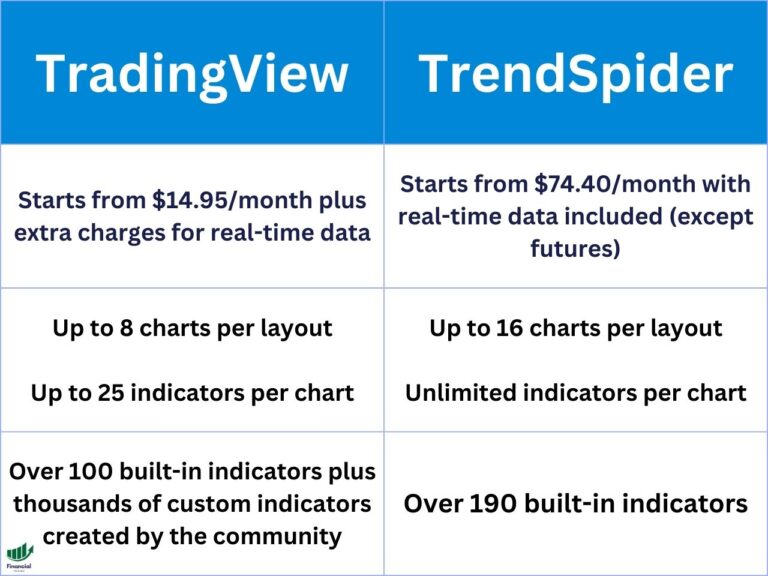
If you are looking for charting software, we highly recommend TradingView, as it runs on any computer on this list.
Key Takeaways
- For most traders, 16GB of RAM, a modern multi-core CPU, and a fast SSD matter far more than a high-end gaming GPU; 32GB is worth it only if you run many charts, scanners, and a virtual desktop at once.
- Premium picks (Apple MacBook Pro, Dell XPS-class Windows laptops) buy you battery life and a great screen; budget and gaming laptops deliver the same trading performance for less if you can live with bulk and shorter battery.
- A laptop only helps if you act on what it shows you; tracking every trade in the Financial Tech Wiz Trading Journal is what turns a fast machine into a measurable edge.
Track every trade
Financial Tech Wiz Trading Journal
A fast laptop shows you the setup. The journal shows you whether you actually trade it well: win rate and P&L across your positions, broken down by symbol and hold duration, with AI insights on what is working.
Start your trading journalWhat Actually Matters in a Trading Laptop
You do not need a $3,000 machine to trade well. Trading platforms are far lighter than the games and 3D software laptops are marketed for, so the specs that matter are the unglamorous ones. Start with memory: 16GB of RAM is the sweet spot for most traders running a platform, a browser with research tabs, and a charting tool side by side. Move to 32GB only if you keep many charts, multiple scanners, and a virtual desktop open at the same time. Next is the processor: a current multi-core chip (Apple M-series, or a recent Intel Core or AMD Ryzen) handles real-time data feeds and fast order entry without stutter. Storage should be a solid-state drive, not a spinning hard drive, so your platform launches in seconds and saved layouts load instantly. The screen matters more than people expect: a 15 to 16 inch display at a sharp resolution lets you fit more charts before you reach for a second monitor, and an anti-glare panel saves your eyes through a full session. Finally, check the ports and outputs: if you plan to run external monitors at your desk, confirm the laptop can drive them through HDMI, USB-C, or Thunderbolt. A dedicated gaming GPU is optional for trading; it adds cost and drains battery, and most platforms never touch it.
Best Laptops for Trading in 2026
The picks below cover every budget and trader type. Each one runs the major platforms (thinkorswim, TradingView, and broker desktop apps) without breaking a sweat, so the choice comes down to screen, battery, portability, and price. Prices and exact configurations move quickly, so confirm the current model on the retailer page before you buy.

HP 14 Laptop
- 14″ screen
- AMD Ryzen 5 5500U CPU
- 256 GB PCIe NVMe M.2 SSD
- 8 GB RAM
- Integrated graphics

Acer Nitro 5 AN515-55-53E5 Gaming Laptop
- 15.6″ screen
- Intel Core i5-10300H CPU
- 256 GB NVMe SSD
- Nvidia GeForce RTX 3050 GPU

ASUS TUF Gaming F15 Gaming Laptop
- 15.6″ screen
- Intel Core i5-10300H CPU
- 512 GB PCIe SSD
- Nvidia GeForce GTX 1650 4GB GDDR6

Apple MacBook Pro (M3 Pro)
- 16.2″ screen
- Apple M3 Pro Chip w/ 12-Core CPU
- 512 GB SSD
- 18-Core GPU
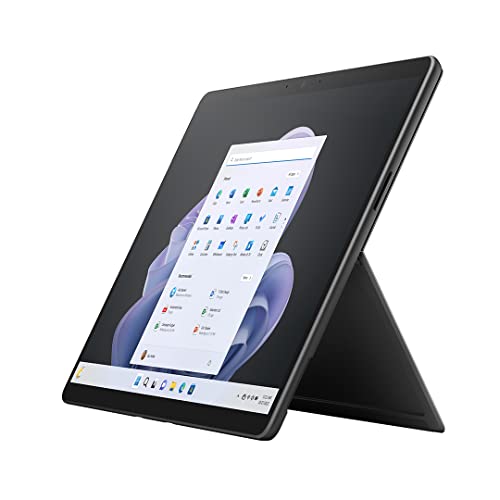
Microsoft Surface Pro 8-13″
- 13″ screen
- Intel Core i7 4.7GHz CPU
- 256 GB SSD
- Intel Iris Xe Graphics

Acer Predator Helios 300 PH315-54-760S Gaming Laptop
- 15.6″ screen
- Intel i7-11800H CPU
- 512 GB SSD
- NVIDIA GeForce RTX 3060 Laptop GPU

HP Omen Gaming Laptop
- 15.6″ screen
- Intel 12th Core i5-12450H
- 1TB SSD
- NVIDIA GeForce GTX 1650
Best Desktop Computers for Trading
Prefer a fixed desk setup? A desktop gives you more power and more screens for the money. These two are strong trading-and-everything machines if portability is not a priority.
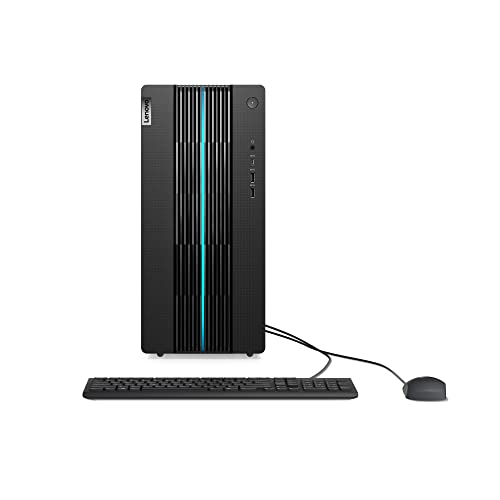
Lenovo IdeaCentre Gaming 5i
- NVIDIA GeForce RTX 3060
- Intel i5 12400-16GB RAM
- 1TB HDD + 512GB SSD
- Windows 11
- Includes Mouse & Keyboard

Corsair Vengeance i7400 Series Gaming PC
- Intel® Core™ i7 13700K CPU
- NVIDIA® GeForce RTX™ 4080 GPU
- 32GB Vengeance RGB DDR5 Memory
- 2TB SSD
Quick Comparison
| Laptop | Best for | RAM (recommended) | Screen | Why it makes the list |
|---|---|---|---|---|
| Apple MacBook Pro (M3 Pro) | Premium all-day use | 18GB+ | 16.2″ high-res | Battery, screen, silent speed |
| Acer Predator / HP Omen / ASUS TUF | Value performance | 16-32GB | 15.6″ | Power per dollar |
| HP 14 | Budget | 8-16GB | 14″ | Runs every platform for less |
| Microsoft Surface Pro | Portability | 16GB | 13″ | Light, desk-docked charting |
Laptop vs Desktop for Trading
A laptop wins on flexibility: you can trade from your desk, the couch, or the road, and dock it to external monitors when you are home. A desktop wins on raw value and screen real estate: the same money buys more power and a multi-monitor wall is cheaper to build. Most traders are best served by a capable laptop plus one or two external monitors, which is the setup we walk through in our guides to the best trading monitors and day trading keyboards. Choose a desktop only if you trade exclusively from one location and want maximum screens for the lowest cost.
Free download
Free Trading Journal Template
New setup, fresh start. Log your trades from day one with our free Google Sheets journal, then upgrade to the full app when you are ready for automatic imports and analytics.
Get the free templateFinancial Tech Wiz / Free resources
Build a clearer picture of your trading.
Start with the free trading journal template. Keep your trades organized, review your results, and build a consistent review routine.
- Free Google Sheets and Excel trading journal template
- Indicators, watchlists, and scanners
- Access to the free trading community
Ready for automatic trade tracking? Explore the Financial Tech Wiz Trading Journal.
Free resources + trading emails. Unsubscribe anytime.
Which Laptop Should You Buy?
If budget is no object and you want one machine that lasts all day, get a premium pick like the MacBook Pro 16 or a Dell XPS-class Windows laptop. If you want the most trading performance per dollar and you trade from a desk, a current gaming laptop is the smart value. If you are new and want to keep costs down, a 16GB ultrabook with an SSD will run everything you need. Whatever you pick, pair it with 16GB of RAM minimum and a solid-state drive, and you will not be the reason a trade goes wrong. Once your machine is set up, the next edge is data: see how it stacks up against the field in our roundup of the best trading journals.
TradingView Limited Time Offer!
Exclusive Deal: 30-Day FREE Premium Access + Bonus Credit
Don’t Miss Out – Sign up for TradingView Now!
- Advanced Charts
- Real-Time Data
- Track all Markets
FAQ
Which laptop is best for trading stocks?
For most stock traders, a laptop with 16GB of RAM, a modern multi-core processor, and a fast SSD is ideal. 8GB can handle basic trading, but 16GB or more is recommended if you run several applications and analysis tools at once. Premium picks like the MacBook Pro 16 or a Dell XPS-class laptop add battery life and a better screen, but a mid-range or gaming laptop runs the same platforms for less.
Are gaming laptops good for trading?
Yes. Gaming laptops have fast CPUs, plenty of RAM, and high-quality screens, which makes them excellent and often better-value trading machines. The trade-offs are weight, bulk, and shorter battery life, so they suit desk-bound day traders more than traders who work on the move.
How much RAM do I need for day trading?
16GB is the practical minimum for day trading with a platform, charts, and a browser open together. Step up to 32GB only if you keep many charts, multiple scanners, and a virtual desktop running at the same time.
Do I need a laptop or a desktop for trading?
Either works. A laptop gives you flexibility and can dock to external monitors at your desk; a desktop gives you more power and screens per dollar if you trade from one location. Most traders do well with a capable laptop plus one or two external monitors.
What is the best budget laptop for trading?
A current 16GB ultrabook with a solid-state drive from HP, Lenovo, or ASUS runs every major trading platform smoothly without the premium price. Prioritize RAM and an SSD over a fancy GPU.
Before you go
If you want to keep educating yourself about trading and your setup, check out these posts as well:
What is the Most Successful Options Strategy
Options Trading for Income: The Complete Guide
Mark Minervini’s Trading Strategy: 8 Key Takeaways
The Best Options Trading Books
How to Get a TradingView Free Trial
The Best TradingView Indicators
Financial Tech Wiz / Free resources
Build a clearer picture of your trading.
Start with the free trading journal template. Keep your trades organized, review your results, and build a consistent review routine.
- Free Google Sheets and Excel trading journal template
- Indicators, watchlists, and scanners
- Access to the free trading community
Ready for automatic trade tracking? Explore the Financial Tech Wiz Trading Journal.
Free resources + trading emails. Unsubscribe anytime.