
TradingView Pricing: How Much Each Plan Costs and What You Actually Get

TradingView is one of the most popular charting platforms available, and it is completely free to start. Upgrading to a paid plan unlocks features like multiple charts per layout, volume profile indicators, footprint charts, and more price alerts than the free tier allows.
Pricing note (April 2026): TradingView recently raised prices across every paid tier. All figures below reflect the new pricing live on TradingView’s pricing page today.
Key Takeaways
- TradingView has four paid plans: Essential, Plus, Premium, and Ultimate. Annual pricing starts at $12.95 per month.
- The Ultimate plan is the highest tier at $199.95 per month billed annually, with 16 charts per tab, 50 indicators per chart, and 1,000 alerts.
- All paid plans include a 30-day free trial. Cancel anytime before the trial ends and you are not charged.
- Using my affiliate link gets you a free trial plus a $15 referral credit toward your subscription.
$12.95 billed annually
- 2 charts per tab
- 5 indicators per chart
- 20 price alerts
$29.95 billed annually
- 4 charts per tab
- 10 indicators per chart
- 100 price alerts
$59.95 billed annually
- 8 charts per tab
- 25 indicators per chart
- 400 price alerts
$199.95 billed annually
- 16 charts per tab
- 50 indicators per chart
- 1,000 price alerts
TradingView Pricing Overview
TradingView uses a freemium model with four paid tiers above the free plan. Monthly pricing runs from $14.95 to $239.95 per month depending on the plan. Paying annually drops each plan by roughly 13 to 17 percent, bringing the entry-level Essential plan down to $12.95 per month and the top-tier Ultimate plan to $199.95 per month.
As you move up the tiers, the key upgrades are charts per tab, indicators per chart, historical bars, parallel chart connections, and alert limits. The higher plans also add watchlist alerts, which the lower tiers do not include. For a complete look at TradingView’s features alongside its pricing, see our full TradingView review.
TradingView Plans: Full Pricing and Feature Comparison
| Plan | Monthly | Annual (per mo) | Charts / Tab | Indicators / Chart | Historical Bars | Price Alerts | Free Trial |
|---|---|---|---|---|---|---|---|
| Essential | $14.95 | $12.95 | 2 | 5 | 10K | 20 | 30-Day Trial |
| Plus | $34.95 | $29.95 | 4 | 10 | 10K | 100 | 30-Day Trial |
| Premium | $69.95 | $59.95 | 8 | 25 | 20K | 400 | 30-Day Trial |
| Ultimate | $239.95 | $199.95 | 16 | 50 | 40K | 1,000 | 14-Day Trial |
New users can typically get a free trial of TradingView before committing to any paid plan.
If you are weighing this subscription against a dedicated scanner rather than deciding between TradingView tiers, see how TradingView pricing compares to TC2000, which lines up both vendors’ current plans side by side.
Annual vs Monthly Pricing
Paying annually saves between 13 and 17 percent depending on the plan. Here is what each plan costs in total on an annual subscription:
- Essential: $12.95 per month, $155.40 billed annually (save $24 vs monthly)
- Plus: $29.95 per month, $359.40 billed annually (save $60 vs monthly)
- Premium: $59.95 per month, $719.40 billed annually (save $120 vs monthly)
- Ultimate: $199.95 per month, $2,399.40 billed annually (save $480 vs monthly)
If you plan to use TradingView consistently, the annual plan is the better value at every tier. The savings compound quickly, especially on Premium and Ultimate.
TradingView Plan Details
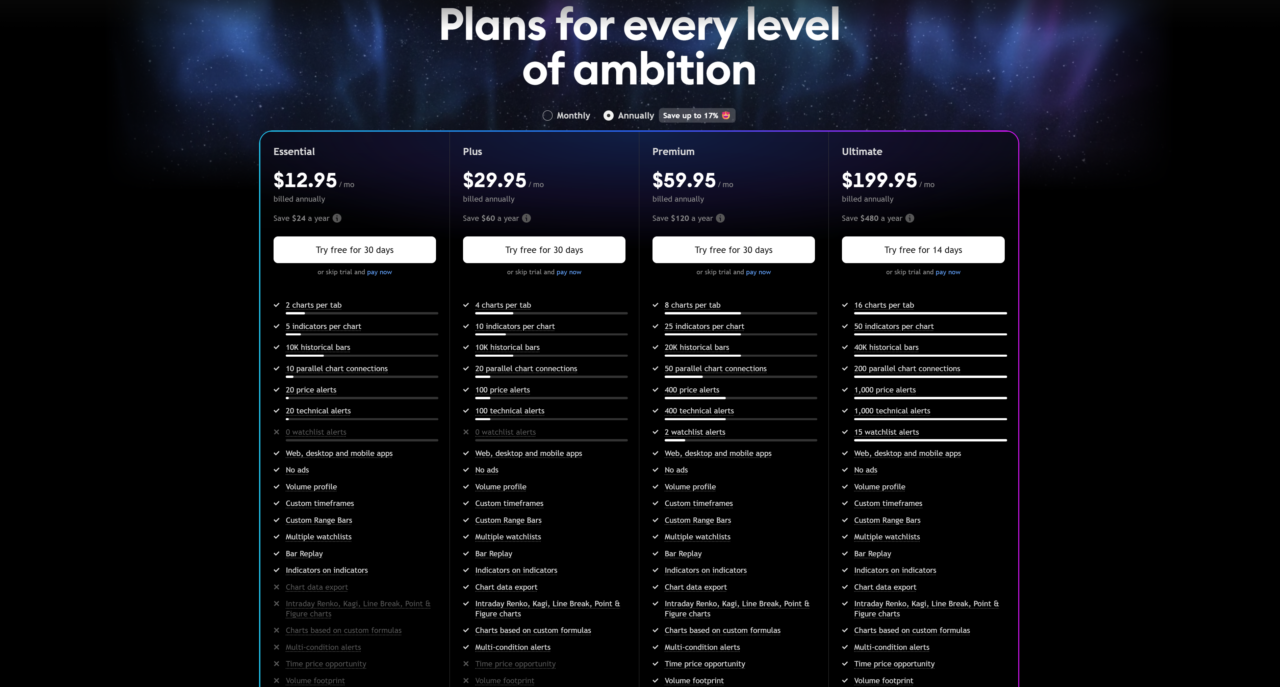
Essential Plan ($12.95/month billed annually)
Essential is the entry point for traders who want a cleaner, ad-free experience with basic multi-chart capability. You get 2 charts per tab, 5 indicators per chart, 20 price alerts, and access to volume profile, custom timeframes, Bar Replay, and multiple watchlists. Historical data is capped at 10K bars. A good fit for swing traders who do not need complex multi-layout setups.
Plus Plan ($29.95/month billed annually)
Plus doubles the chart count to 4 per tab and increases indicators to 10 per chart and alerts to 100. Historical bars stay at 10K, the same as Essential. The main reason to choose Plus over Essential is if you are managing multiple charts simultaneously and need more active alerts running at once.
Premium Plan ($59.95/month billed annually)
Premium is the most popular tier for active traders. The jump from Plus is meaningful: 8 charts per tab, 25 indicators per chart, 400 alerts, 20K historical bars, and 50 parallel chart connections. You also get 2 watchlist alerts, which the lower tiers do not include. Premium is also where you gain access to footprint charts and TPO market profile charts, tools that were previously only available on specialized platforms.
Ultimate Plan ($199.95/month billed annually)
Ultimate is TradingView’s top tier, designed for professional traders who need maximum capacity. You get 16 charts per tab, 50 indicators per chart, 40K historical bars, 200 parallel chart connections, 1,000 price alerts, and 15 watchlist alerts. The trial period is 14 days rather than 30. Most retail traders will not need everything Ultimate offers, but it is the right choice if you are running complex multi-screen setups, need the deepest historical data, or require a large number of simultaneous alerts across many instruments.
How Much Is TradingView Real-Time Data?
TradingView provides real-time data for many markets on paid plans. For more accurate or exchange-direct data, you can purchase real-time data add-ons for an additional monthly fee. These are available on any paid account.
| Data Source | Monthly Cost |
|---|---|
| US Stock Markets bundle (NYSE, NASDAQ, NYSE Arca, NASDAQ GIDS, OTC) | $9.95 |
| NASDAQ Stock Market | $3.00 |
| NASDAQ Global Index Data Service (GIDS) | $5.00 |
| New York Stock Exchange (NYSE) | $3.00 |
| NYSE Arca | $3.00 |
| OTC Markets | $3.00 |
| CME Group (E-mini included): CME, CBOT, COMEX, NYMEX | $7.00 |
| Bursa Malaysia Berhad (MYX) | $2.00 |
| Stock Exchange of Thailand (SET) | $2.00 |
| Tokyo Stock Exchange (TSE) | $3.00 |
| Borsa Istanbul (no volume data) | $1 to $8 |
Should You Pay for TradingView?
If you are an occasional investor checking charts a few times a week, the free plan is likely enough. If you are an active trader who runs multiple watchlists, sets technical alerts, and works across several timeframes simultaneously, a paid plan removes the friction that the free tier creates.
One feature that comes with every plan, including the free tier, is free paper trading on every plan: a $100,000 virtual account with real-time fills you can use to test any strategy before putting real capital on the line.
The Essential plan covers most traders who just want an ad-free experience with a few indicators. Premium is the right call for anyone who uses volume profile, footprint charts, or market profile regularly. Ultimate is for traders who operate at a professional scale.
I recommend using the free trial via my affiliate link to test whichever plan fits your workflow before committing. You will also receive a $15 credit toward your first subscription when you sign up through the link.
Exclusive Deal: 30-Day FREE Premium Access + Bonus Credit
Don’t Miss Out — Sign up for TradingView Now!
- Advanced Charts
- Real-Time Data
- Track All Markets
FAQ
Is it worth paying for TradingView?
For active traders, yes. The free plan limits you to one chart per tab, 3 indicators per chart, and a small number of alerts. Upgrading removes those constraints and adds tools like volume profile, footprint charts, Bar Replay, and custom timeframes that are genuinely useful for technical analysis. If you are paper trading or just learning, start free and upgrade when you feel the limitations.
Is TradingView free?
Yes. TradingView has a free plan with no time limit. New users can also get a 30-day free trial of any paid plan before paying anything.
What is the cheapest TradingView plan?
The Essential plan is the entry-level paid option at $12.95 per month billed annually, or $14.95 per month billed monthly.
What is the most expensive TradingView plan?
The Ultimate plan is the highest tier at $199.95 per month billed annually ($239.95 billed monthly). It includes 16 charts per tab, 50 indicators per chart, 40K historical bars, and 1,000 price alerts.
Is TradingView better than thinkorswim?
They serve different purposes. thinkorSwim is a full brokerage platform with advanced order routing built for Schwab account holders. TradingView is a standalone charting platform that works with any broker. If you already have a Schwab account, thinkorSwim is free and powerful. TradingView’s advantage is its flexibility: you can use it alongside any broker and access a wider range of chart types, community indicators, and international markets.
After You Subscribe
A paid TradingView plan gives you the chart tools. To measure whether those tools are actually improving your results, pair it with a trading journal. The Financial Tech Wiz Trading Journal tracks win rate, equity curve, and P&L by asset type so you can see if the upgrade is paying for itself. There’s also a free Google Sheets version to start with.
Related Posts
Get Your Free Trading Resources
Grab the free trading journal template plus the same tools we use to stay organized, consistent, and objective.
- Free trading journal template
- Custom indicators, watchlists, and scanners
- Access our free trading community
Enter your email below to get instant access.
No spam. Unsubscribe anytime.







